214323 196 Revision A
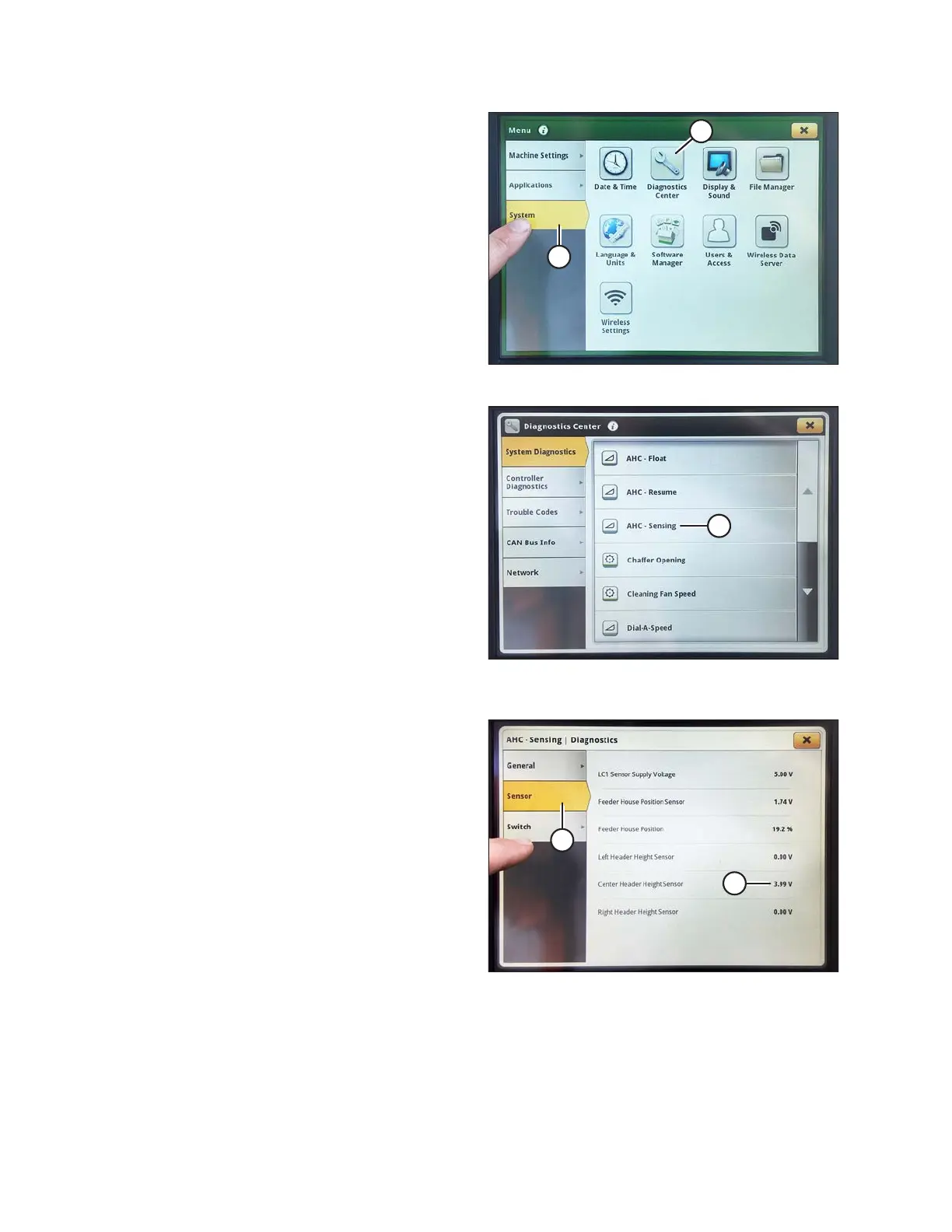
Figure 3.328: John Deere S7 Display – Menu
5. On the MENU page, select the SYSTEM tab (A). The
MENU opens.
6. Select DIAGNOSTICS CENTER icon (B). The
DIAGNOSTICS CENTER opens.
Figure 3.329: John Deere S7 Display –
Diagnostics Center
7. Select AHC - SENSING (A). The AHC - SENSING |
DIAGNOSTICS page displays.
Figure 3.330: John Deere S7 Display – Checking
Sensor Voltage
8. Select SENSOR tab (A) to view sensor voltages. The
center header height sensor voltage (B) must be
between 0.5 and 4.5 V, with at least 3 V of variation
between 0 and 4 on the float indicator box.
9. If sensor voltage adjustment is required, refer to
Adjusting Voltage Limits, page 105.
OPERATION









 To Next Page