215916 194 Revision A
Rotary Disc Only Configuration – Quick Coupler Connections
The rotary disc configuration allows the windrower to operate with compatible rotary disc headers. Attaching the header’s
hydraulic connections to the windrower’s ports using quick couplers does not require any additional tools or hardware.
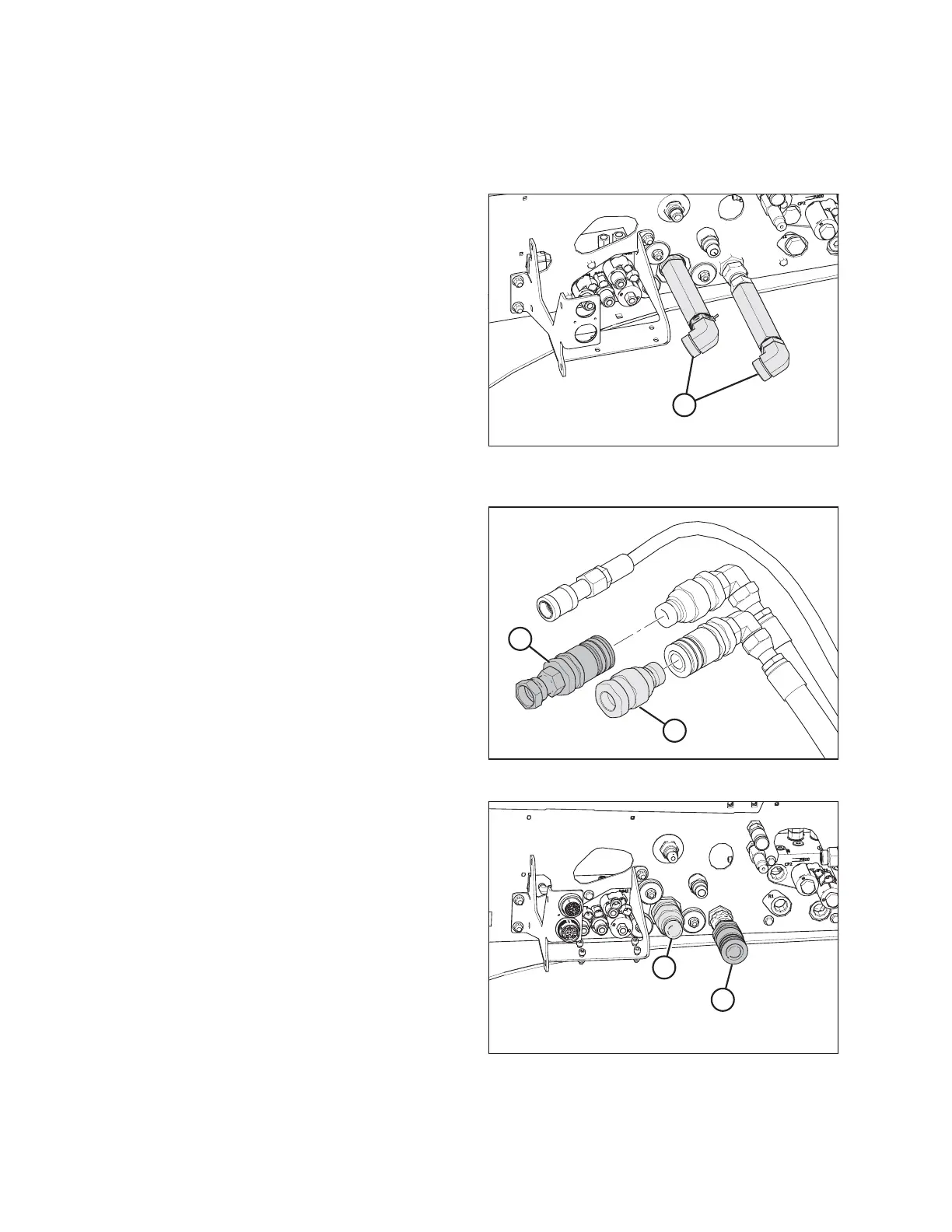
Figure 4.180: Hard Plumbed Connections – Rotary
Disc Ready Windrower
1. Remove extension fittings and elbows (A) from the rotary
disc header’s hydraulic pressure and return connections.
Figure 4.181: Hydraulic Quick Couplers
2. Remove and retain the extra hydraulic quick couplers from
pressure hose (A) and return hose (B).
Figure 4.182: Quick Couplers on Rotary Disc Ready
Windrower
3. Install the male quick coupler at windrower pressure
receptacle (A).
4. Install the female quick coupler at windrower return
receptacle (B).
OPERATION



 To Next Page