215916 254 Revision A
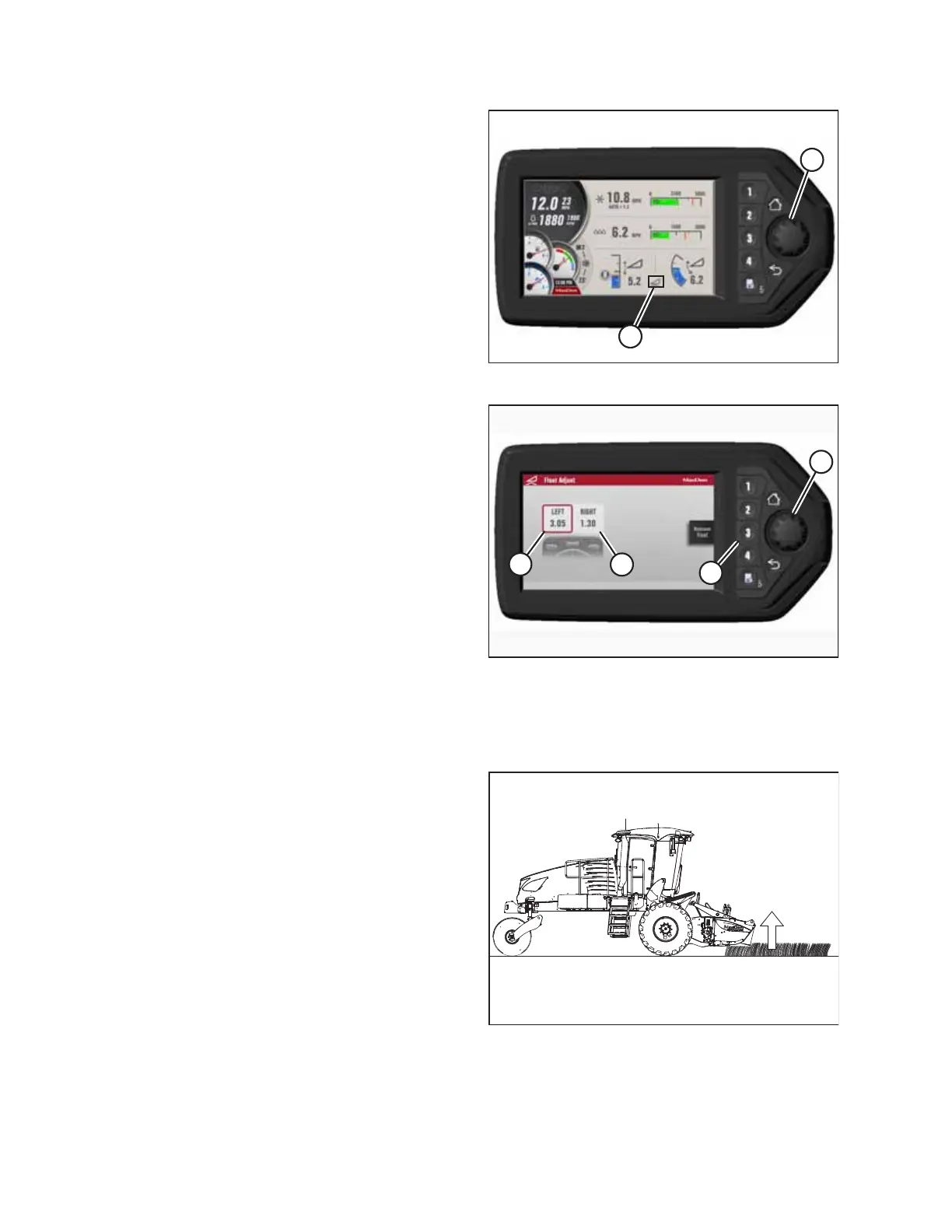
Figure 4.326: HPT Run Screen
3. Press rotary scroll knob (A) on the HPT to display the
QuickMenu system.
4. Rotate scroll knob (A) to highlight header float icon (B) and
press the scroll knob to select.
Figure 4.327: HPT Float Settings
5. Turn scroll knob (A) to highlight left (B) or right float (C) and
press knob (A) to activate the selection.
6. Rotate scroll knob (A) to adjust the float setting and press
the knob when finished.
NOTE:
Float adjustments of 1.0 (out of 10) change the header
weight at the cutterbar by approximately 91 kg (200 lb.).
Adjust the float in increments of 0.05 to optimize field
performance.
7. Press soft key 3 (D) to remove or resume the header float.
Cutterbar off ground – draper header only
The optimum float setting and stabilizer wheel setting lets the header cut the crop evenly with minimal bouncing.
Figure 4.328: Header Float – Cutterbar off Ground
1. Set the center-link to the mid-range position (5.0 on the
Harvest Performance Tracker [HPT]). For instructions, refer
to 4.5.4 Adjusting Header Angle, page 259.
2. Set the cutting height with the header height controls on
the GSL. For instructions, refer to 4.5.5 Setting Header
Height, page 261.
OPERATION



 To Next Page