215916 103 Revision A
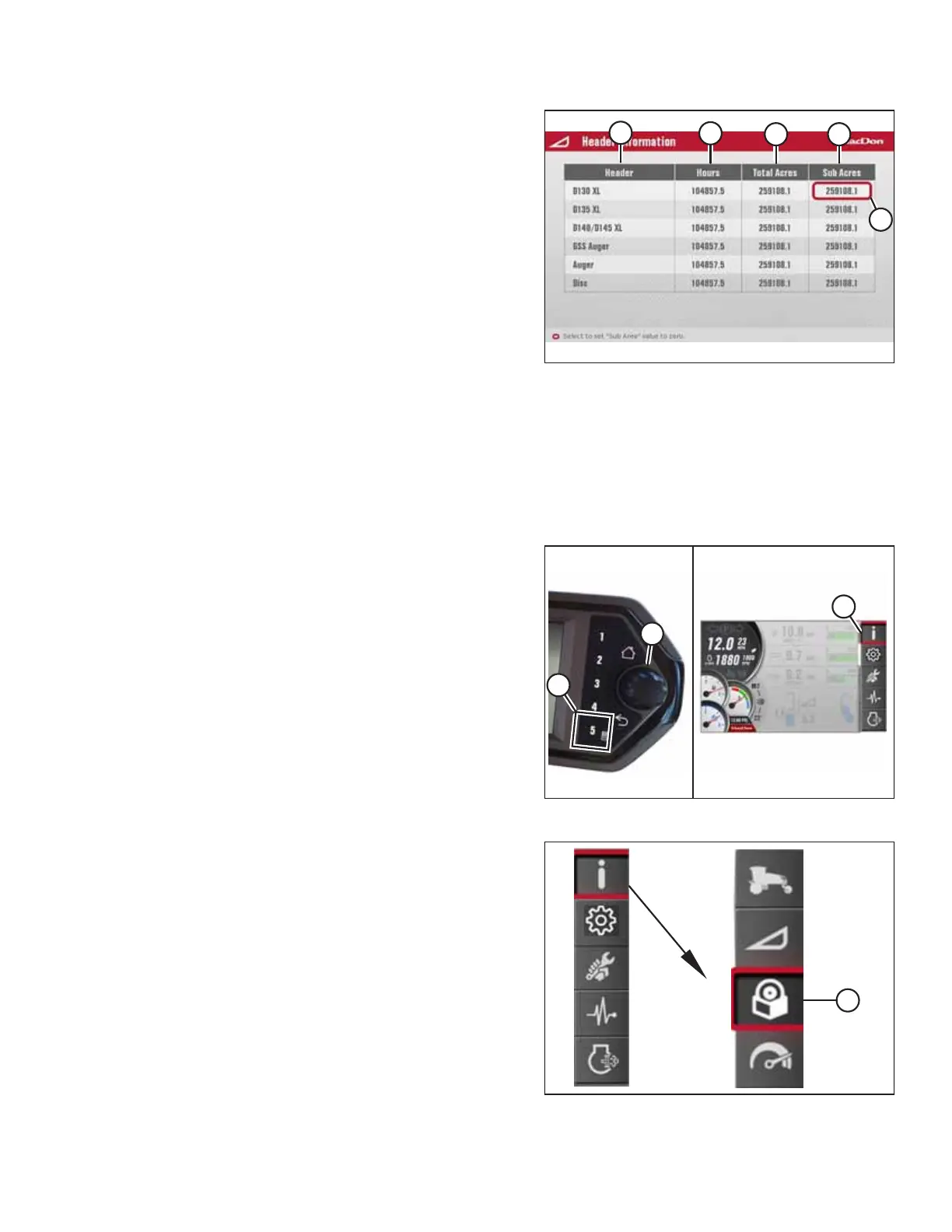
Figure 3.127: Header Information Menu
5. The header information menu displays the following
information:
• Header (A)
• Header hours (B)
• Total acres (C)
• Sub acres (D) (resettable)
NOTE:
If you select any particular value (E), the message RESET
YES/NO appears on the display. Select YES to reset the sub
acres to zero and return to the same highlighted sub acres.
Select NO or press the BACK or HOME button to dismiss the
message without resetting the sub acres. The sub acres are
also resettable from run screen 3. For instructions, refer to
Viewing Performance Data, page 136 .
NOTE:
The acre count is active when the header is engaged and
the header height is in the lower 50% of its range.
Accessing Software Information
Figure 3.128: Opening the Main Menu
1. Press soft key 5 (A) to open the main menu.
2. To scroll to INFORMATION icon (C), use HPT scroll knob (B)
or the ground speed lever (GSL) scroll wheel (not shown).
3. Press HPT scroll knob (B) or the GSL SELECT button (not
shown) to select the highlighted INFORMATION icon.
Figure 3.129: Software Information Submenu Icon
4. Scroll to SOFTWARE INFORMATION submenu icon (A), and
press SELECT to display the module information menu.
OPERATOR’S STATION



 To Next Page