215916 66 Revision A
3.14 Engine Controls
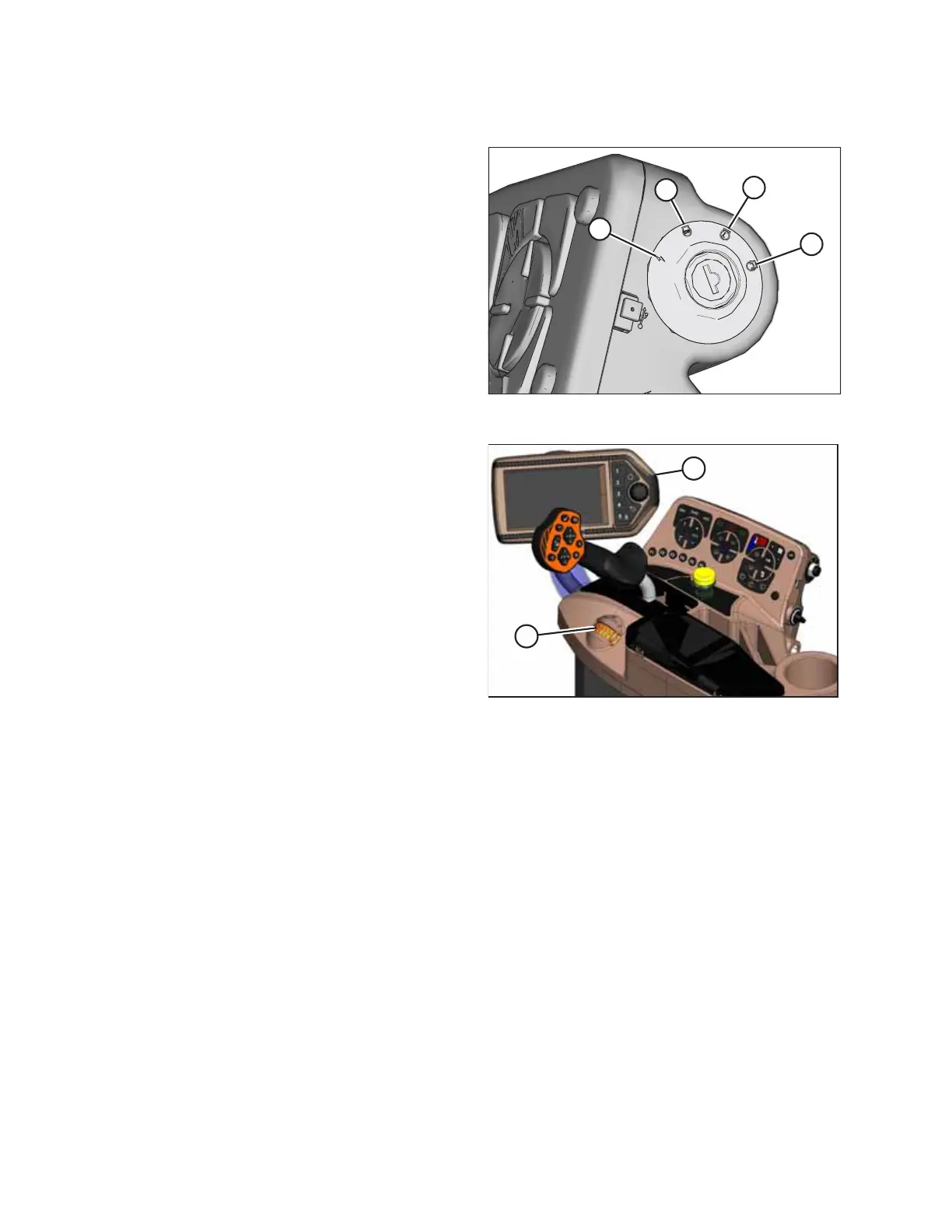
Figure 3.51: Ignition Switch on Operator’s Console
The following engine controls are conveniently located on the
operator’s console.
Ignition switch
• ACC (A): The windrower’s electrical accessories are
turned ON without starting the engine
• OFF (B): All electrical systems OFF
• RUN (C): Engine run position
• START (D): Turn fully clockwise to crank engine, and
release to return switch to RUN position.
IMPORTANT:
Remove ignition key when windrower is not in use. The ignition
key also locks the doors and tool box in the left platform.
Figure 3.52: Engine Controls
Throttle (A)
Controls engine speed range
• MAX: Push lever forward
• MIN: Pull lever back
Harvest Performance Tracker display (B)
• Fuel level monitoring
• DEF level monitoring
• High exhaust system temperature indicator (HEST)
• Exhaust system cleaning inhibit and forced indicator
• Speed monitoring (ground, engine, knife/disc, reel,
conveyor, and cooling fan)
• Pressure monitoring (knife, reel, conveyor, and supercharge)
• Engine parameters (coolant temperature, fuel consumption, and engine load)
• Header position
For more information on the Harvest Performance Tracker, refer to 3.17 Harvest Performance Tracker Display, page 78.
OPERATOR’S STATION



 To Next Page