215916 72 Revision A
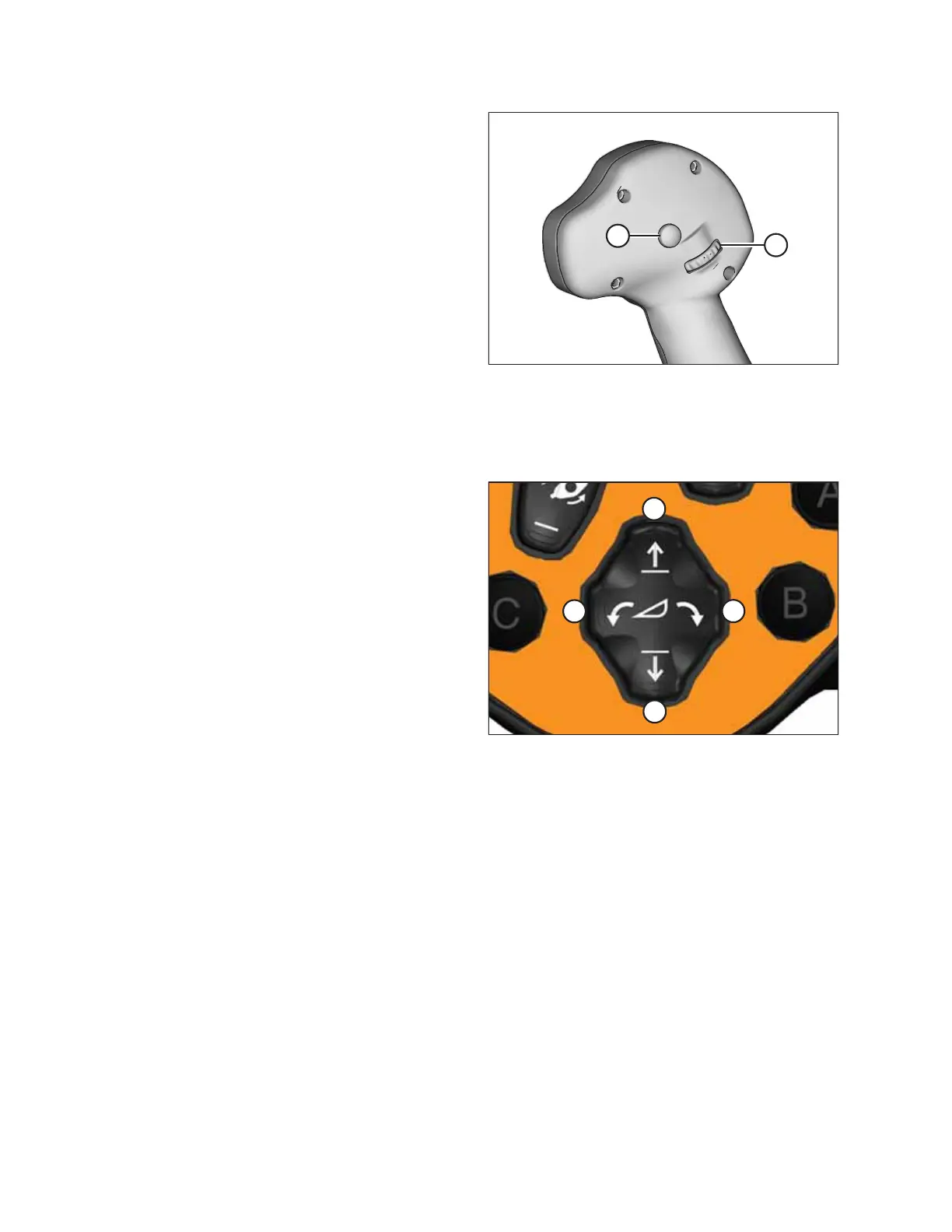
Figure 3.60: GSL Function Groups
GSL controls — rear
• Shift switch (A)
• Scroll wheel (B)
NOTE:
When the shift switch is used with another button it performs
the following shortcut functions:
• SHIFT + BACK – Home page
• SHIFT + SELECT – Main menu access
• SHIFT + SCROLL – Adjust maximum ground speed
Header Position Six-Way Switch
The six-way switch on the Ground Speed Lever (GSL) raises, lowers, and tilts the header.
Figure 3.61: Ground Speed Lever
• To lower the header slowly, press (A) lightly
• To lower the header quickly, press (A) fully
• To raise the header slowly, press (C) lightly
• To raise the header quickly, press (C) fully
• To tilt the header downward, press (B)
• To tilt the header upward, press (D)
Release the switch at the desired position.
NOTE:
The header raise and lower rates are adjustable on the HPT
display. For instructions, refer to 4.5.8 Adjusting Header Raise
and Lower Rates, page 264 or header setup in Menu Icons, page
85.
NOTE:
For detailed switch operating modes, refer to the section in this manual that is specific to your header.
OPERATOR’S STATION



 To Next Page