215916 267 Revision A
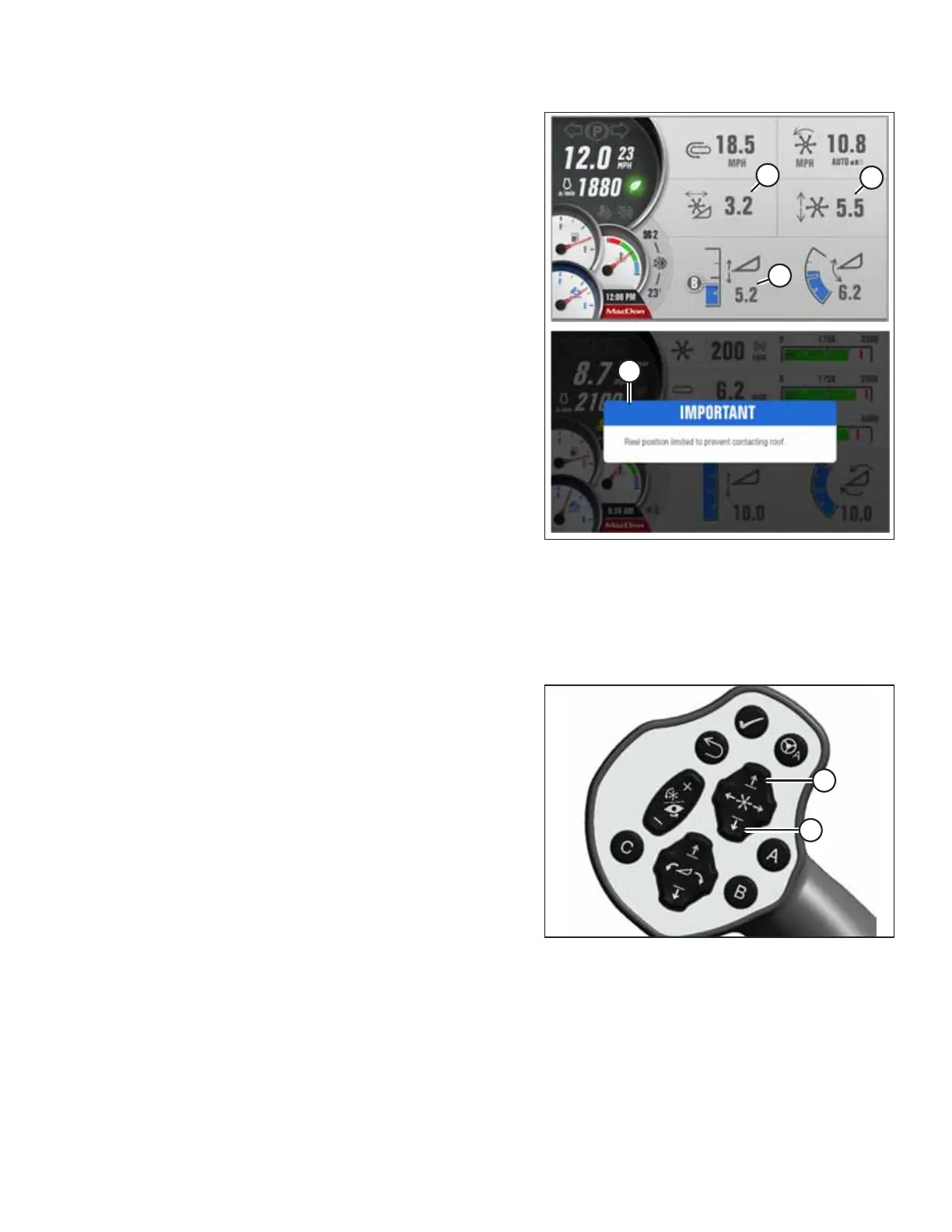
Figure 4.352: HPT Display – Draper Header Shown
Settings for the fore-aft, reel height, and header height are
limited as follows to prevent the reel from colliding with the
cab roof:
• If reel height (C) and header height (A) are both greater than
7.0, reel fore-aft (B) will be limited to 5.0. If you try to move
the reel fore-aft so the value would exceed 5.0, message (D)
("IMPORTANT: Reel position limited to prevent contacting
roof") will show on the Harvest Performance Tracker (HPT)
display. If you want a reel fore-aft value of greater than 5.0,
lower the reel height and/or header height to a value of 7.0
or less.
• The reel fore-aft will automatically move forward to 5.0 or
less If you increase the header height to greater than 7.0
while the reel fore-aft is greater than 5.0, and the reel
height is greater than 7.0.
After the reel fore-aft automatically moves, you will then have
to manually adjust the fore-aft.
4.6.3 Adjusting Reel Height
Optimize header performance based on crop type and conditions by adjusting the reel height position. The reel height
position is adjusted with the multi-function switches on the ground speed lever (GSL).
Figure 4.353: Ground Speed Lever
1. Press and hold the switch for the desired movement of the
reel: UP (A) or DOWN (B).
OPERATION



 To Next Page