215916 124 Revision A
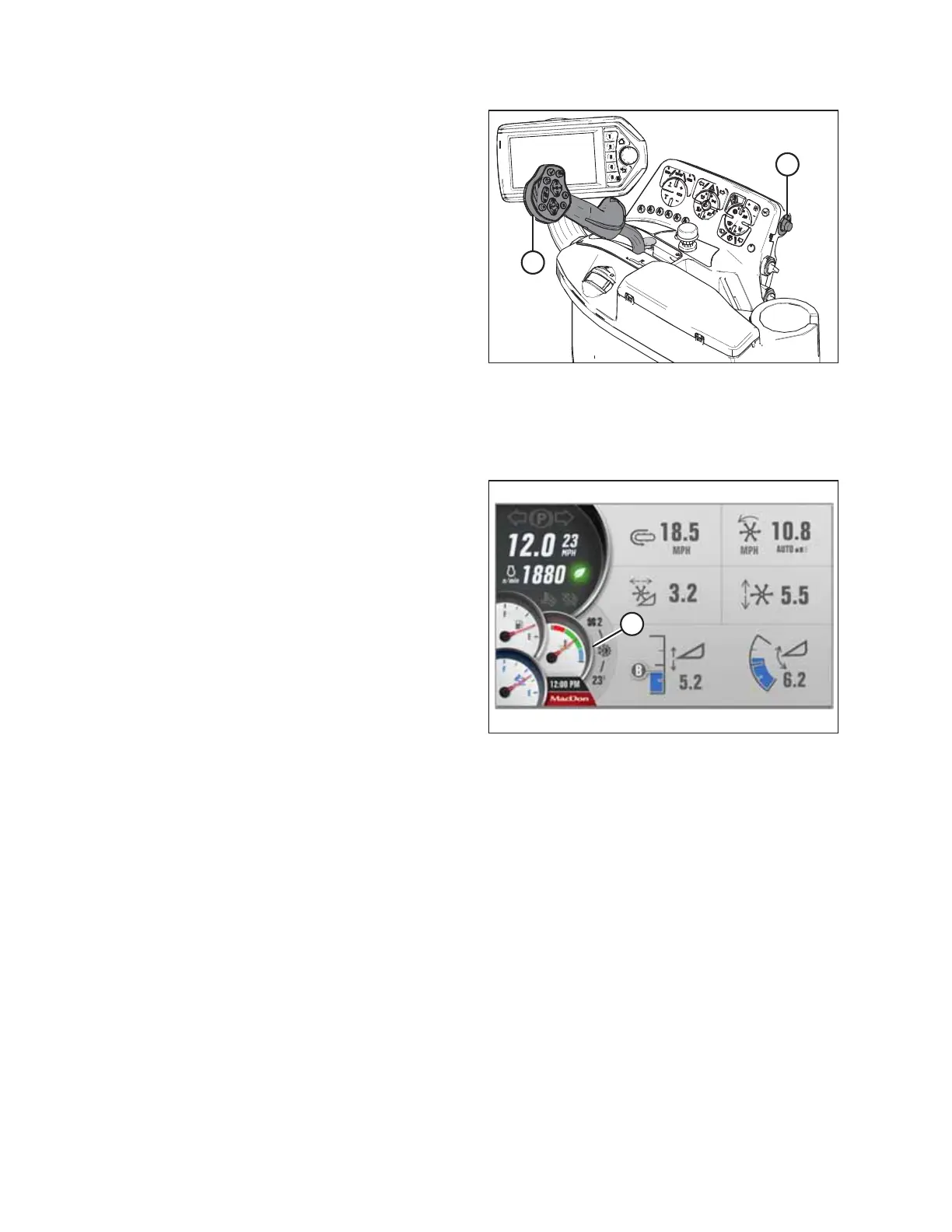
Figure 4.22: Console
2. Lower the header.
3. Place ground speed lever (GSL) (B) into PARK.
4. Lock the steering wheel.
5. Turn ignition key (A) counterclockwise to the OFF position.
Engine Temperature
The engine temperature gauge is displayed in the lower left corner of the Harvest Performance Tracker (HPT) display.
Figure 4.23: HPT Display – Engine Temperature Gauge
Normal engine operating temperature is indicated when the
needle is in the green range of gauge (A).
If the engine temperature exceeds 105°C (221°F), the needle
will move to the red range of the gauge. Depending on the
temperature, the engine will trigger a fault code and an amber
caution or red stop light will illuminate on the HPT display.
When the engine temperature is below 5°C (40°F), the engine
will cycle through a period where it appears to labor until the
engine warms up. Do NOT operate the engine above 1500 rpm
until the HPT engine temperature gauge is above the blue
range.
NOTE:
Before taking the ground speed lever (GSL) out of PARK, let the
hydraulic oil warm up to 32°C (90°F). You can view the hydraulic
oil temperature on Run Screen 4 on the Harvest Performance Tracker (HPT) display. For instructions, refer to Viewing
Engine Cooling Data, page 127.
OPERATION



 To Next Page