215916 321 Revision A
NOTE:
If necessary, refer to the windrower operator’s manual to review navigating the HPT display. A header must be attached to
the windrower to be able to activate the grass seed option.
To activate the grass seed option with the Harvest Performance Tracker (HPT), follow these steps:
1. Turn the ignition key to ON to activate the HPT.
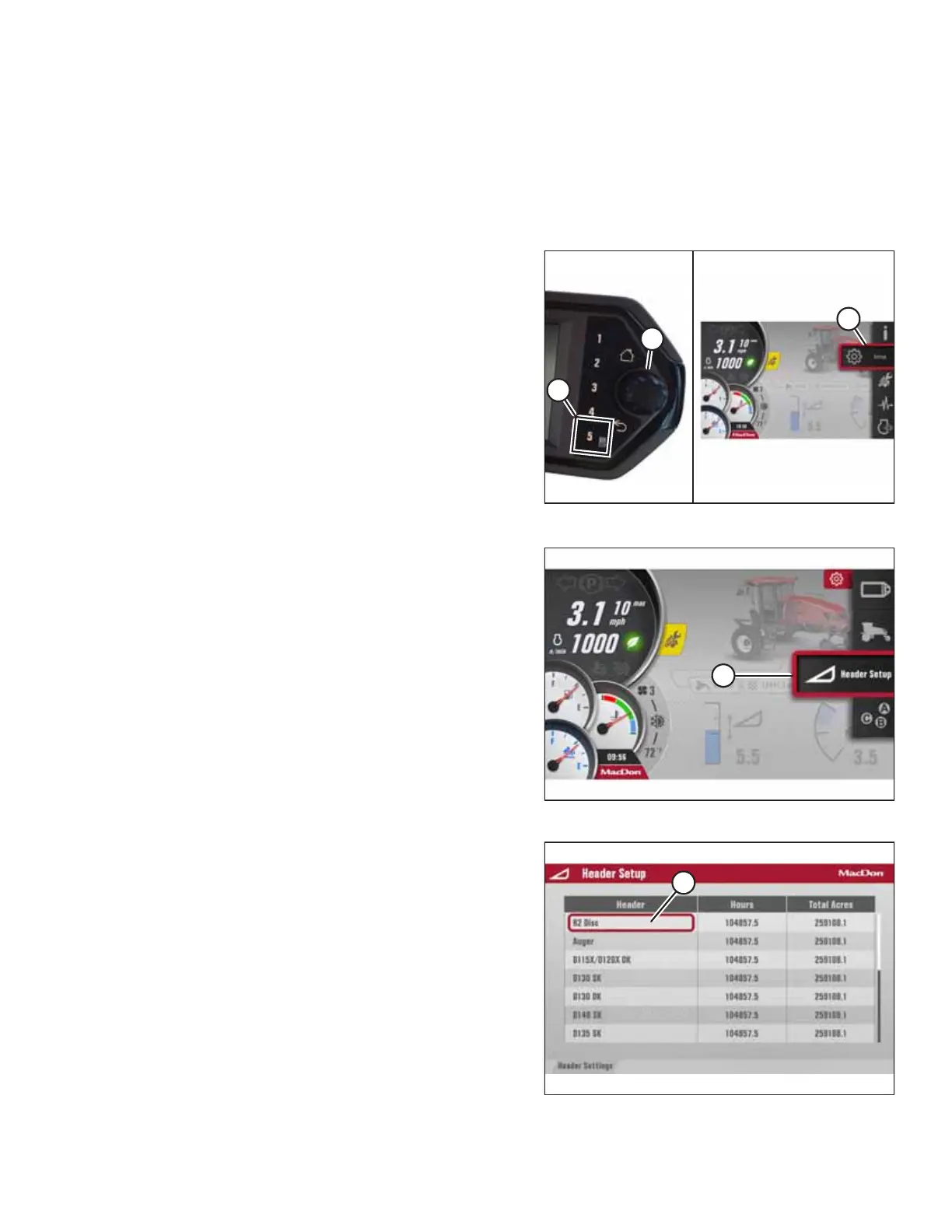
Figure 4.474: Opening the Main Menu
2. Press soft key 5 (A) to open the main menu or press SHIFT
and SELECT on the ground speed lever.
3. Use scroll knob (B) or the ground speed lever (GSL) scroll
wheel (not shown) to place red cursor (C) over the icon you
want to select.
NOTE:
Using the scroll knob will activate titles which explain each
selection.
4. Press scroll knob (B) or the GSL SELECT button (not shown)
to select the highlighted icon.
NOTE:
Pressing the corresponding soft key will also work.
Figure 4.475: Header Setup Screen
5. Scroll down and select HEADER SETUP menu (A).
Figure 4.476: Header Setup
6. Select R2 DISC (A).
OPERATION



 To Next Page