215916 200 Revision A
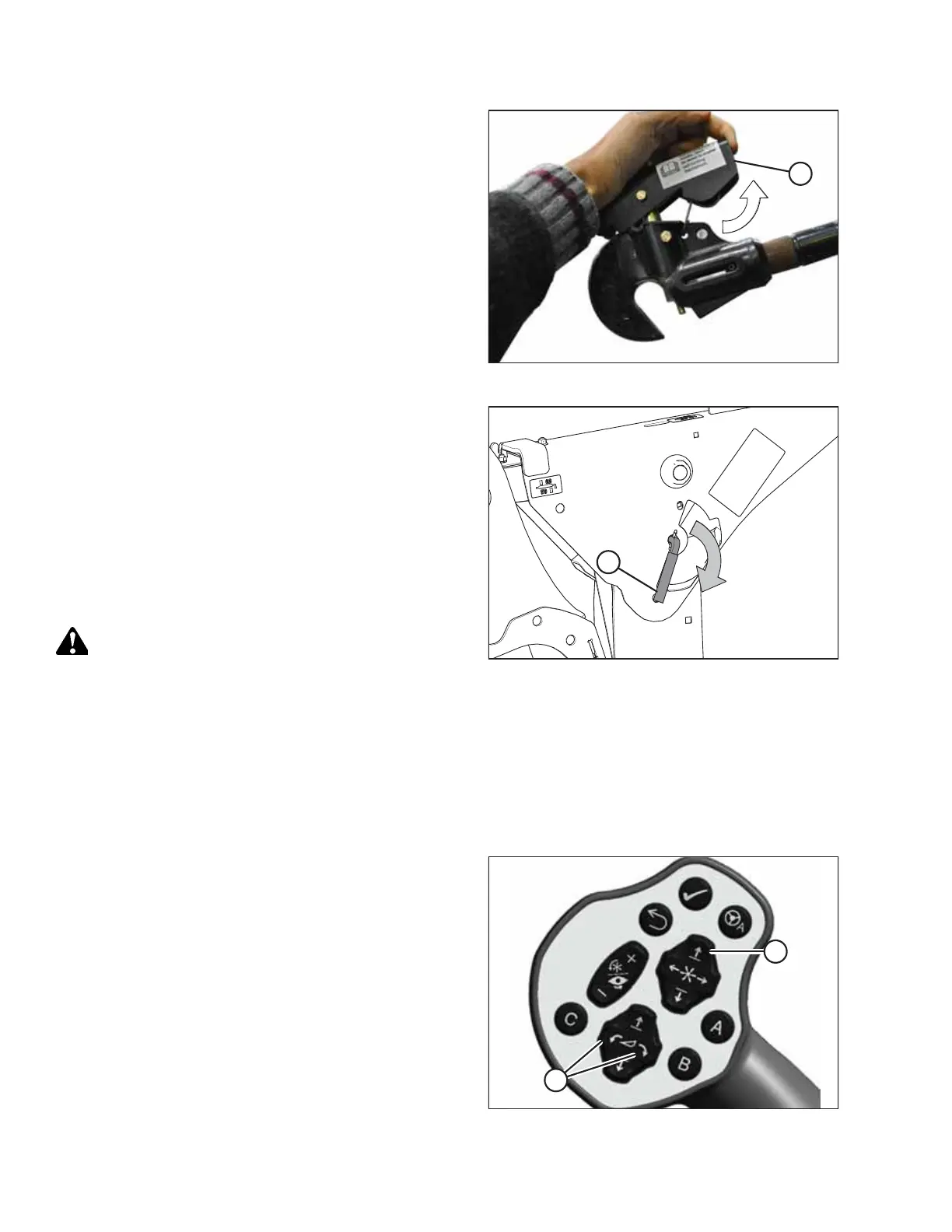
Figure 4.196: Center-Link
14. Windrowers WITH center-link self-alignment kit: Release
center-link latch (A).
Figure 4.197: Safety Prop Lever
15. Disengage the safety props on both lift cylinders as follows:
a. Turn lever (A) away from the header to raise the safety
prop until the lever locks into the vertical position.
b. Repeat the previous step for the opposite cylinder.
NOTE:
If the safety prop will NOT disengage, raise the header to
release the prop.
16. Repeat for the opposite side.
DANGER
Ensure that all bystanders have cleared the area.
17. Start the engine.
18. Remove the header float when prompted by the Harvest Performance Tracker (HPT).
NOTE:
If you are not prompted by the HPT to remove the float, remove the float manually.
19. Lower the header fully.
Figure 4.198: GSL
20. Use HEADER TILT cylinder switches (A) on the GSL to
release the load on the center-link cylinder.
21. Windrowers WITH center-link self-alignment kit: Operate
the link lift cylinder with REEL UP switch (B) to disengage
the center-link from the header. Proceed to Step 25, page
201.
OPERATION



 To Next Page