215916 324 Revision A
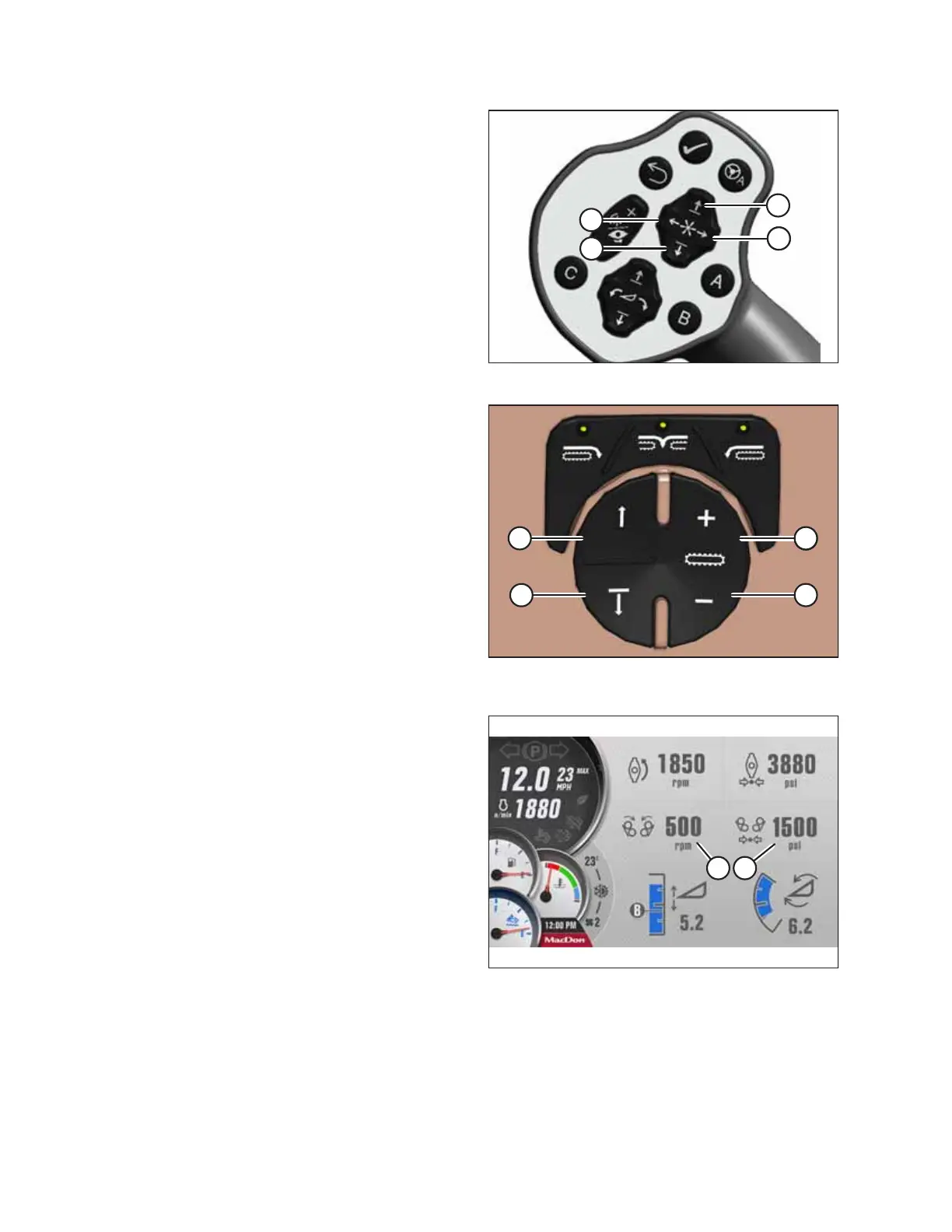
Figure 4.482: GSL – Grass Seed Drum Controls
Figure 4.483: Operator’s Console – Grass Seed Drum
Controls
5. Adjust the drum speed and windrow width (drum spacing)
as desired using the ground speed lever (GSL) or the
operator’s console:
• To widen the windrow, press REEL UP (A) switch the on
the GSL, or button (A) on the operator’ s console.
• To narrow the windrow, press REEL DOWN (B) switch on
the GSL, or button (B) on the operator’s console.
• To increase the drum speed, press switch (C) on the
GSL, or button (C) on the operator’s console.
• To decrease the drum speed, press switch (D) on the
GSL, or button (D) on the operator’s console.
Figure 4.484: Run Screen 2 – Grass Seed Active
6. Check Run Screen 2 on the HPT as required to monitor
grass seed drum speed (A) and pressure (B).
NOTE:
Proper operating drum speed is 0–660 rpm.
OPERATION



 To Next Page