215916 100 Revision A
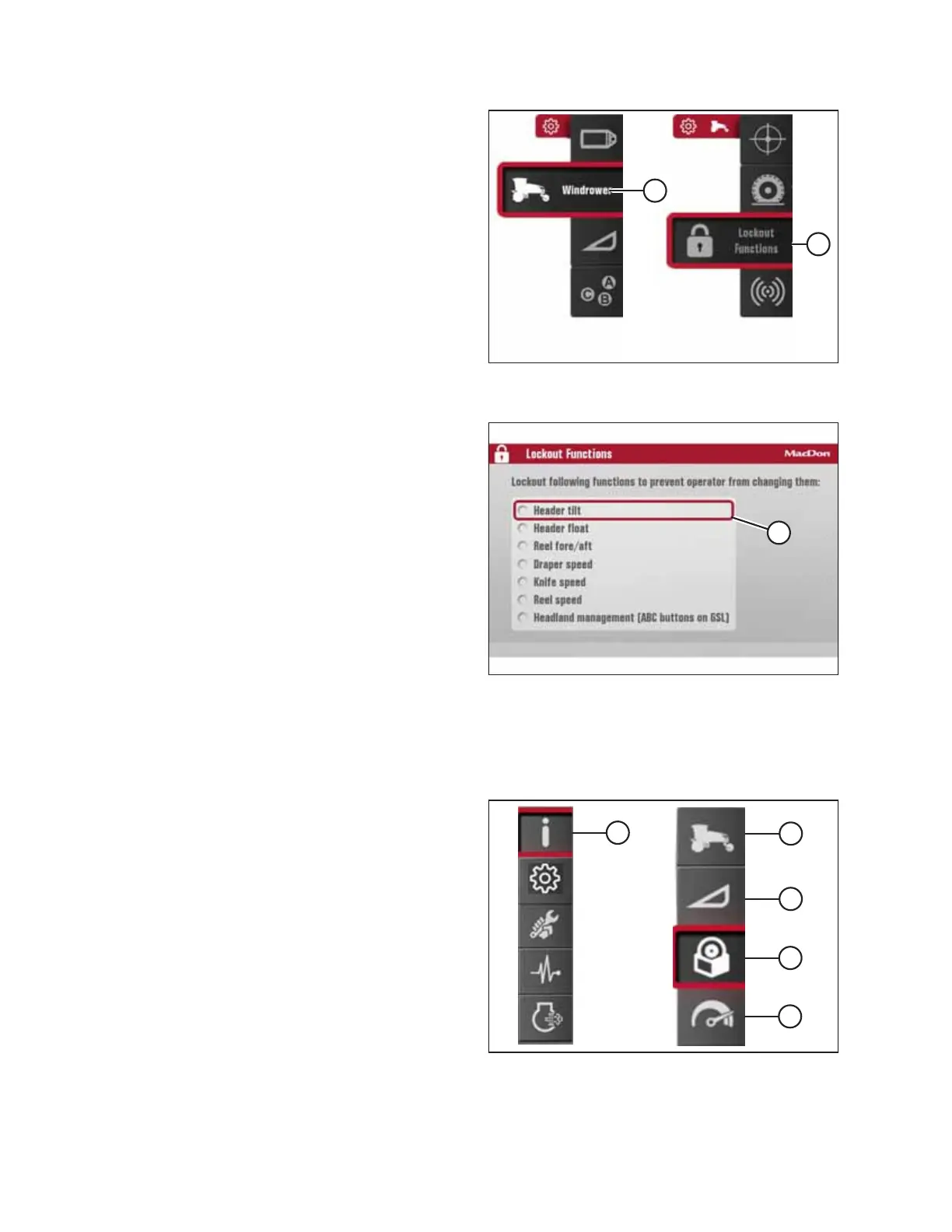
Figure 3.119: Windrower Settings Icon and Tires
Submenu Icon
4. Scroll to WINDROWER SETTINGS icon (A) and press SELECT.
5. Scroll to CONTROL LOCKS icon (B), and press SELECT to
display the adjustment window.
NOTE:
The F3 shortcut button on the operator’s console will also
display the windrower settings menu.
Figure 3.120: Lockout Functions Page
6. On the LOCKOUT FUNCTIONS page, use the scroll knob on
the HPT to move cursor (A) to the desired function(s)
to lock.
7. Press SELECT to activate the lock.
3.17.6 Machine Information Pages
The Harvest Performance Tracker can display various pages of information
Figure 3.121: Information Icon and Information
Submenu Icons
Selecting the INFORMATION icon (A) from the main menu
provides access to the following submenu icons:
• Windrower information (B) – Refer to Accessing Windrower
Information, page 101 .
• Header information (C) – Refer to Accessing Header
Information, page 102 .
• Software information (D) – Refer to Accessing Software
Information, page 103 .
• Performance information (E) – Refer to Accessing
Performance Information, page 104.
OPERATOR’S STATION



 To Next Page