215916 79 Revision A
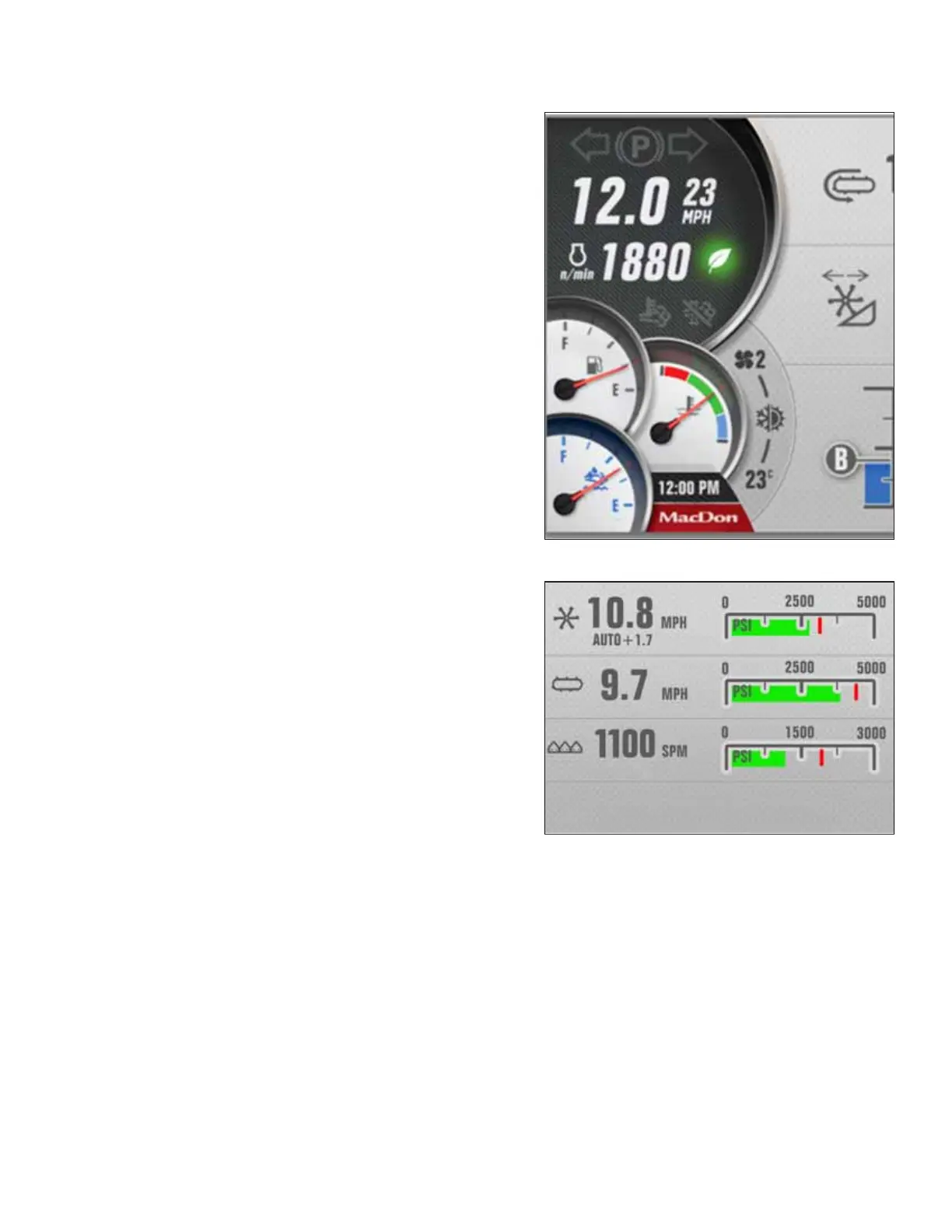
Figure 3.73: Left Gauge Cluster
The HPT display is separated into the following zones:
Left gauge cluster:
• Ground speed
• Maximum ground speed
• Engine rpm
• Eco engine control (EEC) active/inactive
• High exhaust system temperature (HEST) light
• Inhibit status
• Park and turn signal status
• Level gauges for fuel and diesel exhaust fluid (DEF)
• Coolant temperature gauge
• Climate control temperature and blower speed
• Current time
Figure 3.74: Draper Header Information
Header information:
The information displayed depends on the type of header
attached to the windrower and which run screen is active.
• Run screen #1: Displays reel, draper, knife, disc, or auger
speed and pressure; alarm point; and indexing (factory-set
according to header)
• Run screen #2: Displays draper, knife, or disc speed and
pressure; reel height and fore-aft position; hydraulic
pressure; and load bar
NOTE:
Master controller software MCAK203587P (or later) required
to accurately display changes in draper speed.
• Run screen #3: Displays fuel per hour/acre, acres per hour,
and sub acres per hour (resettable)
• Run screen #4: Displays cooling fan speed, engine air intake
temperature, hydraulic oil temperature, and engine coolant
temperature
OPERATOR’S STATION



 To Next Page