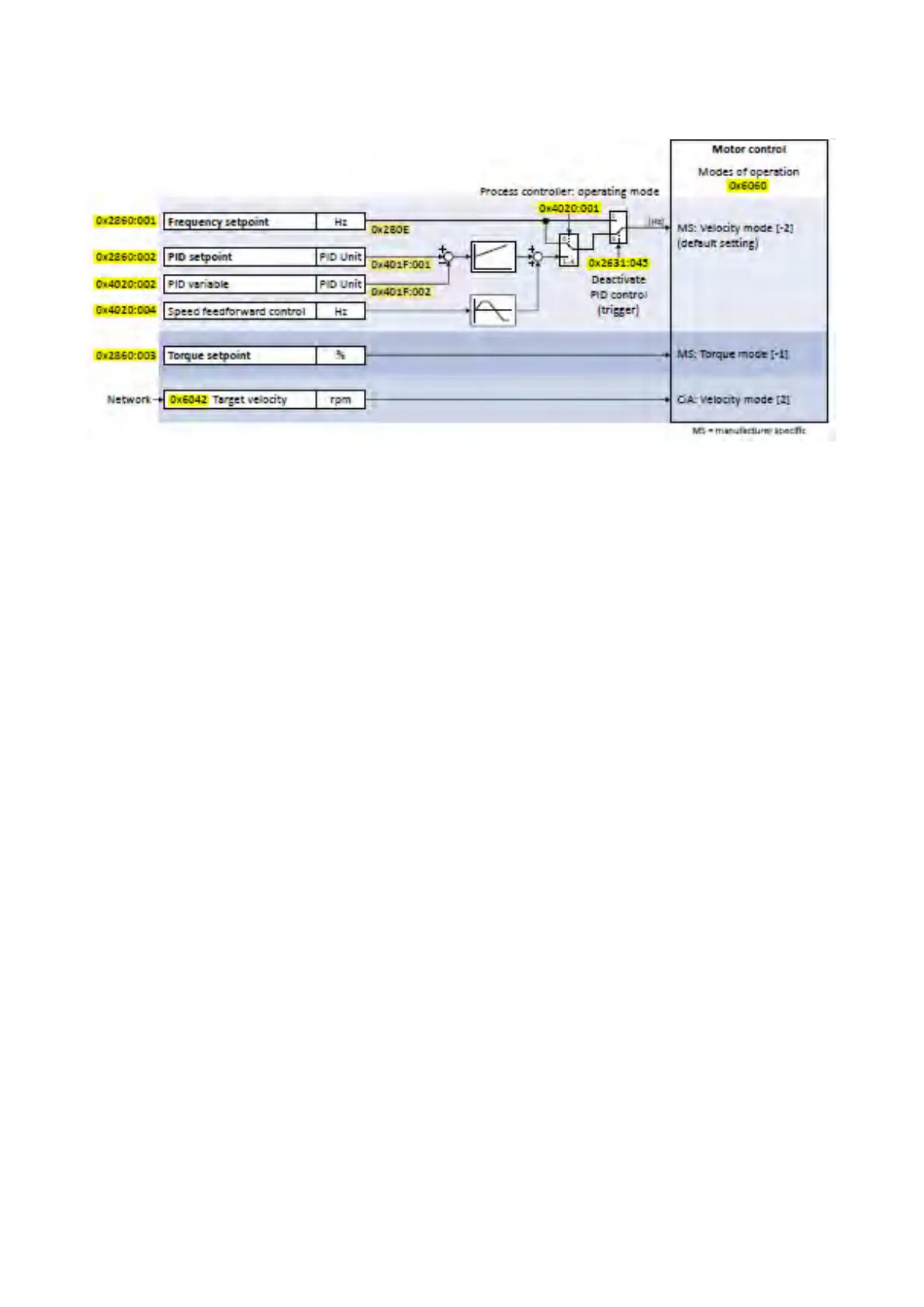
The following signal flow shows the internal setpoint logics:
Notes:
• In case of an activated network control, the functions for setpoint change-over are not
active! If in case of network control no setpoint is defined via the network control
word, the standard setpoint source is active.
• The setpoint used by the motor control depends on the operating mode selected in
0x6060 (P301.00):
•
"MS: Velocity mode [-2]": The active frequency setpoint is used. In addition, the
PID
control can be activated in 0x4020:001 (P600.01).Configuring the process
control-
ler
232
•
"MS: Torque mode [-1]": The active torque setpoint is used.
Torque control w/
freq.
limit
147
•
"CiA: Velocity mode [2]": The setpoint speed defined via the "Target velocity"
0x6042 (P781.00) parameter is used.
Device profile CiA 402
299
• As only one setpoint source can be active at a time, priorities are assigned to the
frequency, PID and torque setpoint sources. For details see the following subchapter
"Priority of the setpoint sources".
380.
Diagnostic parameters:
• 0x282B:002 (P125.02): Active setpoint source



 To Next Page