215916 153 Revision A
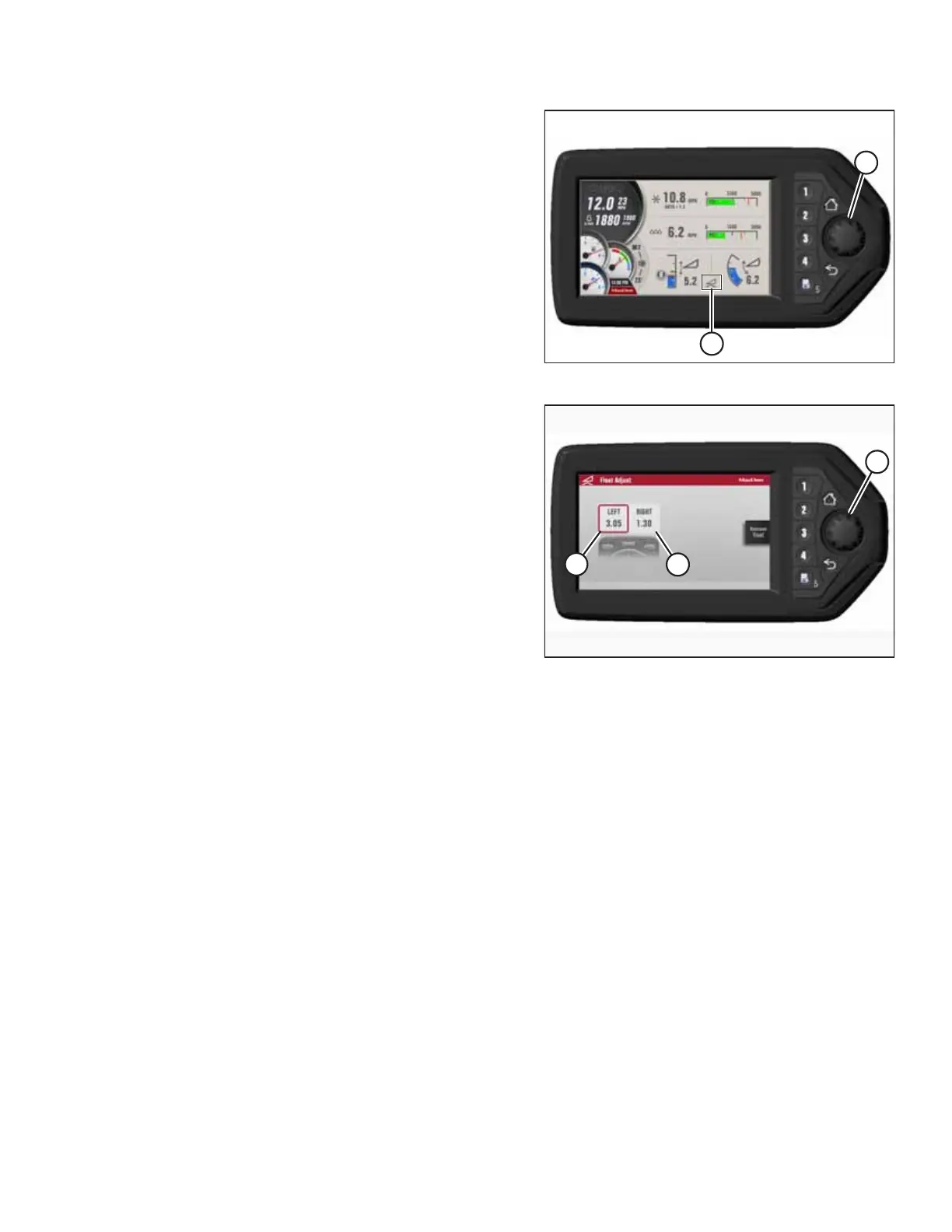
Figure 4.78: HPT Display
25. Press rotary scroll knob (A) on the HPT to highlight the
QuickMenu options.
26. Rotate scroll knob (A) to highlight HEADER FLOAT
symbol (B). Press the scroll knob to select it.
Figure 4.79: HPT Display
27. Turn scroll knob (A) to highlight left (B) or right (C) float and
press knob (A) to activate the selection.
28. Rotate scroll knob (A) to adjust the float setting and press
the knob to make your selection.
IMPORTANT:
Float adjustments of 1.0 (out of 10) change the header
weight at the cutterbar by approximately 91 kg (200 lb.).
Adjust the float in increments of 0.05 to fine-tune the float
setting.
29. Shut down the engine, and remove the key from
the ignition.
30. Grasp one end of the auger header and lift it. The lifting
force used should be 357 N (80 lbf.) at both ends of the
auger.
31. Proceed to Connecting A40DX Auger Electrical and
Hydraulics, page 154.
OPERATION



 To Next Page