215916 155 Revision A
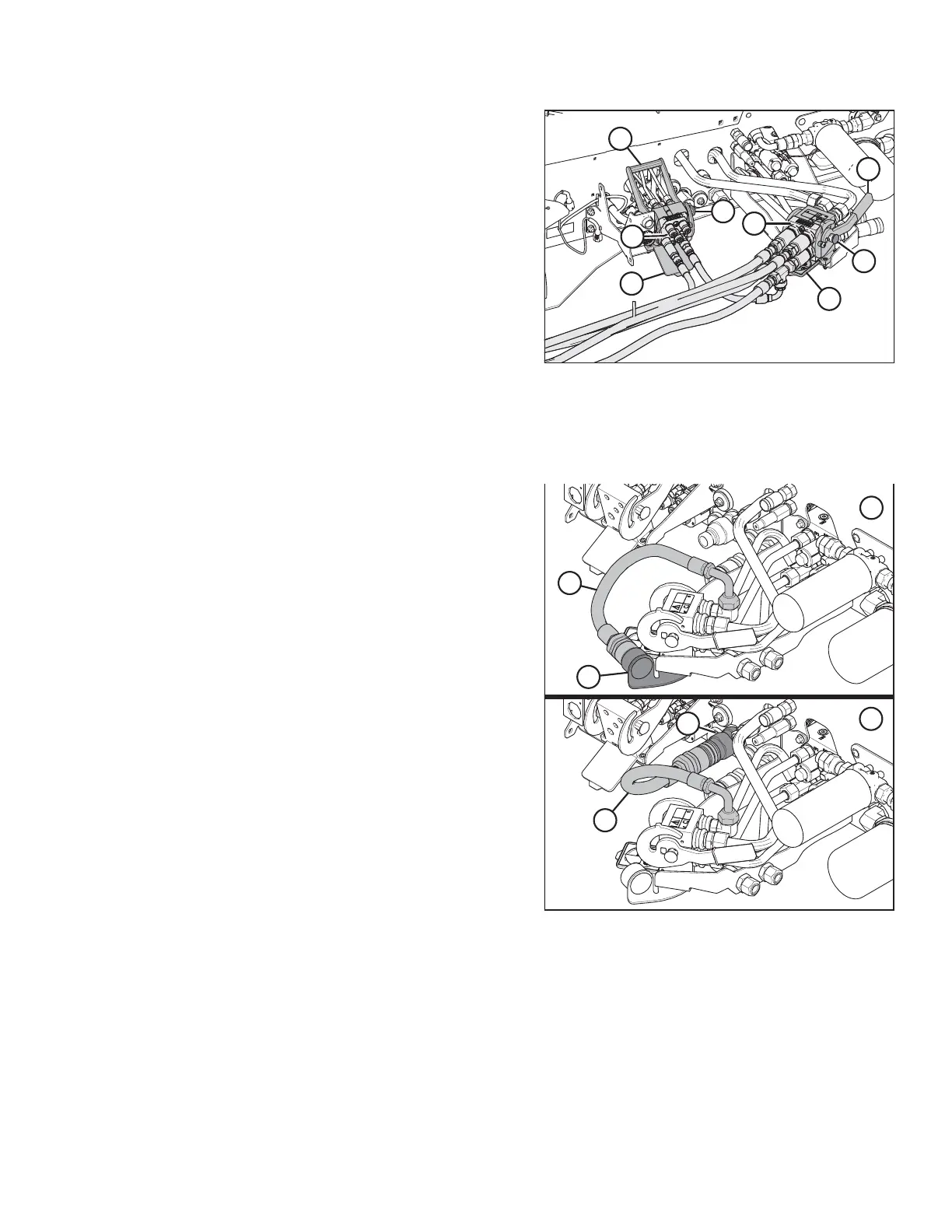
Figure 4.83: Knife/Reel/Auger Drive Multicoupler
6. Clean the multicouplers and receptacles to prevent
contamination of the hydraulic system.
7. Push button (A) on the rear multicoupler receptacle and
rotate handle (B) away from the windrower.
8. Open cover (C) and position multicoupler (D) onto the
receptacle. Align the pins in the coupler with the slots in
handle (B), and rotate the handle toward the windrower so
that the coupler is locked onto the receptacle and
button (A) pops out.
9. Push button (E) on the front multicoupler receptacle and
rotate handle (F) away from the windrower.
10. Open cover (G) and position multicoupler (H) onto the
receptacle. Align the pins in the coupler with the slots in
the handle, and rotate the handle toward the windrower so
that the coupler is locked onto the receptacle and
button (E) snaps out.
Figure 4.84: Knife Pressure Hose Positions
1 - Hose in Storage Position (Rotary Configuration)
2 - Hose to Knife Pressure Receptacle (Auger/Draper Configuration)
11. If you are switching from a rotary header to an auger
header: Remove hose (A) from storage location (B) and
connect it to knife pressure receptacle (C) on the frame.
NOTE:
Hose quick-disconnect (C) is only present on M1240
machines configured for draper/auger headers.
OPERATION



 To Next Page