215916 276 Revision A
4.6.6 Adjusting Draper Speed
Draper speed is displayed in mph or km/h (depending on the global units selection); the default is rpm, and can be set to
auto or manual mode.
• AUTO mode: Draper speed is maintained relative to ground speed. For instructions, refer to Setting Draper Speed in
Auto Mode, page 276.
• MANUAL mode: Draper speed is manually set and is maintained independently of ground speed. For instructions, refer
to Setting Draper Speed in Manual Mode, page 278.
NOTE:
Both speed modes work with the One-Touch-Return feature. For example, button A on the GSL can be set for MANUAL
mode and button B can be set for AUTO mode. For instructions, refer to One-Touch-Return Buttons (A, B, C), page 74.
Setting Draper Speed in Auto Mode
This adjustment requires the header to be in operation.
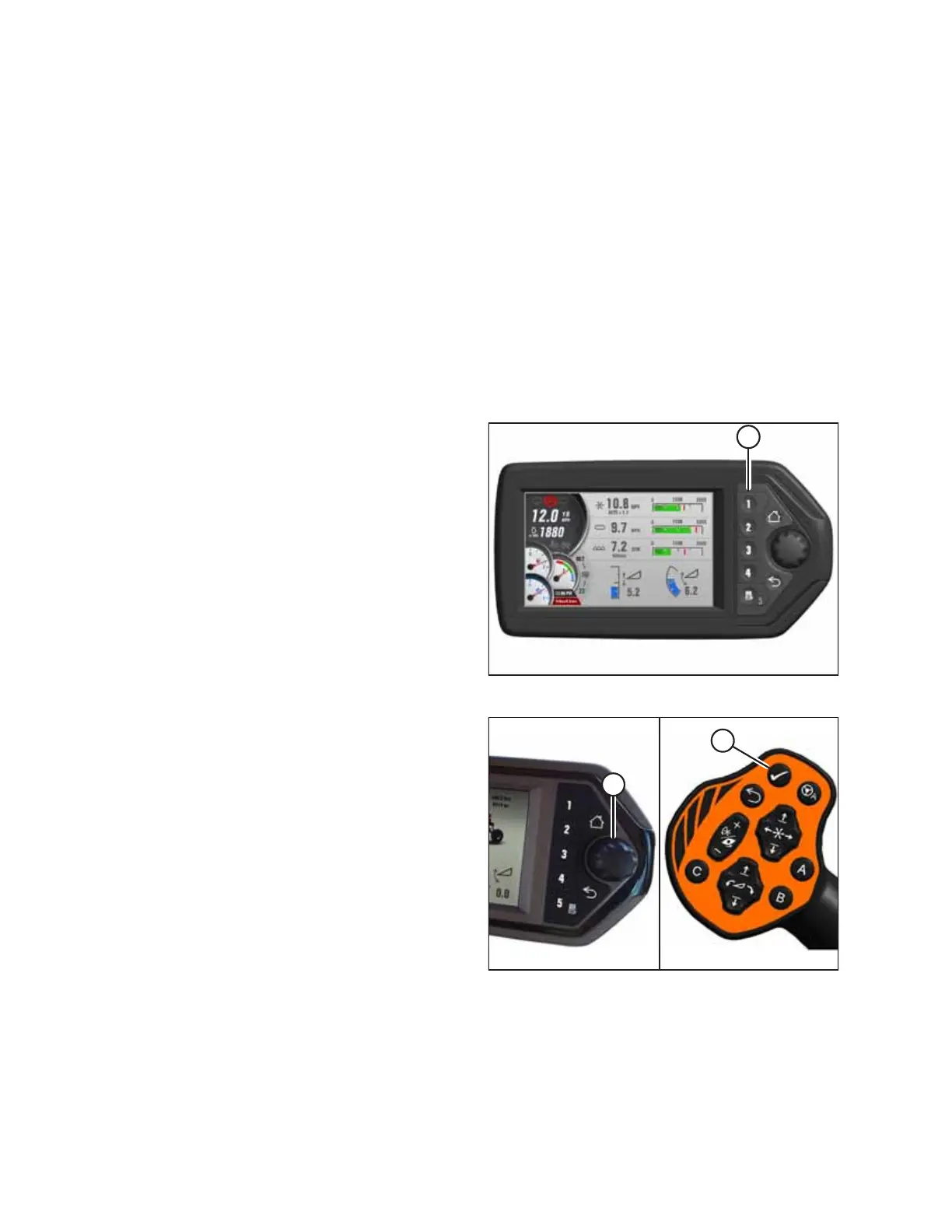
Figure 4.374: Header Run Screen 1
1. If RUN SCREEN 1 is not already displayed, press soft
key 1 (A) on the Harvest Performance Tracker (HPT) to
display draper RUN SCREEN 1.
Figure 4.375: HPT Scroll Knob and GSL Select Button
2. Press scroll knob (A) on the Harvest Performance Tracker
(HPT) or SELECT button (B) on the ground speed lever (GSL)
while in any run screen to display the QuickMenu system.
OPERATION



 To Next Page