DISPLAY AND CONTROL ELEMENTS 4
MHL360 E 4.47
4.5.14.2 Set limits (optional)
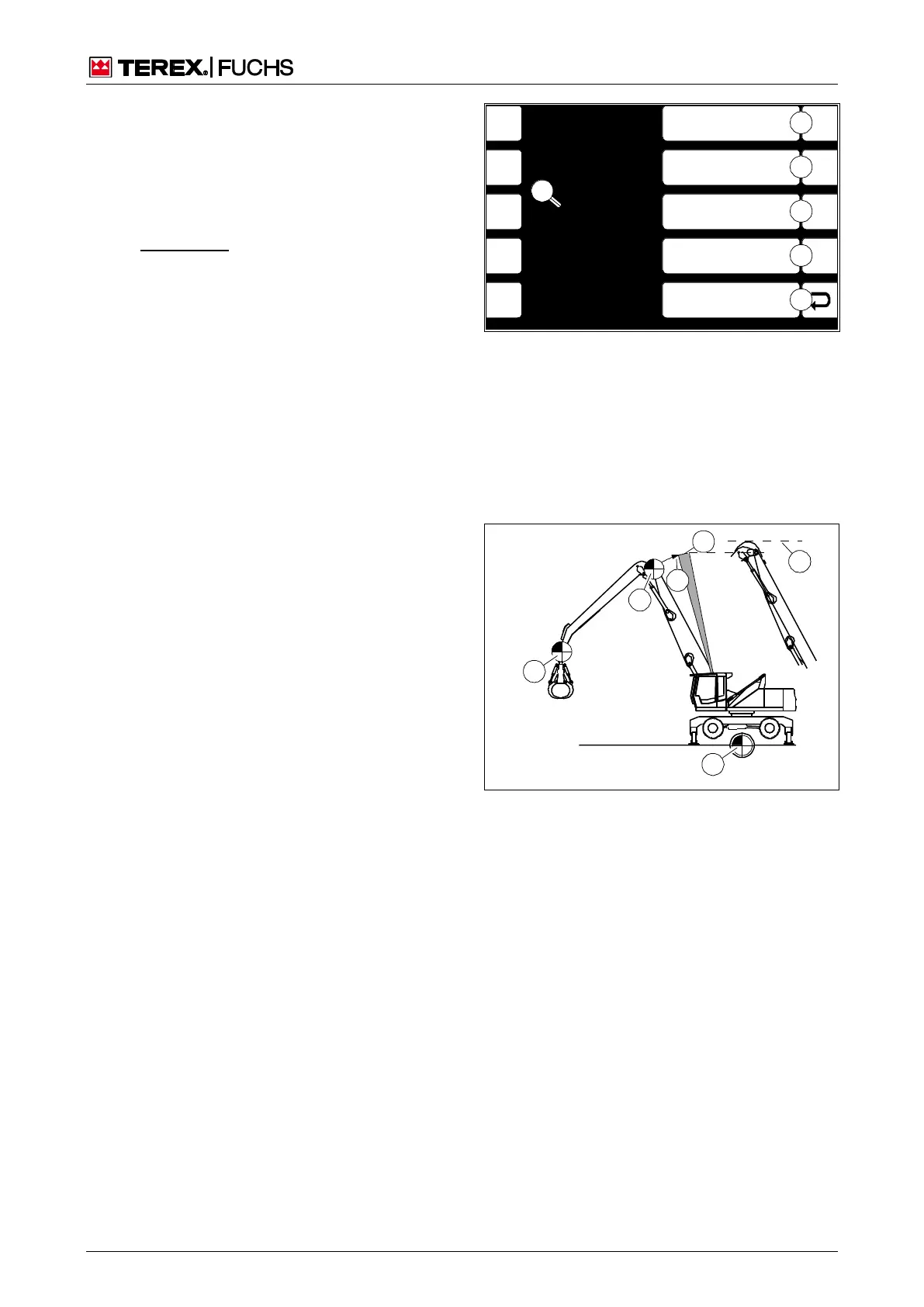
This display screen enables the individual
adjustment of the range and height limit (op-
tional). The limit values are defined by teach-
ing the current position of the loading equip-
ment. The figures for height and reach relate
to the pivot points with the outrigger fully ex-
tended (Fig. 88).
n Regarding cut-off paths, ensure that ap-
propriate safety distances and working
speeds are maintained according to local
conditions.
Call-up
►
Main control display > Main menu > User
settings > Set limits
Structure
The menu is structured as a two-column table.
The cell (87/5) on the left side displays the
current height and reach of the loading
equipment.
The following options are available on the
right side:
(87/1): Adopt current reach as range limit
(87/2): Adopt current height as height limit
(87/3): n Set the range limit to the maxi-
mum possible value to deactivate perma-
nently
(87/4): n Set the height limitation to the
maximum possible value to permanently
deactivate
Operating note
►
Move loader attachment into the desired
cut-off position. In so doing, take into ac-
count the cut-off path that the loading
equipment needs until it comes to a stop.
►
Briefly press side function key next to the
desired button (87/1 or 2).
or multifunction button
►
Navigate the focus to the button (87/1 or
2).
►
Briefly press button.
h Chapter 5.19 Important functions
F1
F2
F3
F4
F6
F7
F8
F9
F5
BSB50632
ESC
3
2
1
0
4
Current Height
8.29 m
Current Reach
6.86
5
Reset Height Max
Reset Reach Max
Set Height Max
Heigh Max 30.00 m
Set Reach Max
Reach Max 30.00 m
Fig. 87 Set limits
0 Back
1 Set max range
Max reach (m)
2 Set max height
Max height (m)
3 Reset max range
4 Reset max height
5 Current height (m)
Current reach (m)
Fig. 88 Height limitation example (not to scale)
1 Theoretical boom cut-off
2 Cut-off path until the boom stops
3 Height and reach zero position
4 Pin eye reference point
5 Dipperstick boom joint reference point
6 Taking the overhang of the hoses into account
2 Set
limits
(option



 To Next Page