DISPLAY AND CONTROL ELEMENTS 4
MHL360 E 4.19
4.2.12.4 Focus and multifunction button
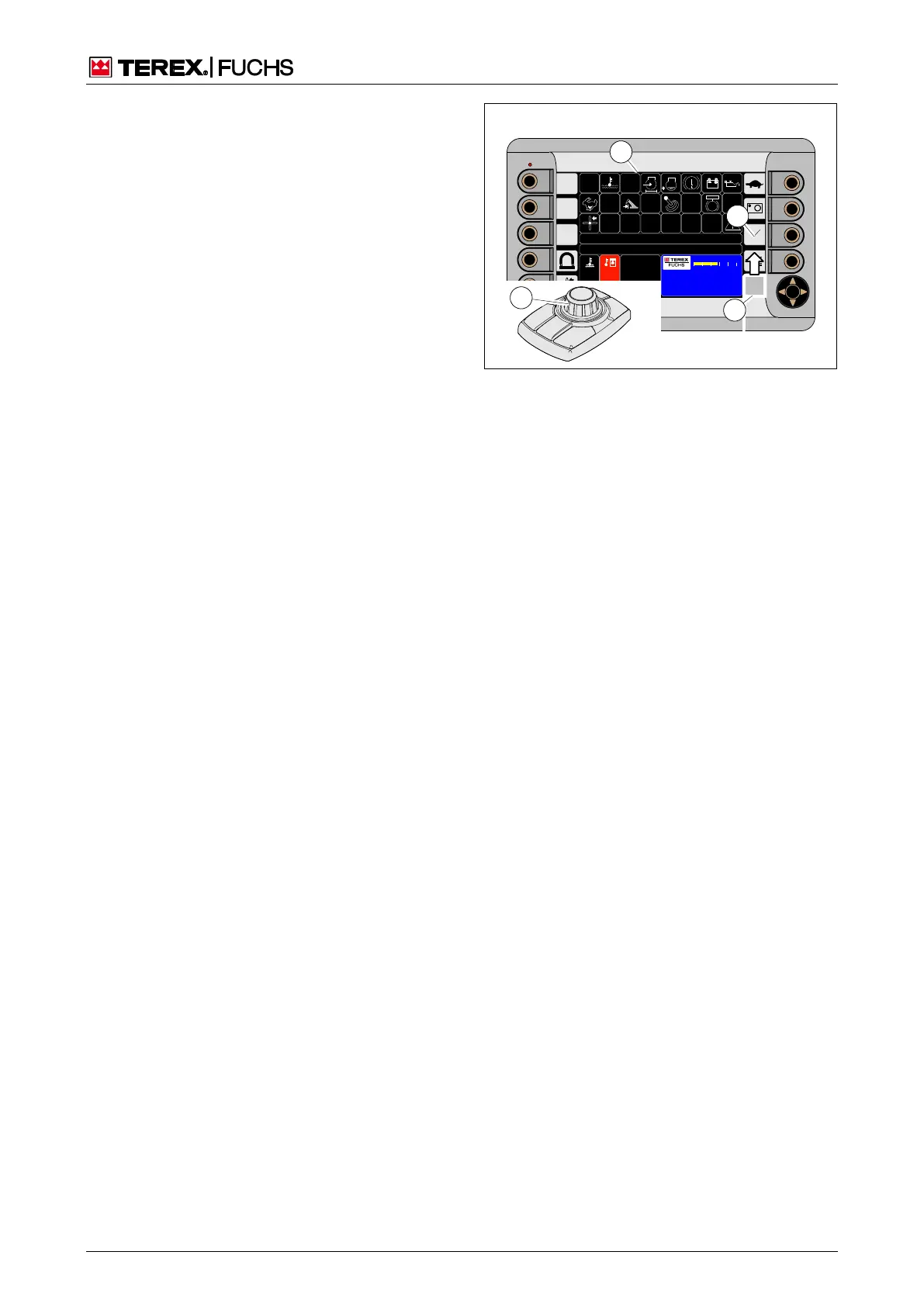
With the multifunction button, the focus can
be controlled by operating personnel without
changing the seat position.
Pivoting the mini-joysticks (38/3) moves the
focus (38/2) in the pivoting direction to the
desired sensitive area.
Pressing the button (38/4) activates the
functionality of the sensitive area.
For example, to change the indicator from
time to operating hours on the main control
display (38/1), note that the focus after the
machine start is initially at the bottom right
(38/2). Use the mini-joystick (38/3) to move
the focus to the sensitive area for
time/operating hours (38/5). Press the but-
ton (38/4), to change the indicator.
If the focus is on a sensitive area for set
values, the button (38/4) changes the val-
ues according to the direction of rotation.
BSB50536
11
9 5
C
100
C
00:00
h
F
0 ½ 1
09:43 11.03.2011
MHLXXX / XXXX
1800 UPM
0 5 1 0 1 5 2 0 2 5
1
2
5
3
Fig. 38 Focus and multifunction display



 To Next Page