Chapter 8: INSTALLATION AND SETTING PROCEDURES (HARDWARE)
3. VX-2000SF, VX-200SZ , VX-200SP, VX-200SI , VX-200SO, AND VX-200SE
8-31
3.5. Changing the VX-200SI's Logic
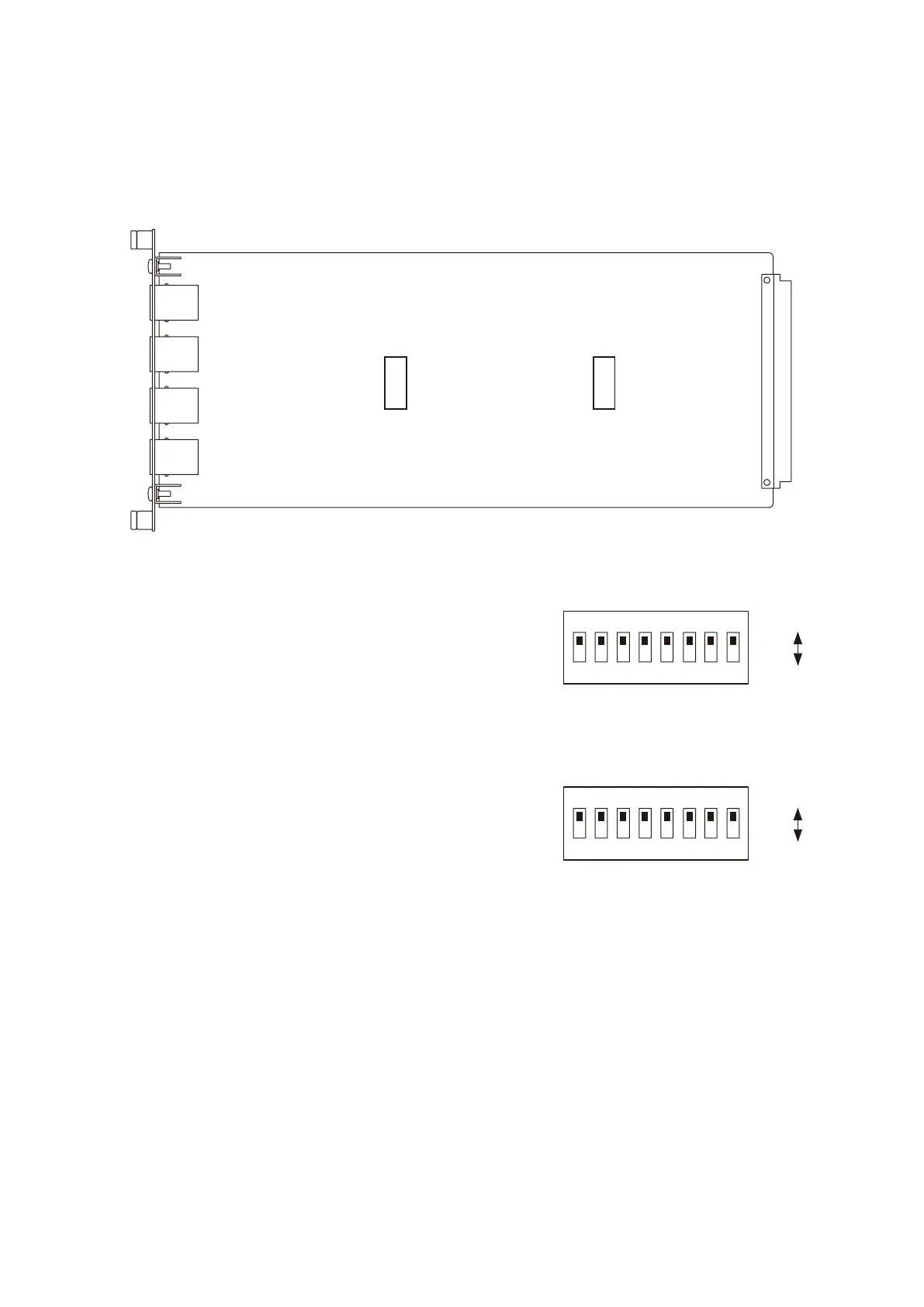
The logic ("make" or "break" signal activation) of the CTRL IN terminal can be changed by the DIP switch on
the VX-200SI circuit board.
SW100: Used to switch the logic of CTRL IN terminals 1 – 8.
Switches 1 – 8 correspond to CTRL IN terminals 1 – 8.
SW101: Used to switch the logic of CTRL IN terminals 9 – 16.
Switches 1 – 8 correspond to CTRL IN terminals 9 – 16.
• The logic can be individually changed for each of CTRL IN terminals 1 – 16. To change, set the switch
corresponding to the desired CTRL IN terminal to the M (Make) or B (Break) side.
• Allswitchesarefactory-presettotheM(Make)side.
[Logic change switch position]
VX-200SI
M
B
SW101
SW100
M
B
12
ON
345678
M (Make)
B (Break)
12
ON
345678
M (Make)
B (Break)



 To Next Page