Chapter 8: INSTALLATION AND SETTING PROCEDURES (HARDWARE)
2. VX-2000, VX-200XR, VX-200XI, AND EV-200
8-21
[VX-200XI]
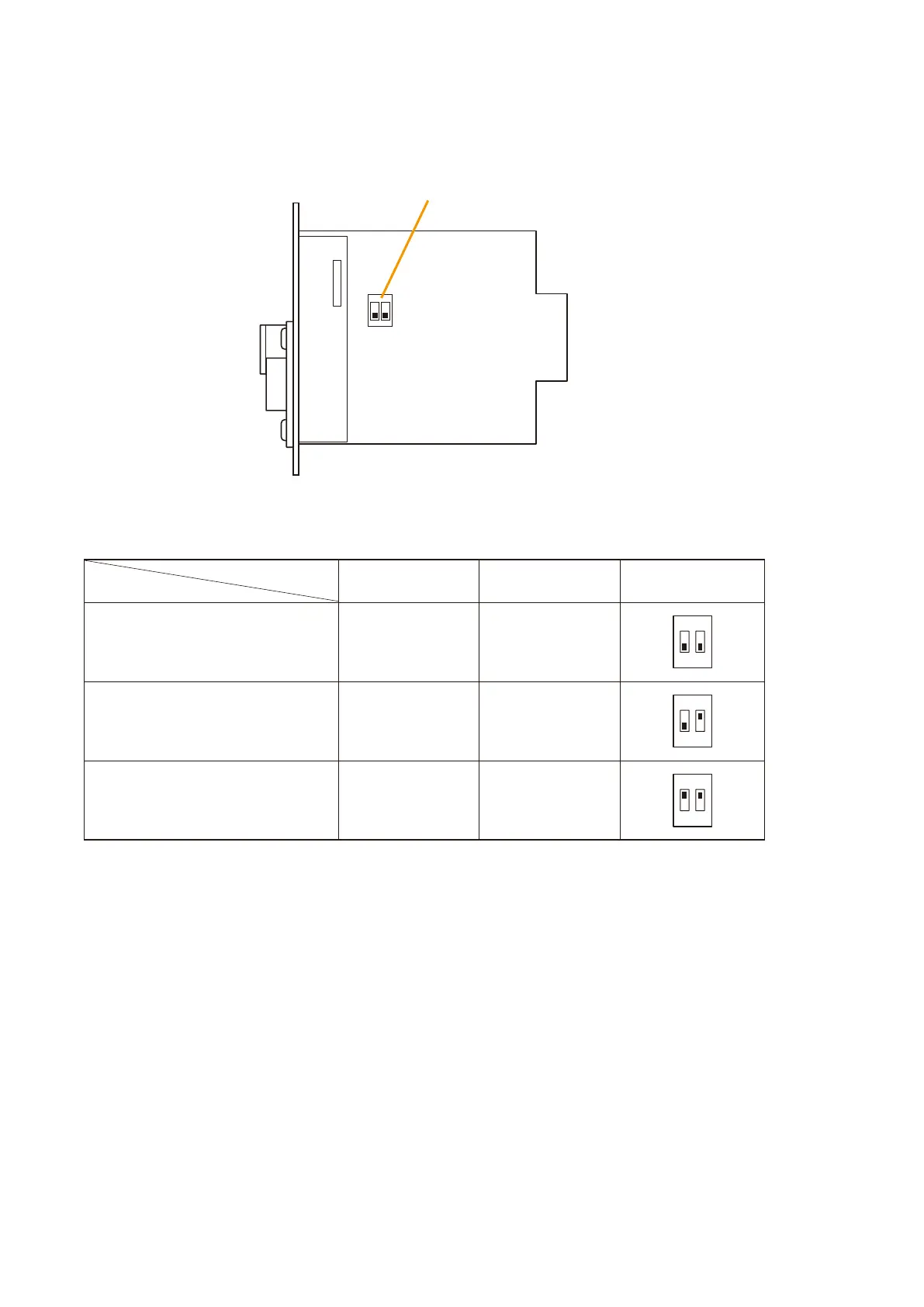
Setting DIP Switch
SW1
2.6. Setting the VX-200XI Audio Input Module DIP Switch
Input sensitivity (MIC: –70 dB* or LINE: –20 dB*) and phantom power ON/OFF settings can be performed using
the DIP switch on the VX-200XI circuit board.
[DIP Switch Setting]
Input sensitivity: LINE ( –20 dB*)
Phantom power: OFF
OFF OFF
* 0 dB = 1 V
Notes
•SetthephantompowertoOFFwhentheinputsensitivityissettoLINE.
•Inputsensitivityisfactory-presettoLINEandthephantompowerispresettoOFF.
Switch No.
Setting Item
1
Phantom Power
2
Input Sensitivity
Switch Position
12
ON
Input sensitivity: MIC (–70 dB*)
Phantom power: OFF
OFF ON
12
ON
Input sensitivity: MIC (–70 dB*)
Phantom power: ON
ON ON
12
ON



 To Next Page