Chapter 7: PC SOFTWARE OFFLINE SETTINGS
7. CONFIGURATION SETTING MODE
7-20
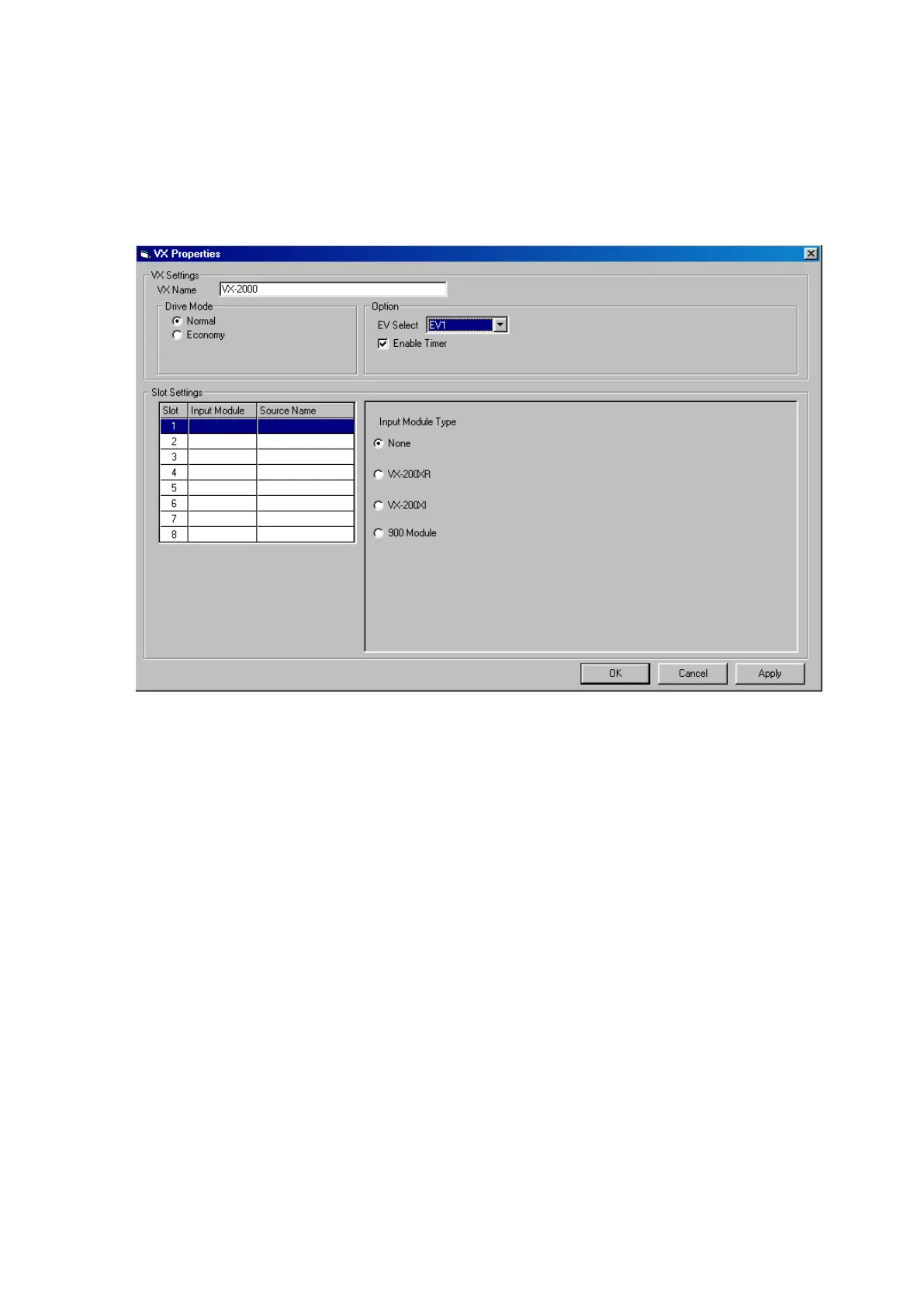
7.3. VX-2000 Properties Settings
Set the VX-2000's name, drive mode, the number of EV-200 units to be used, internal timer operation, and the
type of module(s) mounted.
Step 1. ClickontheVX-2000'snameindicatedbuttonor[Slot1–8]onthecongurationscreen.
The [VX Properties] window will open.
Step 2. Change the name of the VX-2000, if necessary.
Step 3. Select the drive mode.
•[Normal]: Normaloperationmode.
•[Economy]:Automaticallyswitchesoffthepowertotheamplifierwhennotinuse.
Step 4. Select the number of EV-200 units to be mounted in the VX-2000 from the Option EV Select pull-down
menu.
•[None]: Nounitmounted.
•[EV1]: 1unitmounted.
•[EV1&EV2]: 2unitsmounted.
Step 5. When using the internal timer, tick the [Enable Timer] checkbox.
Continued on next page



 To Next Page