Chapter 11: OTHER PC SOFTWARE FUNCTIONS
2. SYSTEM SETTING FILE UPLOAD
11- 5
2. SYSTEM SETTING FILE UPLOAD
Notes
• ThisfunctionappliestotheVX-2000SettingSoftwareVersion2.0orlater.
• Systemsettingfileuploadcannotbeperformedinemergencymode.
The VX-2000's system setting file in use can be uploaded and displayed on the connected PC.
Step 1. Select [Communications
Upload (PC VX)] from the menu.
The following message will be displayed:
"The file under setup is closed and a new file will be opened. Is communication started?"
Step 2. Click on the [OK] button.
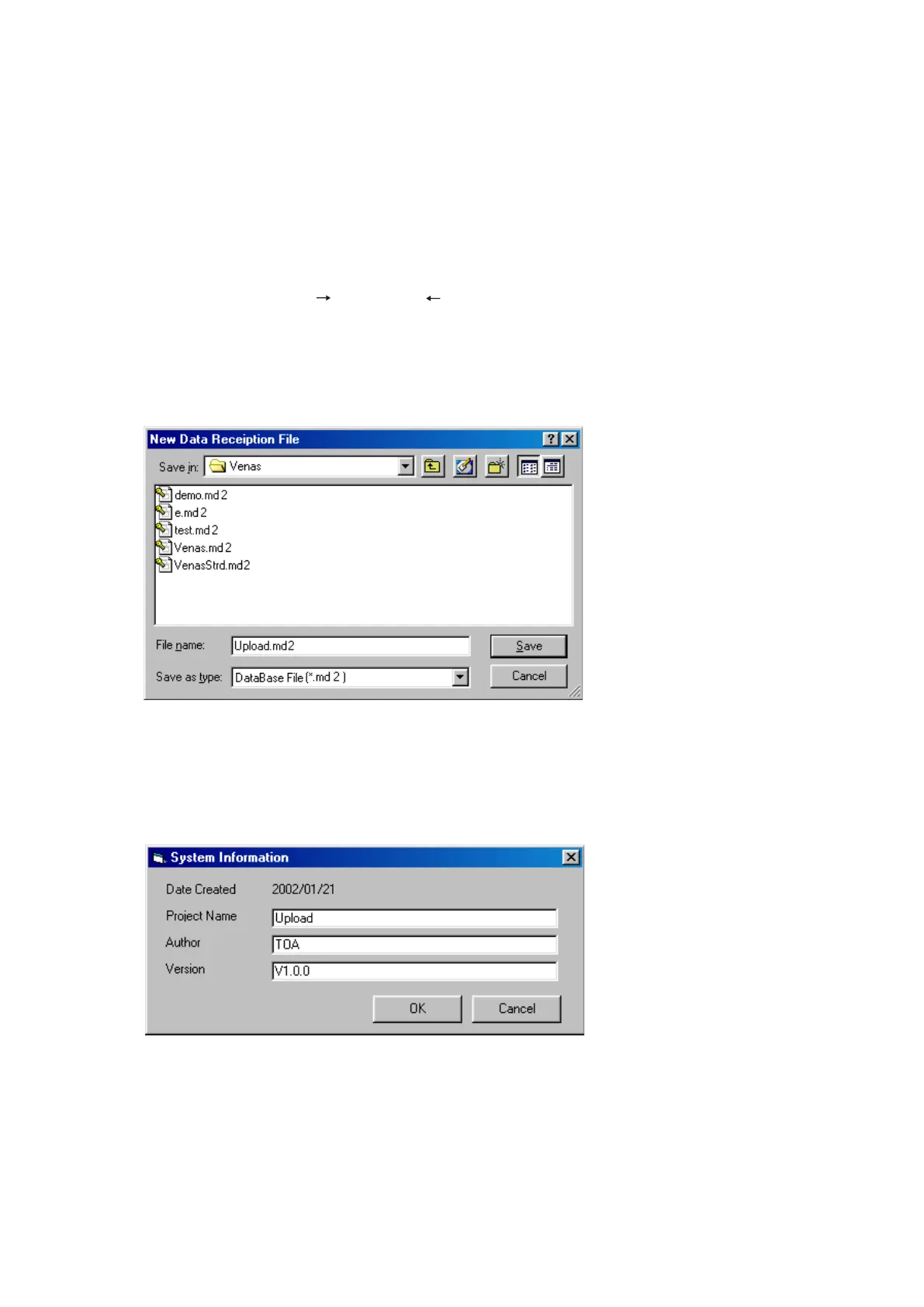
The [New Data Reception File] window will open.
Step 3. Select the location to save the file and its filename, then click on the [Save] button.
Note
Using the same filename as original one is invalid to protect the original data file from being overwritten.
The [System Information] window will then open.
Continued on next page
[Difference of file extension depending on the software version]
The setting file extension is "md2" for the VX-2000 Setting Software Version 2.1 or later.
The file extension "mdb" is used for the file created by the Version 2.0, but it is converted to "md2" when saved
to a PC.
So use the file with this extension "md2" thereafter.



 To Next Page