Chapter 8: INSTALLATION AND SETTING PROCEDURES (HARDWARE)
4. VP-2064, VP-2122, VP-2241 AND VP-2421 POWER AMPLIFIERS
8-34
4. VP-2064, VP-2122, VP-2241 AND VP-2421 POWER AMPLIFIERS
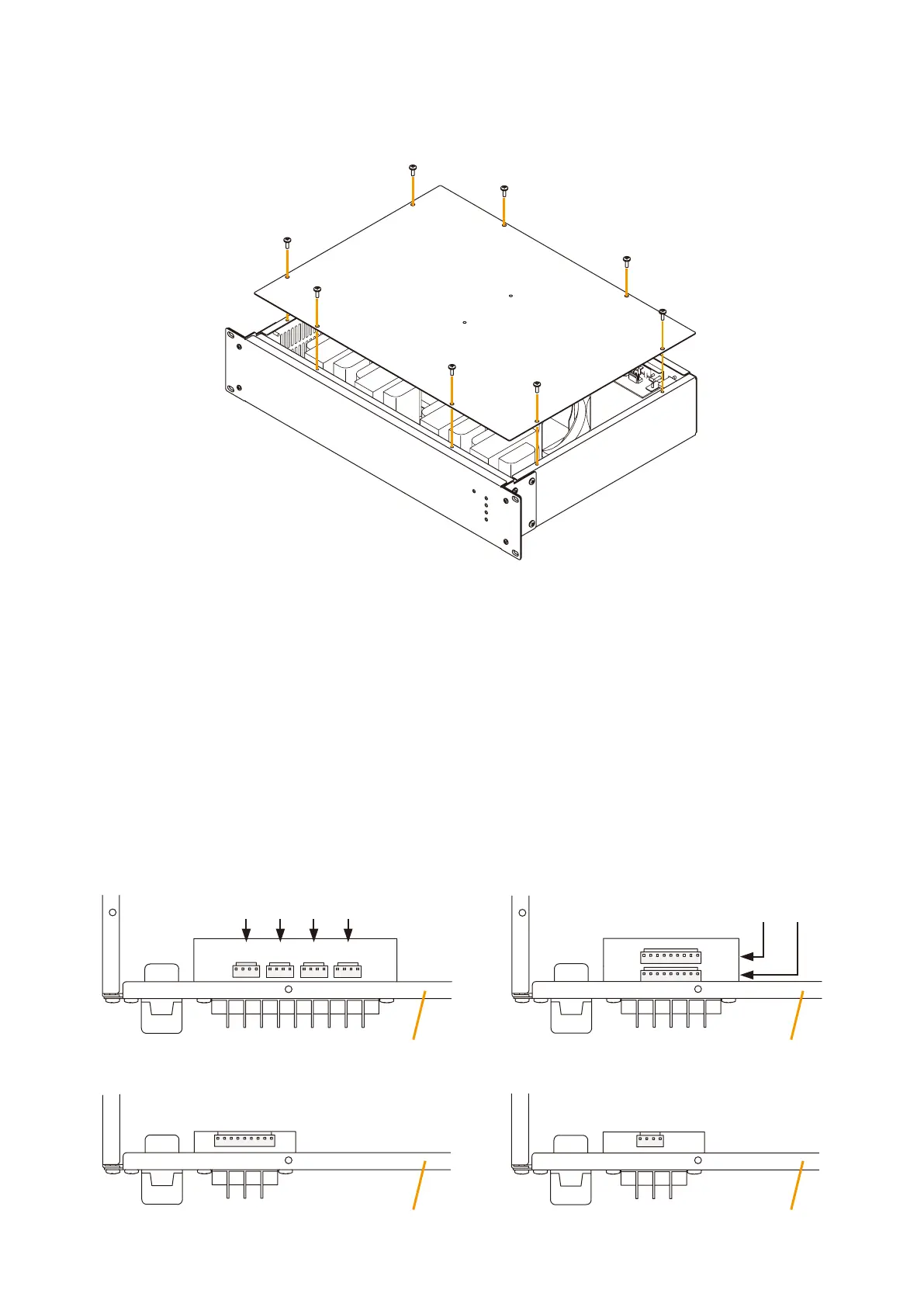
4.1. Removing the VP Power Amplifier's Top Panel
4.2. Changing the Speaker Line Voltage
The speaker line voltage of the VP-2064, VP-2122, VP-2241 and VP-2421 is factory-preset to 100 V, however
this can be changed to 50 V or 70 V by following the procedures below.
Note
The speaker line failure detection functions are designed to perform on a 100-volt line of speaker. For the
methods using a 70- or 50-volt line, please consult your TOA dealer.
Step 1. Removethetoppanelreferringtotheabovegure.
Step 2. Remove the connectors.
[VP-2064 Connector position]
[VP-2241 Connector position] [VP-2421 Connector position]
[VP-2122 Connector position]
CN102
CN102
CN202
CN102
CN102
CH1CH2CH3CH4
CN202CN302
CN402
Rear panel
Rear panel
Rear panel
Rear panel
CH2
CH1



 To Next Page