Chapter 9: CONNECTIONS
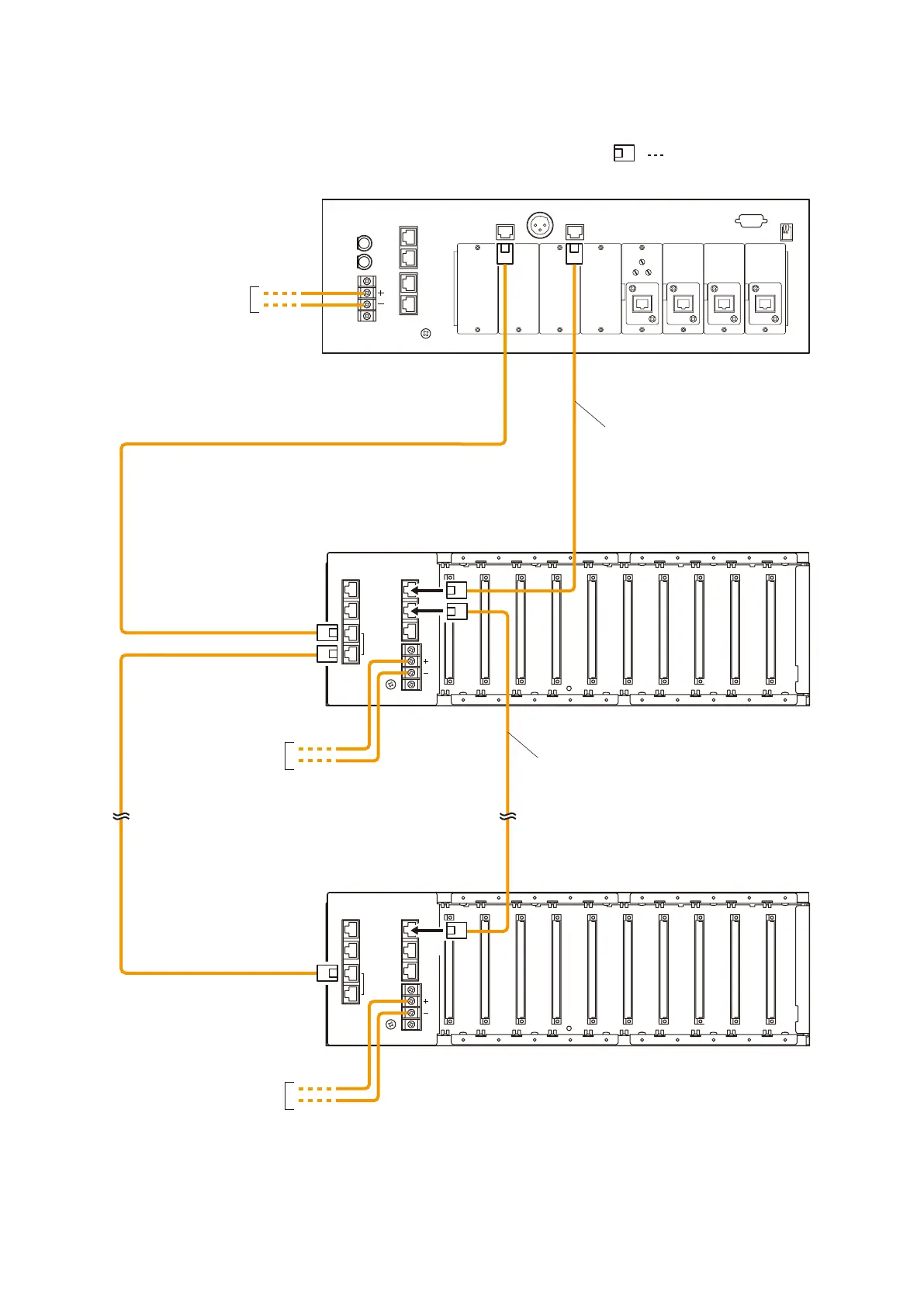
2. CONNECTIONS BETWEEN VX-2000 AND VX-2000SF
9-3
2. CONNECTIONS BETWEEN VX-2000 AND VX-2000SF
IN
OUT
AUDIO
LINK
DC POWER IN
DATA
LINK
IN
OUT
AUDIO
LINK
DC POWER IN
DATA
LINK
DATA LINK
DC POWER IN
AUDIO LINK
OUT
Cat. 5 STP
Cat. 5 STP
[VX-2000 Rear]
[VX-2000SF No. 1 Rear]
[VX-2000SF No. 5 Rear]
RJ45 male connector
Cat. 5 STP
Cat. 5 STP
From VX-2000DS'
or VX-3000DS'
DC POWER OUT
From VX-2000DS'
or VX-3000DS'
DC POWER OUT
From VX-2000DS'
or VX-3000DS'
DC POWER OUT
Note
Turn ON the terminator of the VX-2000SF connected last using the unit's front-mounted setting DIP switch.
When a single VX-2000SF unit is connected, switch its terminator ON.
For setting the terminator, refer to p. 8-26.



 To Next Page