Chapter 10: PC ONLINE CHECKS AND ADJUSTMENTS
3. SYSTEM CHECK FUNCTIONS
10 -11
3.2.1. Using the PC software initial impedance settings
Follow the steps in the procedure below to set the VX-200SZ's initial impedance value.
Step 1. Select [System
Initial Impedance Settings] from the menu.
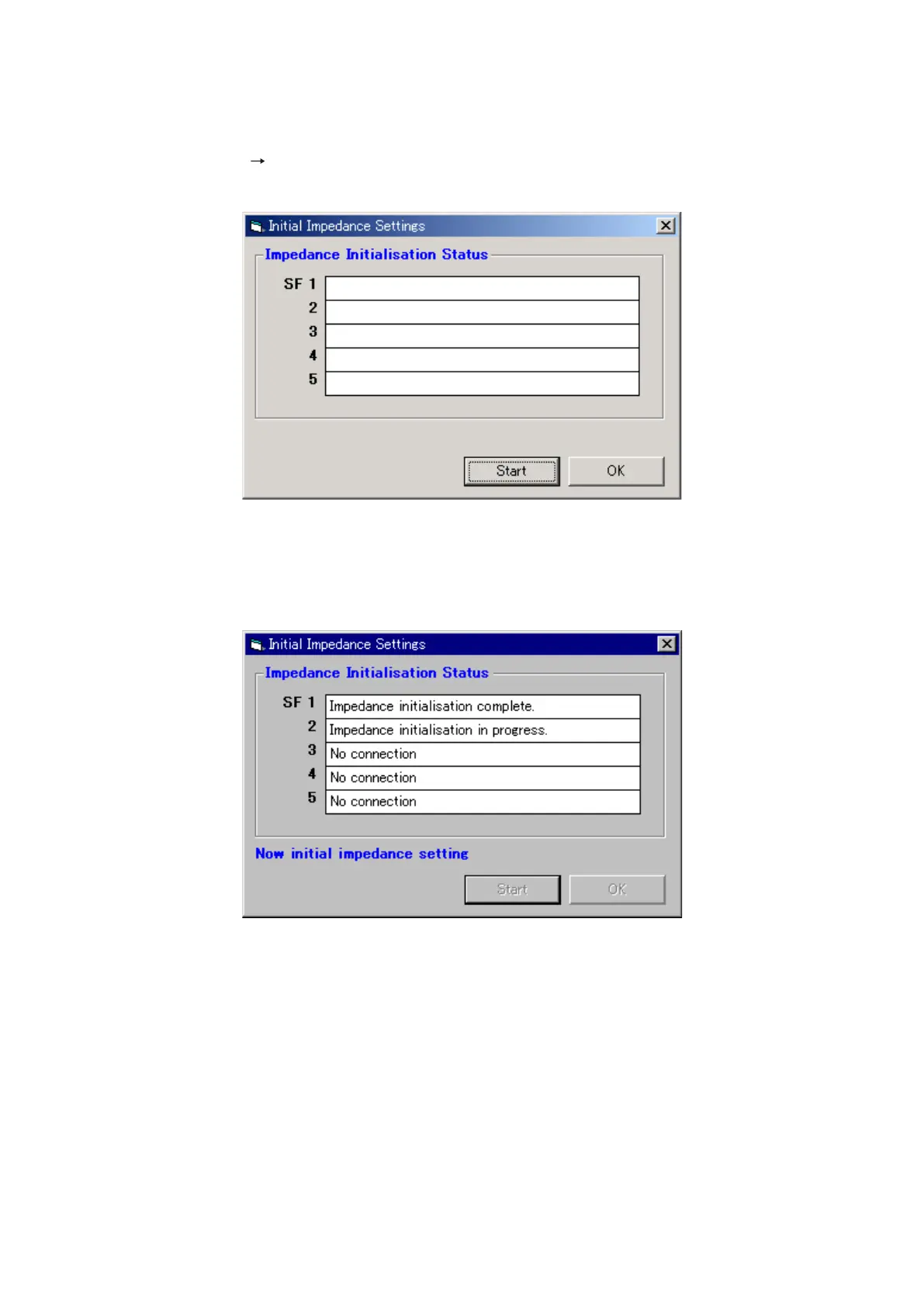
The [Initial Impedance Settings] window will open.
Step 2. Click on the [Start] button.
Initial impedance value setting will be performed for all VX-200SZ modules in the system. When the
VX-2000SF is not used in the system or when a VX-200SZ is not mounted in the frame, the "No
connection" indication will be displayed on the Impedance Initialisation Status screen.
Step 3. Terminate the Initial Impedance Settings.
A dialog box with the message "Initial impedance settings was completed." will be displayed after
completion of the initial impedance value setting.
Click on the [OK] button in the [Initial Impedance Settings] window to terminate the setting.
Note
If the indication "Impedance initialisation failed." is displayed on the [Impedance Initialisation Status] screen,
there may be a faulty connection in the system. In such cases, find and correct the faulty connection and then
re-perform the initialisation.



 To Next Page