Chapter 7: PC SOFTWARE OFFLINE SETTINGS
8. SYSTEM SETTING MODE
7-37
8.3. Equaliser Settings
Set the VS-200SE Equaliser Card to be mounted in the VX-200SP or VX-200SZ Failure Detection module.
Step 1. Click on the [EQ] button on the Configuration screen.
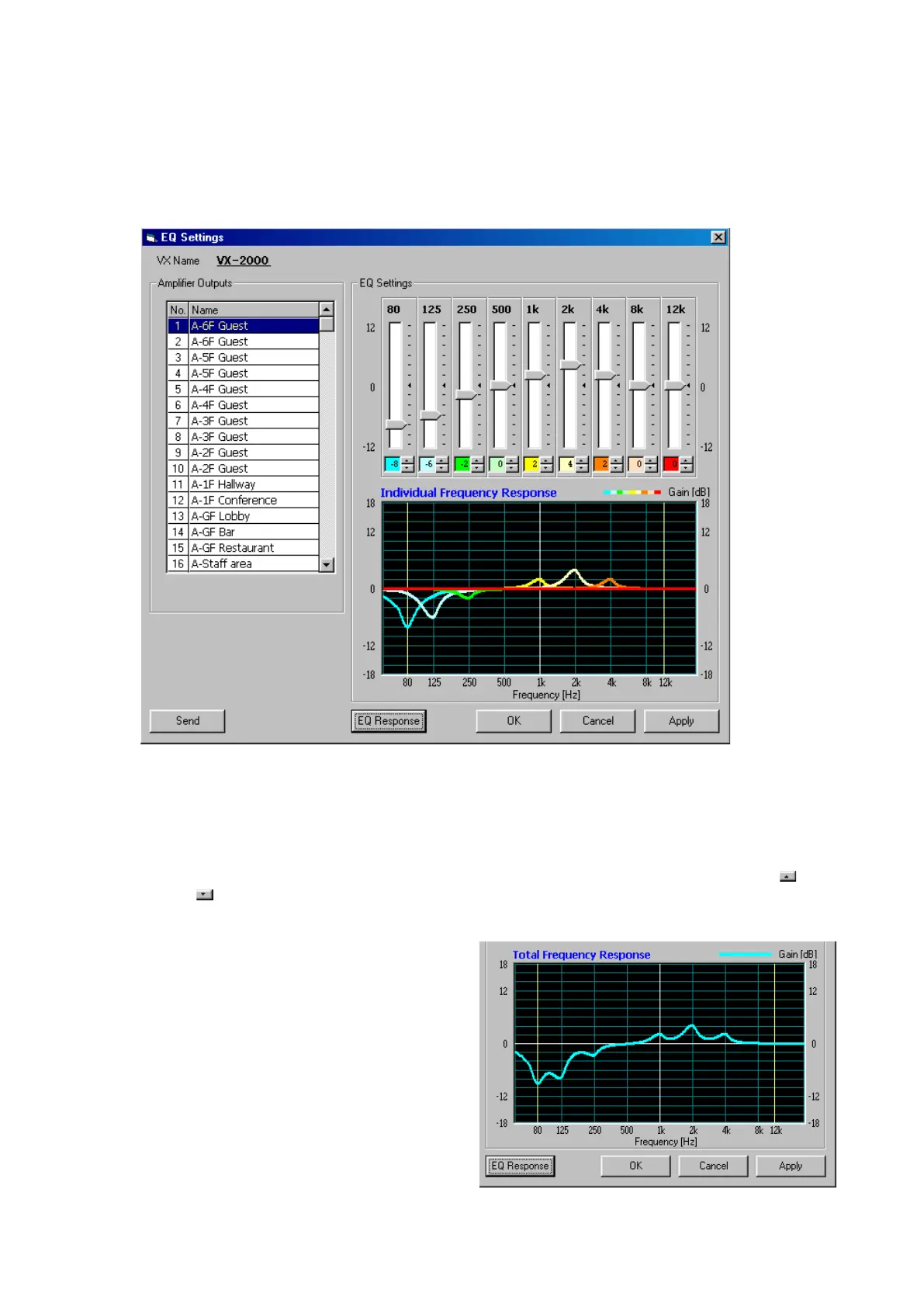
The [EQ Settings] window will be displayed. The output zones for which equalisation was set in the [SF
Properties] window will be displayed on the left side of the window.
Step 2. Clickonthenameoftheamplieroutputforwhichtheequalisationistobeset,highlightingtheentire
selected.
Step 3. Set the equaliser.
Drag the volume control knob with the mouse to set the gain for each centre frequency. The gain can
be changed within the variable range of ±12 dB in 2 dB step by either clicking on the Up (
) and
Down (
) buttons located next to the value or directly entering the numerical value.
In the figure, uncombined input and output
characteristics are shown on the graph.
Combined input and output characteristics
can also be displayed with the [EQ
Response] button.
The display alternates between these 2
modes as the [EQ Response] button is
clicked.
Continued on next page



 To Next Page