Chapter 10: PC ONLINE CHECKS AND ADJUSTMENTS
4. VOLUME AND EQUALISER SETTINGS
10-15
4. VOLUME AND EQUALISER SETTINGS
When connected online, initial volume and equaliser settings can be varied using the PC software's "Send"
function. This makes it possible to output sound and set the volume and equaliser to adequate initial levels
during system installation.
Note
The volume level and equaliser characteristics initially set using the software's "Send" function are reset when
the system power is turned off. They return to the settings in the system setting file that was downloaded from
a PC to the VX-2000 when the system power is turned on again.
After initial setting completion, download the changed system setting file to the VX-2000.
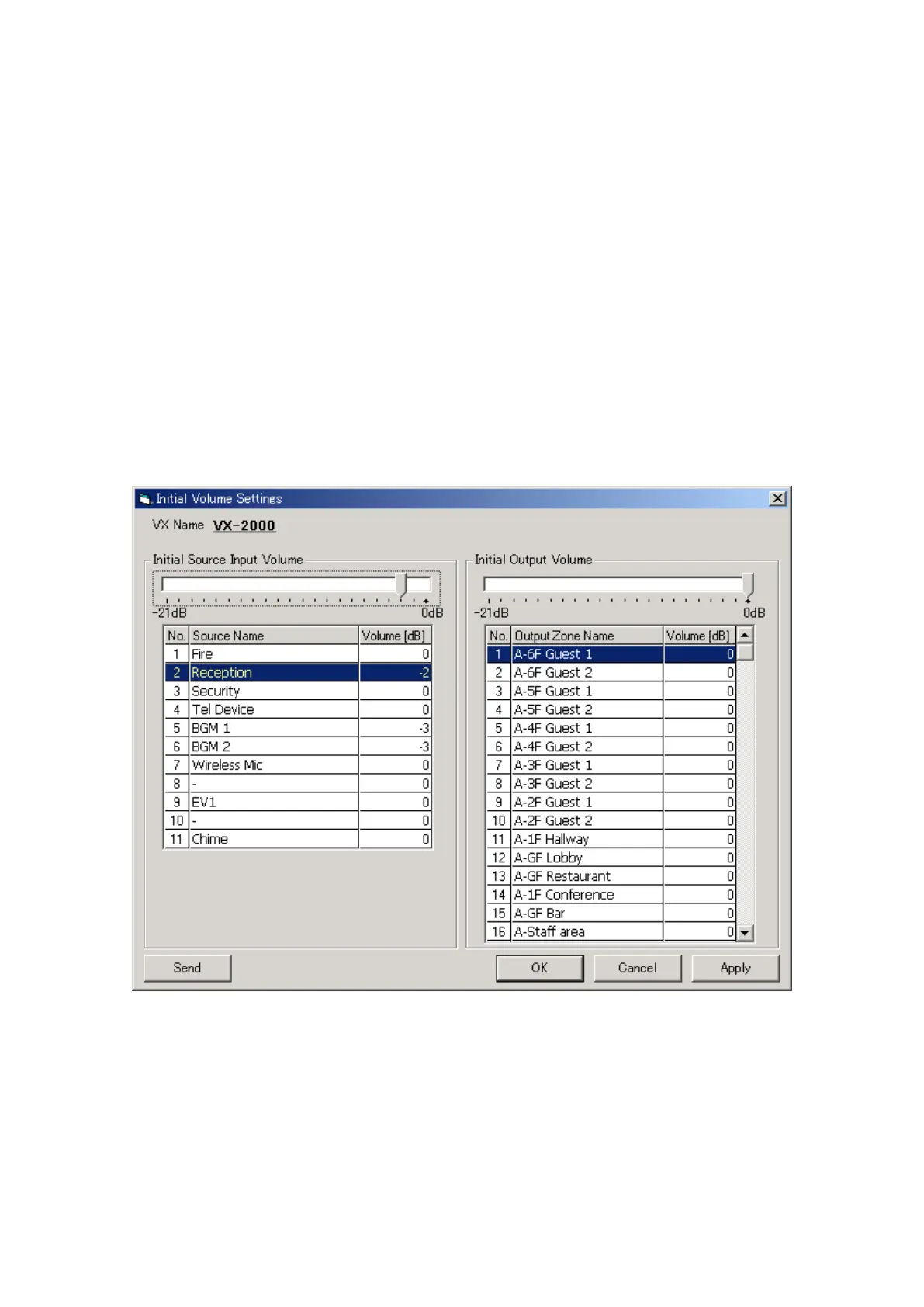
4.1. Initial Volume Settings
Step 1. Click on the [Initial Volume] button on the Configuration screen.
The [Initial Volume Settings] window will be displayed.
Step 2. Click on the name of the component for which the initial volume is to be set.
The sound volume can be set for 0 to –21 dB in 1 dB step.
This setting can also be performed by directly entering a numerical value in the volume cell.
Step 3. Click on the [Send] button and transmit the set value to the VX-2000.



 To Next Page