Chapter 10: PC ONLINE CHECKS AND ADJUSTMENTS
2. SYSTEM SETTING FILE DOWNLOAD
10-5
2.3. General Settings
Select [System
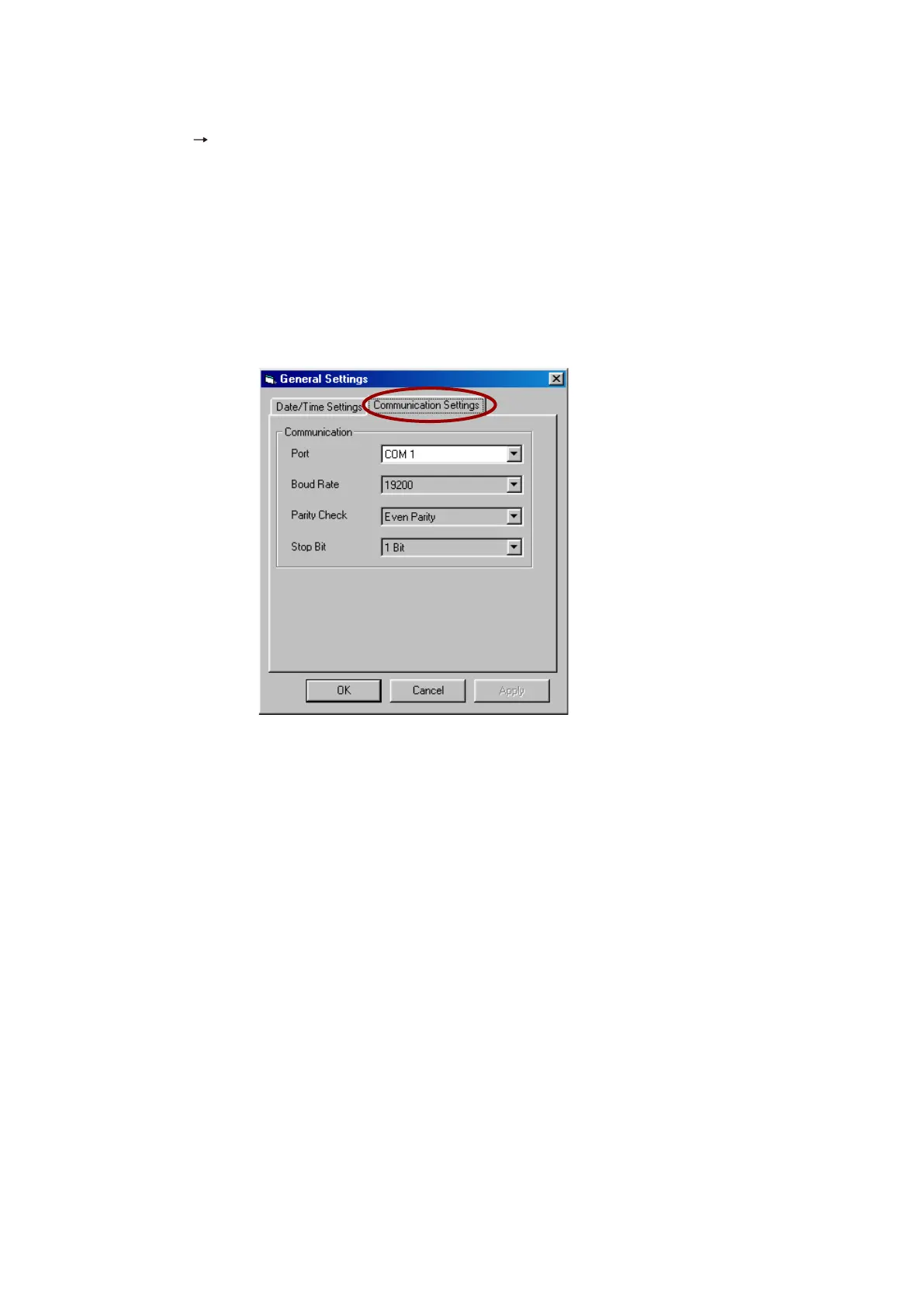
General Settings] from the menu to open the [General Settings] window.
Set the time and date for the VX-2000's internal timer, and select the PC COM port. The COM port is set to
COM 1 by default. If the COM port setting needs to be changed, see the next section "2.3.1. Communication
Port Settings." If it does not need to be changed, refer to p. 10-6 "2.3.2. Current Date/Time Settings."
2.3.1. Communication Port Settings
When communication port setting is required, click on the [Communication Settings] tab and perform the
required settings. The port is set to COM 1 by default. If this needs to be changed, select from COM 2 to COM
9 and set.
Step 1. Set the COM port.
Selet the port from COM 1 to COM 9 in accordance with the communication port of the PC being used
to control the VX-2000.
Step 2. Click on the [Apply] button to save the settings.
Step 3. Click on the [Date/Time Settings] tab.
Return to the [Date/Time Settings] window to perform the settings.



 To Next Page