Chapter 10: PC ONLINE CHECKS AND ADJUSTMENTS
4. VOLUME AND EQUALISER SETTINGS
10-16
4.2. Equaliser Settings
Step 1. Click on the [EQ] button on the Configuration screen.
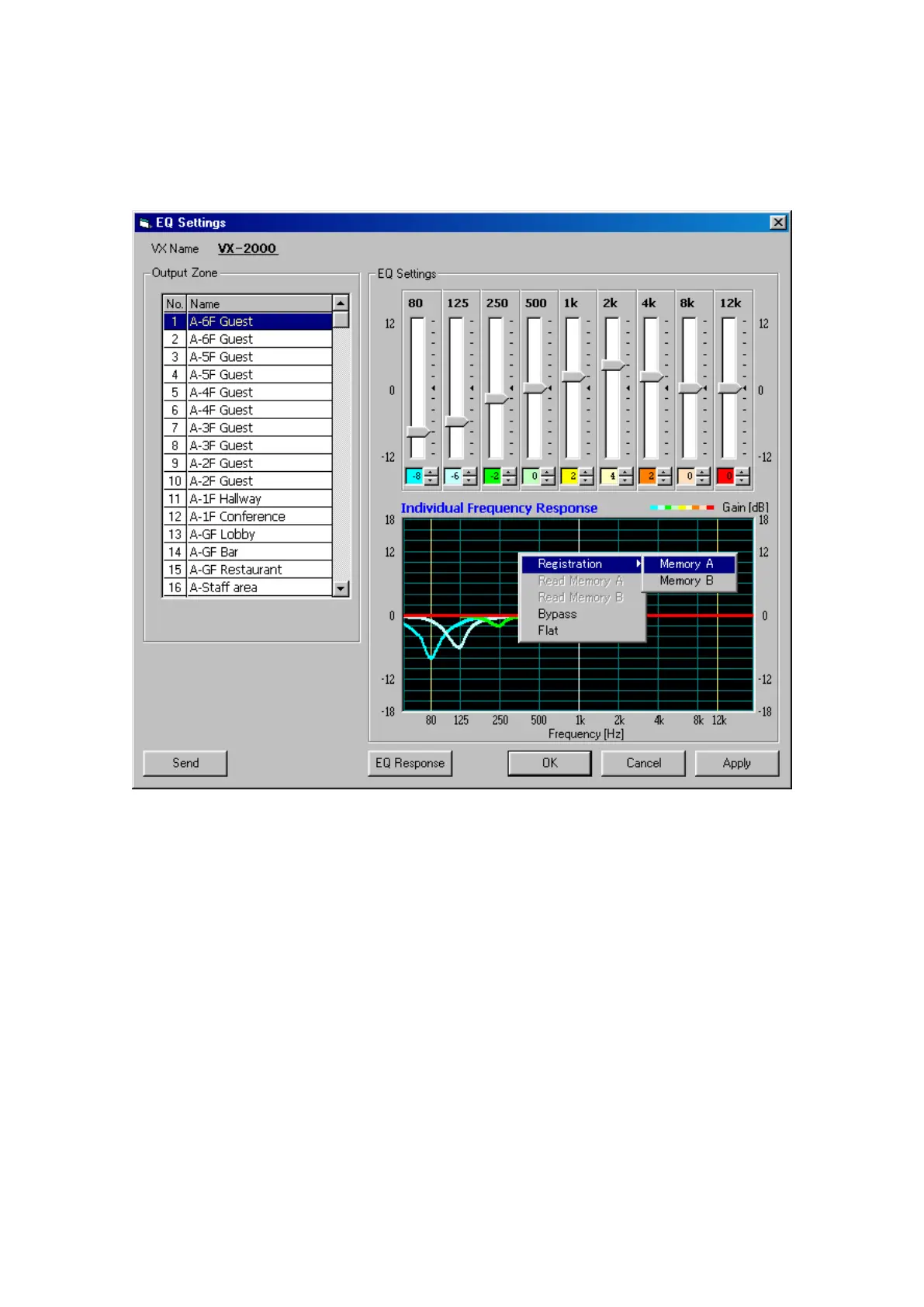
The [EQ Settings] window will be displayed.
Step 2. Click on the name of the Output Zone for which the equalisation is to be set, and set the equaliser.
The gain can be changed within ±12 dB in 2 dB step.
Step 3. Click on the [Send] button and transmit the set value to the VX-2000.
Note
The EQ settings also have a memory function with 2 storage settings: A and B. Optimum settings can be
achieved by recalling Memory A or B and comparing its sound with the current settings.
The floating menu shown superimposed over the frequency characteristics chart in the figure below is displayed
when the right mouse button is clicked on the chart.
· Registration (Memory A, Memory B): Stores settings in either Memory A or B.
· Read Memory A: Recalls settings from Memory A.
· Read Memory B: Recalls settings from Memory B.
· Bypass: Bypasses the equaliser.
· Flat: Returns the equaliser settings to flat characteristics.



 To Next Page