Chapter 10: PC ONLINE CHECKS AND ADJUSTMENTS
3. SYSTEM CHECK FUNCTIONS
10-9
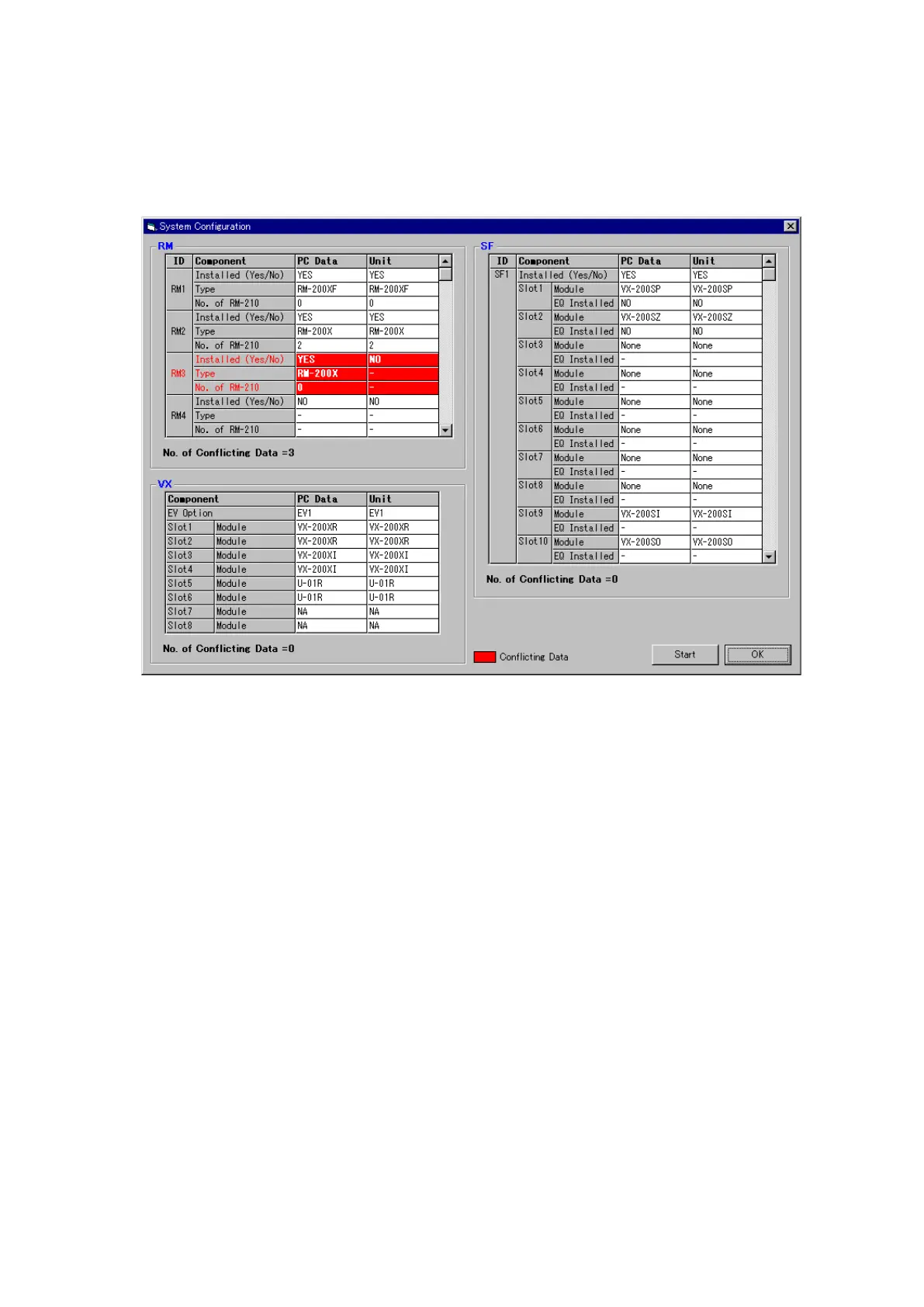
Step 4. Should conflicting data be detected, either correct the system setting file and download the new settings
to the VX-2000 or match the actual component configuration to the system setting file.
When any system setting file is changed, the revised data must be downloaded to the VX-2000 again
in order to be valid. Press the [Start] button again and perform equipment configuration checks until the
"Conflicting Data" indication disappears.
Step 5. After confirming that the system setting file match the actual configuration, click on the [OK] button and
close the [System Configuration] window.
Step 3. Compare with actual equipment configurations.
After configuration check completion, the dialog box "Configuration check was completed." will be
displayed. Press the [OK] button to close the dialog box.
The connected equipment is displayed in the "Unit" column. Data that differs in configuration between
the system setting file and actual configuration are displayed in red (Conflicting Data).



 To Next Page