CDM-625 Advanced Satellite Modem Revision 13
Ethernet-based Remote Product Management MN-CDM625
6–41
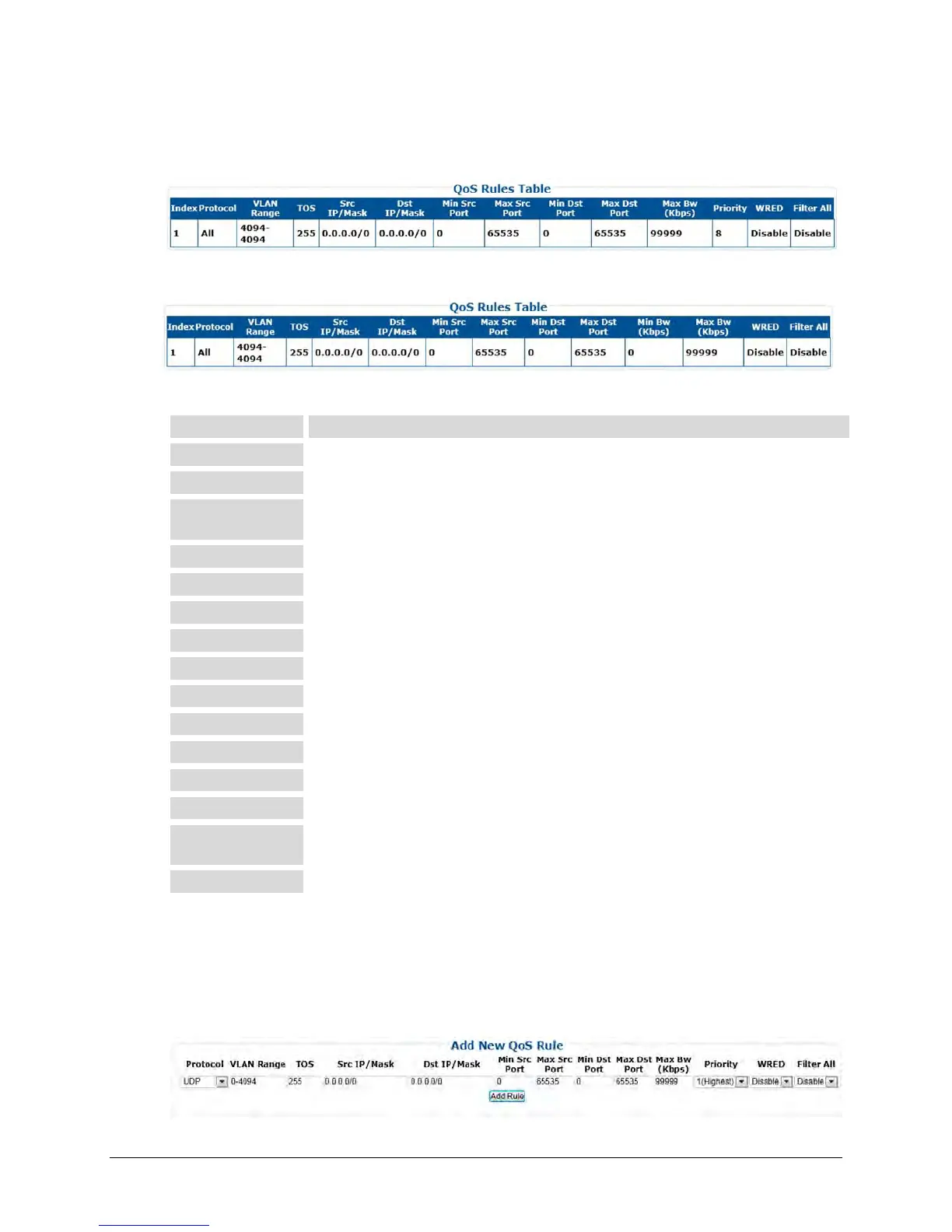
QoS Rules Table
For the ‘Max/Priority’ page:
For the ‘Min/Max’ page:
This section displays all existing QoS Rules Table entries. From left to right:
This is the internal table index that is automatically assigned and cannot be edited.
Specifies the protocol for the specific rule.
Specifies the minimum-to-maximum range of VLAN IDs (applicable only in Managed Switch
Mode)
Specifies the Type Of Service
Identifies the Source IP Address/Mask in the form XXX.XXX.XXX.XXX/YY.
Identifies the Destination IP Address/Mask in the form XXX.XXX.XXX.XXX/YY.
Specifies the Minimum Source Port.
Specifies the Maximum Source Port.
Specifies the Minimum Destination Port.
Specifies the Maximum Destination Port.
(“Min/Max” page only) Specifies the minimum bandwidth value.
Specifies the maximum bandwidth value.
(“Max/Priority” page only) Specifies the priority established for the specific rule.
Specifies the WRED (Weighted Random Early Detection) setting for the specific rule as
Disable or Enable.
Specifies the flow filter setting for the specific rule as Disable or Enable.
Add New QoS Rule
This section allows you to directly add a new rule entry. Note that the index will automatically
increment to the next available number.
For the “Max/Priority” page:



 To Next Page