CDM-625 Advanced Satellite Modem Revision 13
Appendix E MN-CDM625
E–29
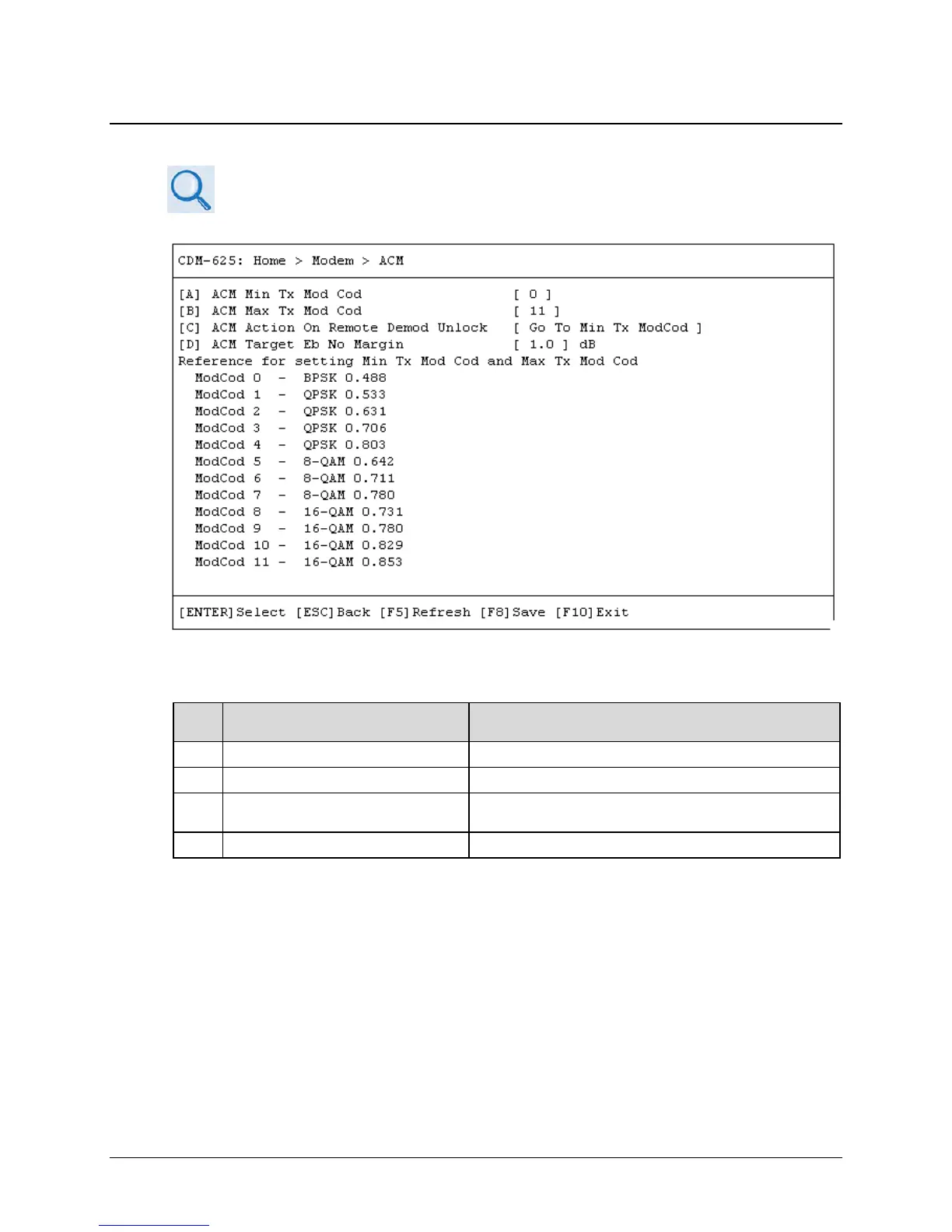
E.3.3.5 Home > Modem > Adaptive Coding and Modulation (ACM)
Chapter 17. ADAPTIVE CODING AND MODULATION (ACM) OPTION
Open the ACM page from the Modem submenu. Use this page as a quick reference guide for the
Minimum and Maximum Tx ModCod settings. This submenu contains the following options:
Dialog Window Option Entry
A ACM Min Tx Mod Cod Enter a minimum value from 0 to 11
ACM Max Tx Mod Cod Enter a maximum value from
to
C ACM Action on Remote Demod Unlock
Use the ↑↓ arrow keys to select Go To Min Tx Modcod or
Maintain Tx Modcod
Enter a value from 0.0 to 4.5 dB
Press a hot key to open a dialog window. Otherwise, press [ESC] to return to the Modem
submenu.



 To Next Page