CDM-625 Advanced Satellite Modem Revision 13
Ethernet-based Remote Product Management MN-CDM625
6–63
6.5.4.4.2.2 Status | Modem Logs | Packet Processor
This nested page is accessible only to Admin users and when the optional IP Packet
Processor card is installed and enabled. See Sect. 6.5.3.1 for complete details about
using conditional access pages.
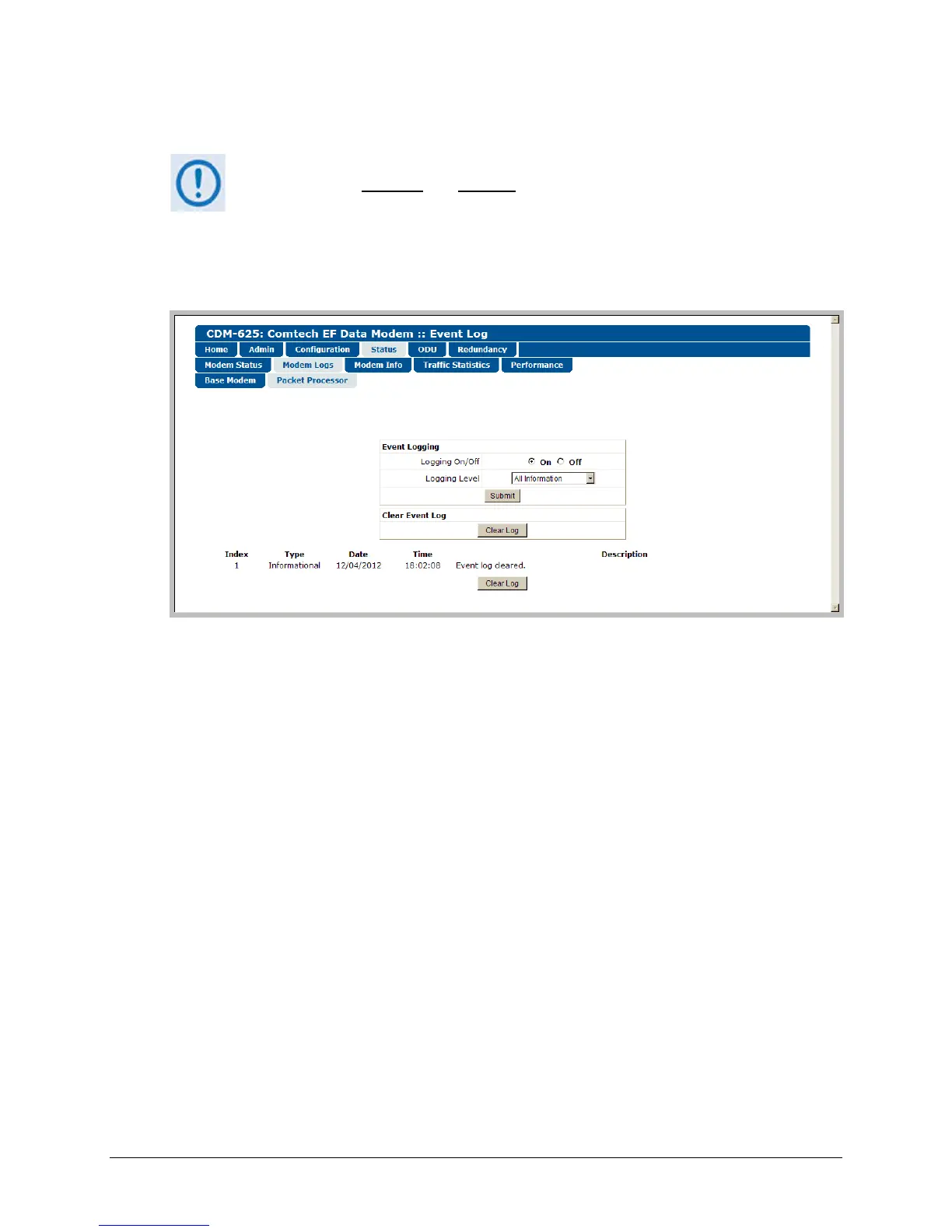
This page provides you with a scrollable window showing the optional IP Packet Processor’s
cumulative events, plus control over what information is displayed for IP Packet Processor
operations.
Figure 6-35. Status | Modem Logs | Packet Processor page
Event Logging
The Event Log can display a maximum of 256 events. Each event is assigned a sequential Index
number; its type, the date and time of occurrence, and a description of the event follows.
• Logging On/Off – Select event logging as On or Off.
• Logging Level – Use the drop-down list to select the type of information displayed in the log:
Errors Only, Errors and Warnings, or All Information.
Click [Submit] once the desired settings have been entered in this section.
Clear Event Log
Scroll through the Event Log as needed, and then click [Clear Log] to wipe the log clean. The
table will reset to a single event description – “Event log cleared.”



 To Next Page