CDM-625 Advanced Satellite Modem Revision 13
Ethernet-based Remote Product Management MN-CDM625
6–58
6.5.4.3.11.2 Configuration | ANT | SNTP (Simple Network Timing Protocol)
Sect.
16.7.1 Simple Network Timing Protocol (SNTP) (Chapter 16. ETHERNET
NETWORK MANAGEMENT)
Simple Network Time Protocol (SNTP) is used to synchronize computer clocks throughout a
computer network when the ultimate performance of the full NTP implementation as per
RFC-1305 (Requests for Comment No. 1305: Network Time Protocol, Version 3, Specification,
Implementation and Analysis) is not needed or justified.
F
i
g
u
r
e
6
-
3
1
.
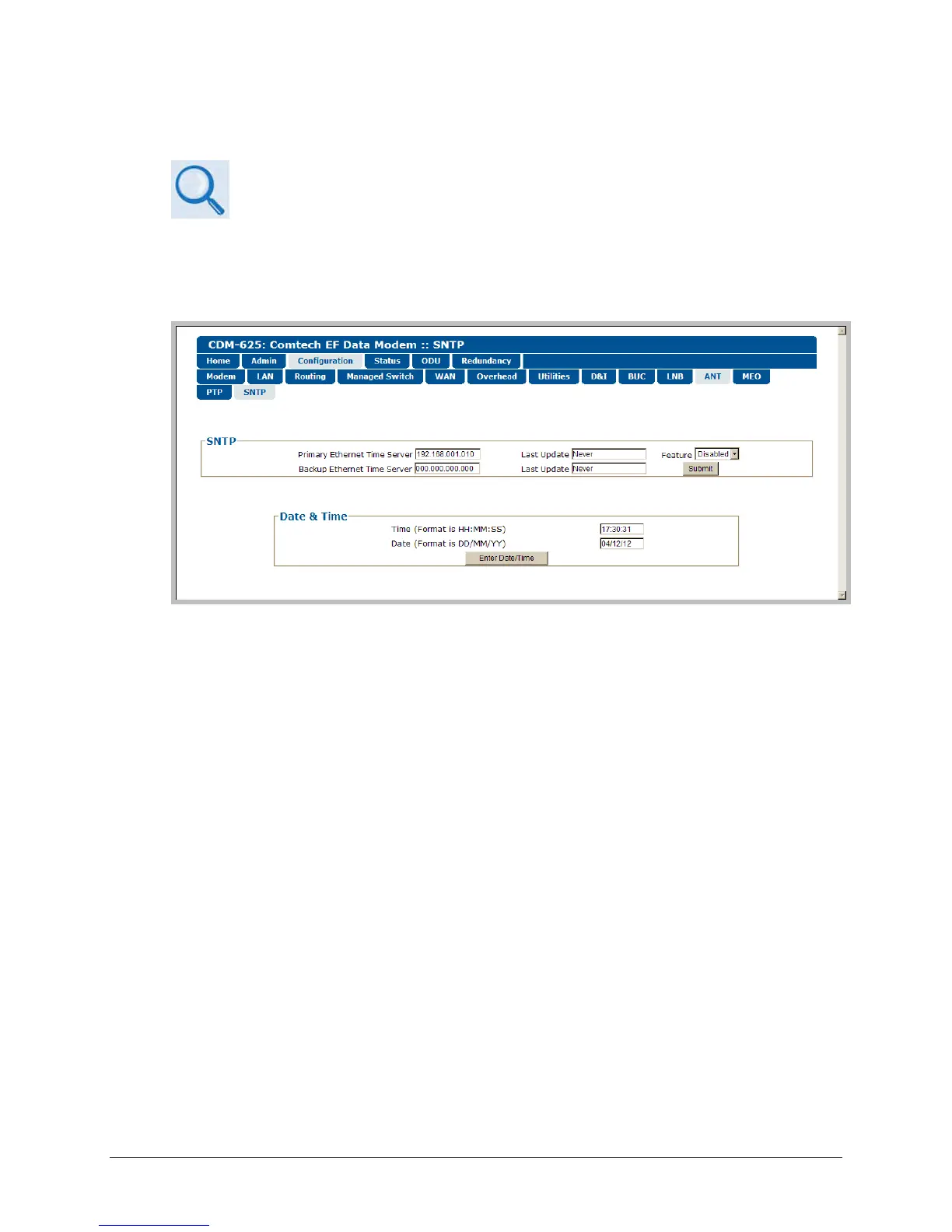
Configuration | ANT | SNTP page
SNTP
• Primary / Backup Ethernet Time Server – Enter the desired Time Server’s IP Address in the
form XXX.XXX.XXX.XXX.
• Last Update – This read-only field displays the time and date that the selected server was
last updated. The time in shown military format (HH:MM:SS); the date is shown in DAY-
MONTH-YEAR format in accordance with European convention. This line specifies “Never” if
no update information exists.
• Feature – Use the drop-down list to select SNTP as Disabled or Enabled.
Click [Submit] to save these settings.
Date and Time
• Enter a time using HH:MM:SS format
(where HH = hour [00 to 23], MM = minutes [00 to 59], and SS = seconds [00 to 59]).
• Enter a date using DD/MM/YY format
(where DD = day [01 to 31], MM = month [01 to 12], and YY = year [00 to 99]).
Click [Enter Date/Time] once you set the desired date and time.



 To Next Page