CDM-625 Advanced Satellite Modem Revision 13
Appendix E MN-CDM625
E–10
E.3 Command Line Interface Pages
E.3.1 Home (Main) Menu
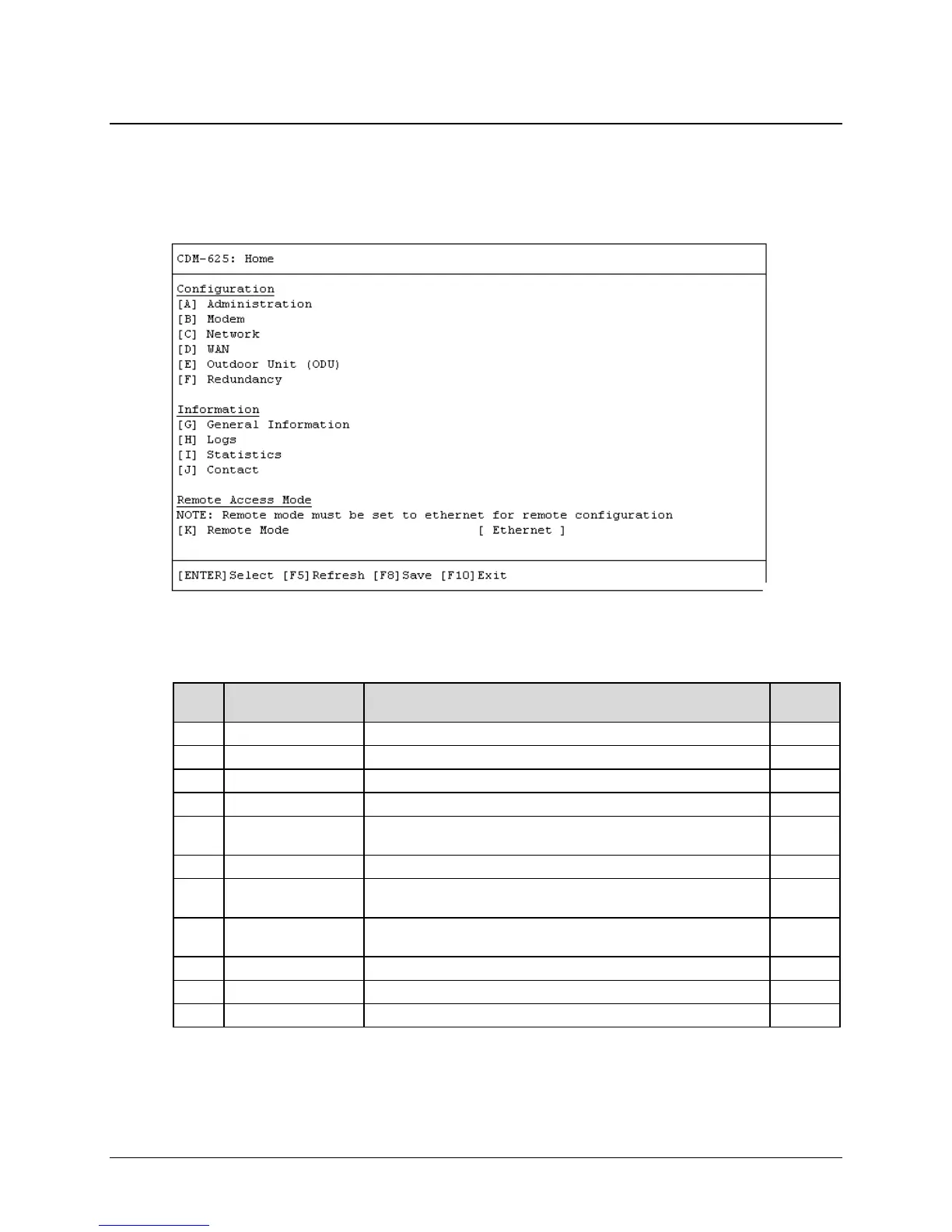
The Home Menu serves as the CLI’s primary navigation page. All selections made on this page
take you to the submenus listed in this table. Press a hot key to access a submenu from this top-
level navigation page.
Key
Description Function Sect.
Access administrative configuration submenu
Access modem configuration submenu
Access network configuration submenu
Access WAN configuration submenu
E Outdoor Unit (ODU)
Access ODU comms, CSAT-5060 configuration submenus (summary
only)
Access 1:1 or 1:N redundancy configuration submenu
G General Information
Enter alphanumeric Circuit ID; view read-only CDM-625 operations
information screens
H Logs
Access Base Modem and Packet Processor stored events and
statistics logs, alarms control submenus
Access CDM-625 operational statistics submenus
View read-only Customer Support contact information screen
Open the Remote Access Mode setting
See the listed appendix section for further information. Once you have confirmed that the
Telnet CLI’s Remote Access Mode is set to [Ethernet], press a hot key to access a configuration
submenu.



 To Next Page