CDM-625 Advanced Satellite Modem Revision 13
Ethernet-based Remote Product Management MN-CDM625
6–31
6.5.4.3.3 Configuration | Routing Pages
The nested Routes, IGMP, and DHCP pages are accessible only to Admin users and
when the optional IP Packet Processor card is installed
and enabled. See Sect.
6.5.3.1 for complete details about using conditional access pages.
Click the Routes, IGMP, DHCP, or DNS tab to continue.
6.5.4.3.3.1 Configuration | Routing | Routes
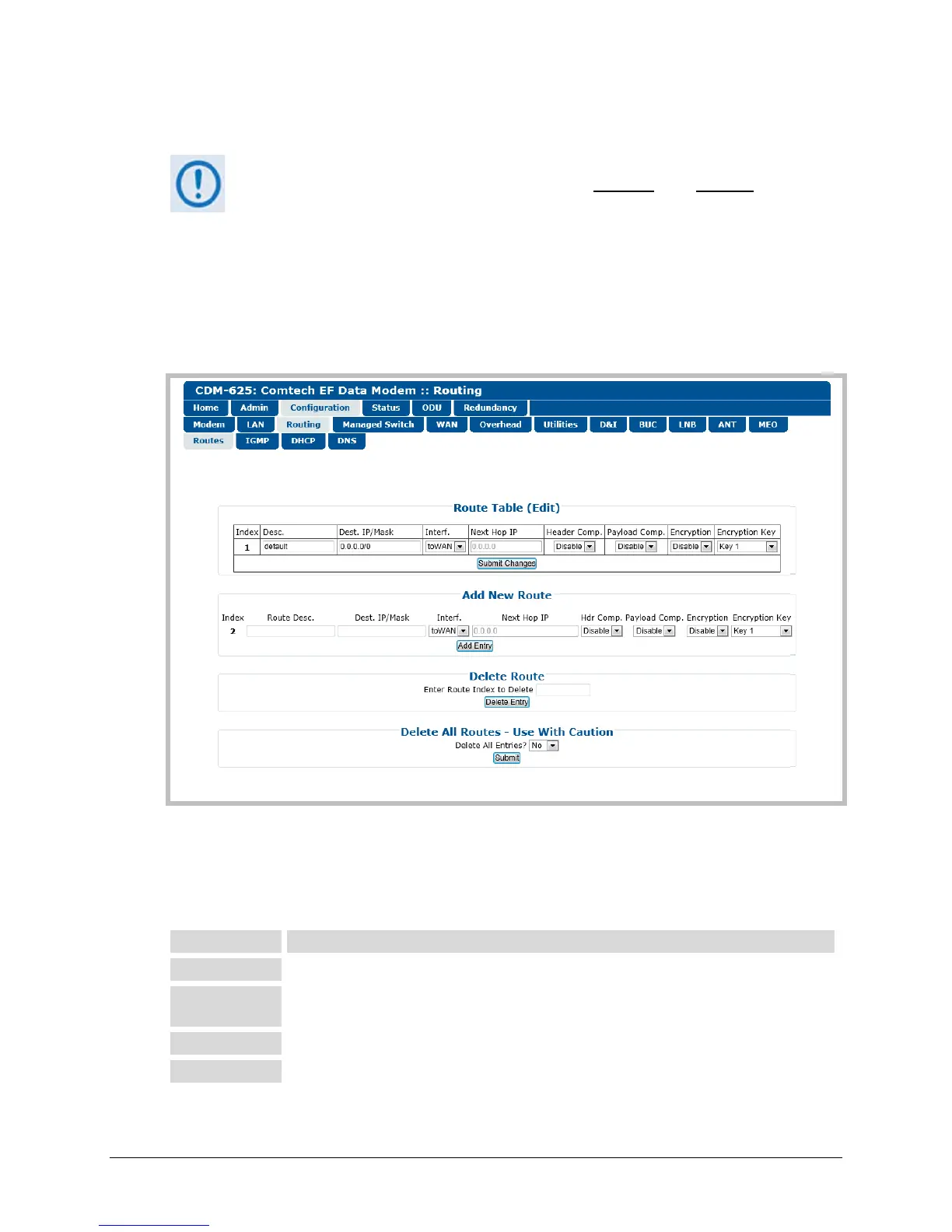
Use this page to enter static routes into the IP Packet Processor to route IP traffic over the
satellite or to another device on the local LAN.
Figure 6-16. Configuration | Routing | Routes page
Route Table (Edit)
This section displays and allows you to edit all current Route Table entries. Note the following:
This is the internal table index that is automatically assigned and cannot be edited.
This label helps to maintain the network. Enter a l abel string in this text box. The assigned
name must be unique and cannot contain any whitespace.
Enter a Destination IP Address/Mask in the form XXX.XXX.XXX.XXX/YY.
Use the drop-down list to select the Interface as toWAN or toLAN.



 To Next Page