CDM-625 Advanced Satellite Modem Revision 13
Ethernet Network Configuration MN-CDM625
16–12
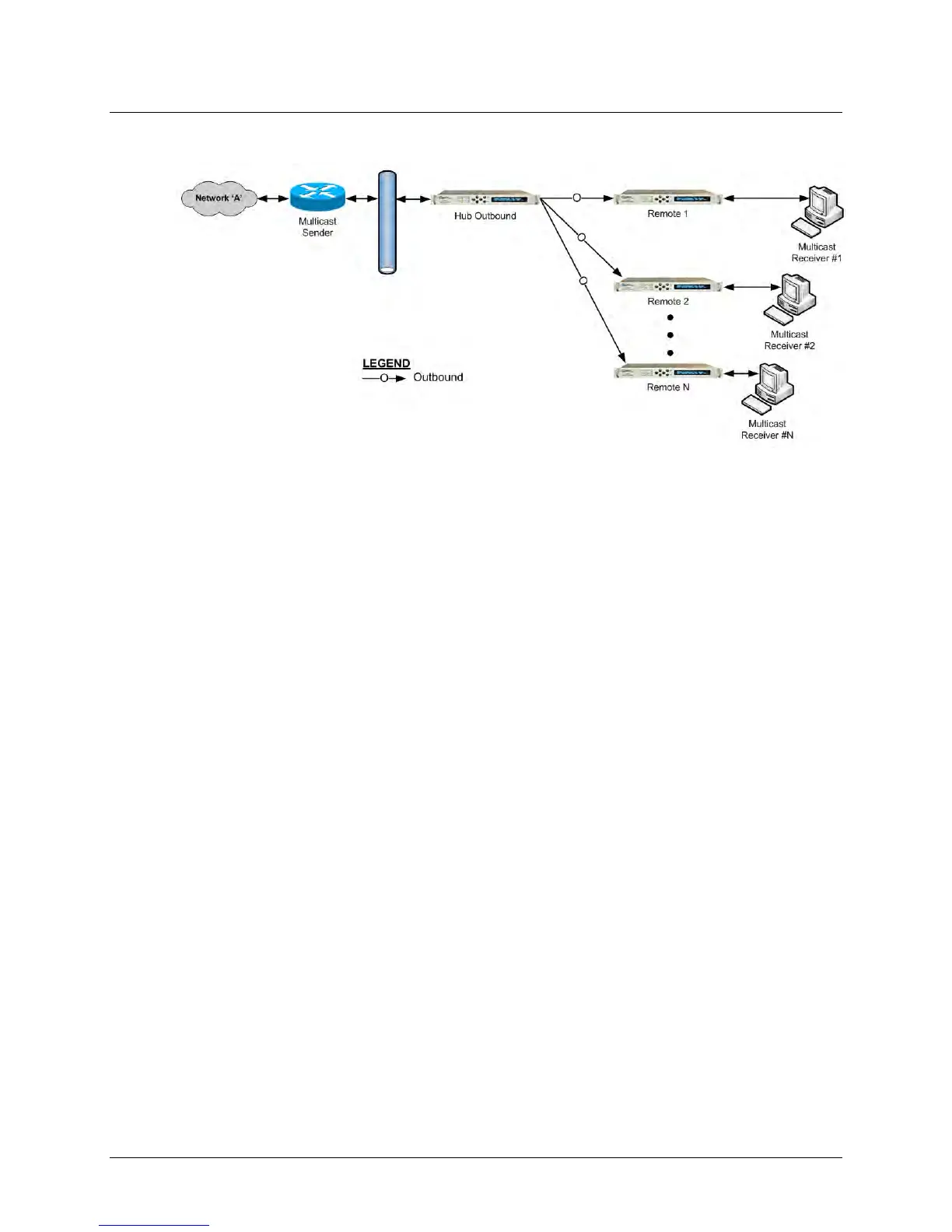
16.4.2.1 Multicast Routing Configuration
Figure 16-12. Configuration Example for a Multicast Routing Network
To configure a Multicast Routing Network (Figure 16-12):
• For “Hub Outbound” Modem Configuration – Referring to Sect. 6.5.4.3.3.1
Configuration | Routing | Routes in Chapter 6. ETHERNET-BASED PRODUCT
MANAGEMENT: Add a multicast route (using the page’s Add New Route section),
making sure to select toWAN from the Interf. drop-down menu (this defines the route
as LAN WAN). Click [Add Entry] once the route is created.
• For “Remote” Modem Configuration – Referring to Section 6.5.4.3.3.2 Configuration |
Routing | IGMP in Chapter 6. ETHERNET-BASED PRODUCT MANAGEMENT: From the
page’s IGMP Multicast Router section, edit the IGMP parameters to suit the multicast
receivers’ capabilities (i.e., version number and query intervals).



 To Next Page