Repairing/Replacing Internal Components
DSX™ System Service Manual 11-31
11.4.12 Removal/Replacement of the Optics in the Lens Bracket
Note: Always handle optical components with gloves or tweezers.
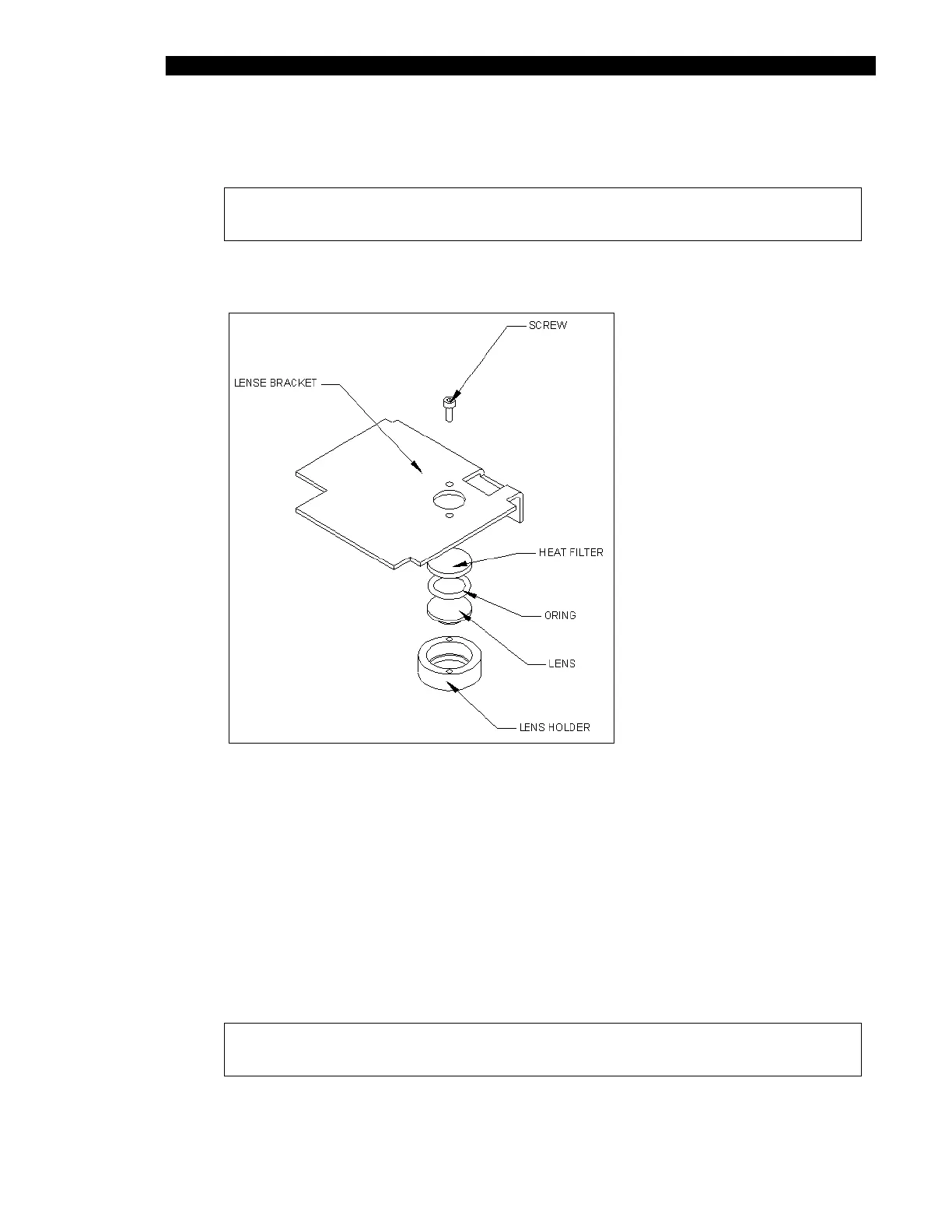
1 Remove the 2 M2 x 6mm socket head cap screws from the lens-retaining ring and
remove from bracket (Figure 11-26).
Figure 11-26 Taking the Lens Assembly Apart
To Clean (or Replace as Necessary) and Reassemble the Optics:
1 Drop lens in lens retaining ring.
2 Place o-ring on top of the lens.
3 Place the heat-absorbing filter on top of o-ring.
4 Mount this group to the lens bracket using 2 M2 x 6mm socket head cap screws
and Loctite 242.
Note: Ensure the Loctite does not migrate to the lenses.



 To Next Page