Repairing/Replacing Internal Components
11-36 DSX™ System Service Manual
11.4.17 Removal/Replacement of the Filter Switch
To Remove the Filter Switch:
1 Remove the filter wheel.
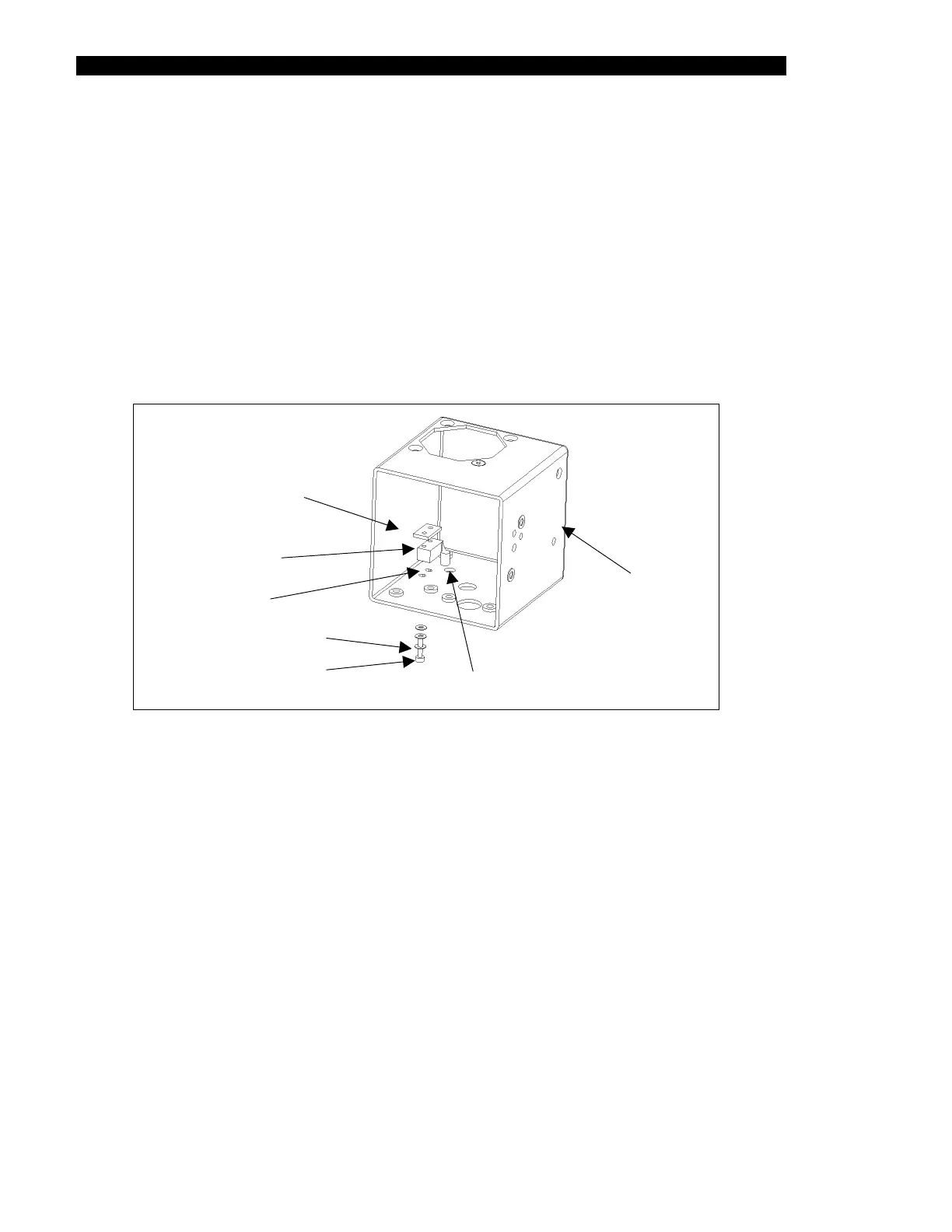
2 Remove the filter switch by undoing the two M2 x 10mm screws and the 6 M2
washers (3 per screw) from the nut plate.
3 Carefully cut away the RTV from the switch wires, release the wires from the
connector and remove the switch from the cube (Figure 11-31).
OPTICS CUBE
SCREW
SWITCH
NUT PLATE
WASHER
SWITCH
WIRE HOLE
SWITCH
MOUNT
LES HO
Figure 11-31 Filter Switch
To Replace the Filter Switch:
1 Unsolder wires from the old switch and solder them to the new switch.
2 Mount the new filter switch to the floor of the optics cube using two M2 x 10mm
screws, 6 M2 washers (3 per screw), nut plate and Loctite 242.
3 Orient the switch and route wires through the hole as noted above.
4 Reinstall the connector. Attach the filter wheel switch wires to the leads of a
digital voltmeter with an audible continuity checker.
5 Slowly rotate the filter wheel clockwise by hand and listen for when the beep of
the continuity checker stops. The beep should stop when the flat of the hub is in
contact with the switch. The beep should be continuous when the round of the
hub is in contact with the switch.



 To Next Page