K117sm5e7
5-87
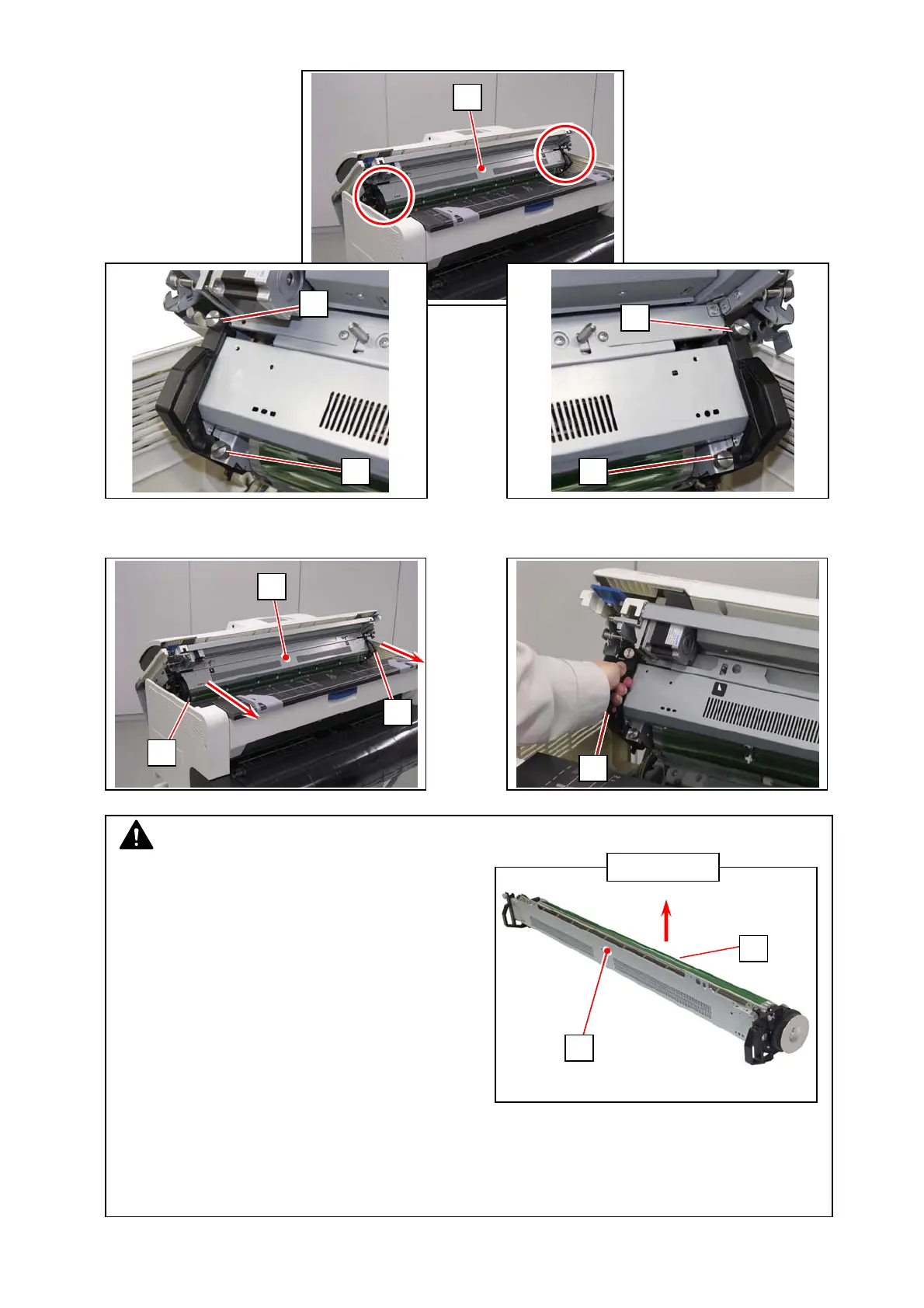
3. Loosen 4 thumb screws (4) to release the Process Unit (5).
4. Hold the handgrip (6) on both sides. Pull the Process Unit (5) to the arrow direction to remove it
from the machine.
NOTE
(1) Gently place the Process Unit (5) on a flat
surface in the correct direction. Not doing so
may damage the Photoconductive Drum (7)
(shiny green cylinder).
(2) The Photoconductive Drum is one of the most important components for the printer to
obtain a satisfactory print image quality.
- Never touch the shiny green area of the Photoconductive Drum with a bare hand.
- Do not expose the Photoconductive Drum to light. It is recommended to shade the
whole Process Unit with a piece of plain bond roll paper.
THIS SIDE UP
4
4
4
4
6
6
5
5
6
5
7



 To Next Page