K117sm8e9
8-108
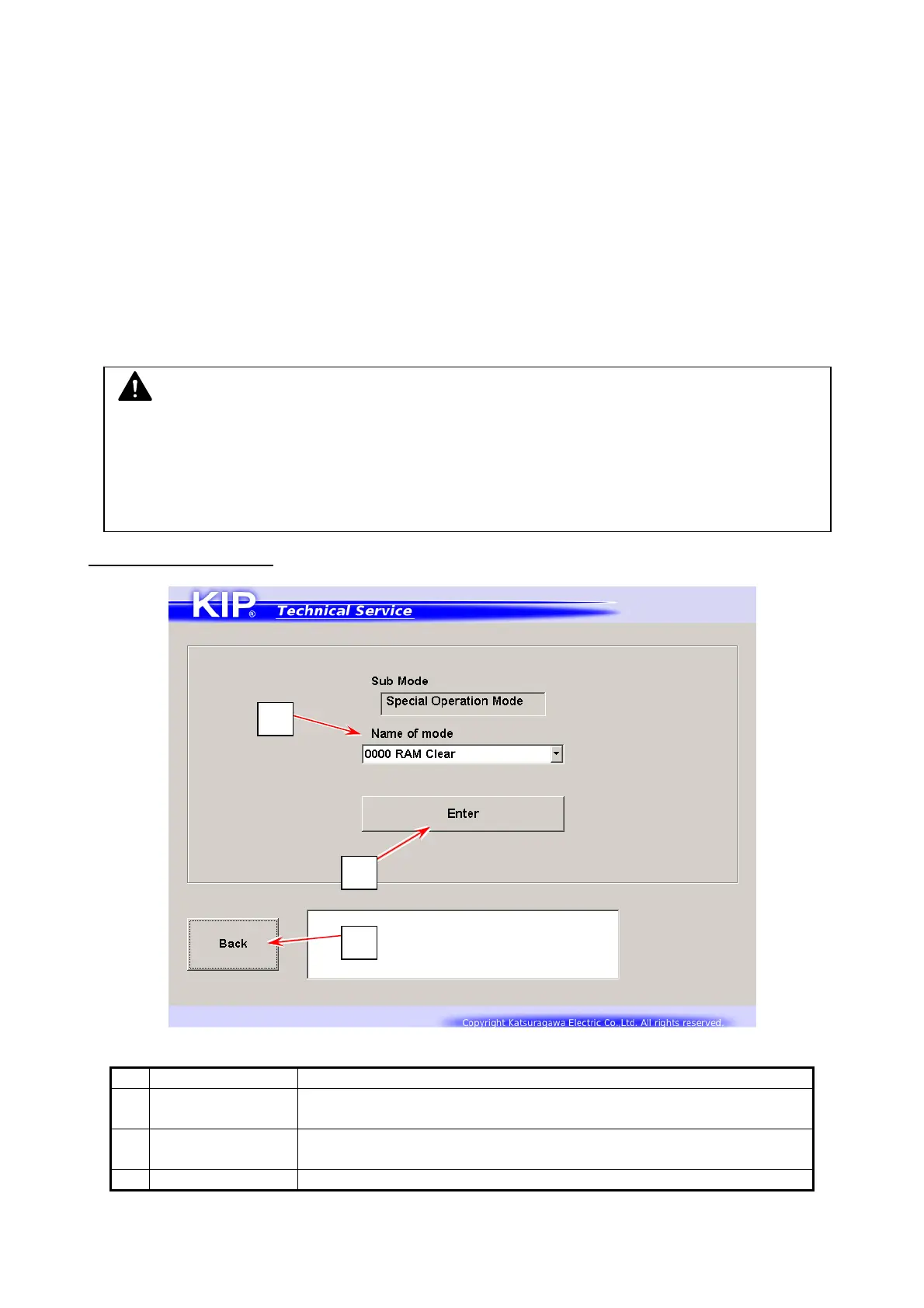
8. 11 Special Operation Mode
Special Operation Mode has several kinds of special important functions to the machine.
(1) Clears the following recorded error
- E-0000 Fuser Temperature Rising Error
- E-0001 Fuser Over Temperature Error
- E-0002 Fuser Low Temperature Error
- E-0003 / 0004 Fuser Temperature Abnormal Fall Error
(2) Clears the following history
- Jam History
- Error History
(3) Resets bias adjustment by Density Compensation Process
(4) Starts Toner Supply for initial toner
(5) Resets any counting parameters in Information Mode
Operation Target screen
Name Function
1 Name of Mode Displays items in drop-down menu
Choose one item that you want to use.
2 Enter Switches to Confirmation screen
Clearing is not executed immediately once you press [Enter].
3 Back Returns to Service Mode Home
NOTE
E-0000 / 0001 / 0002 / 0003 / 0004 (regarding Fuser Error) do not disappear automatically
even if you remove any cause of these errors.
You should clear the error in Special Operation Mode to allow the printer to be ready for
printing.
1
2
3



 To Next Page