K117sm7e4
7-47
7. 5 Internal Counter Error
The KIP 700m has 2 kinds of the software counter.
One is “Print Count”, this is shown in “? Help” screen as “Counter A”. The other is “Total Count”,
this can be seen NOT in the UI program screen but KIP Service Software.
The counter values are stored on PW11720 PCB Assy and the HDD of IPS at the same time.
The KIP 700m has a backup system for the counter values. If one of them gets lost, the UI asks
“which counter value has been lost, PW11720 or HDD?”
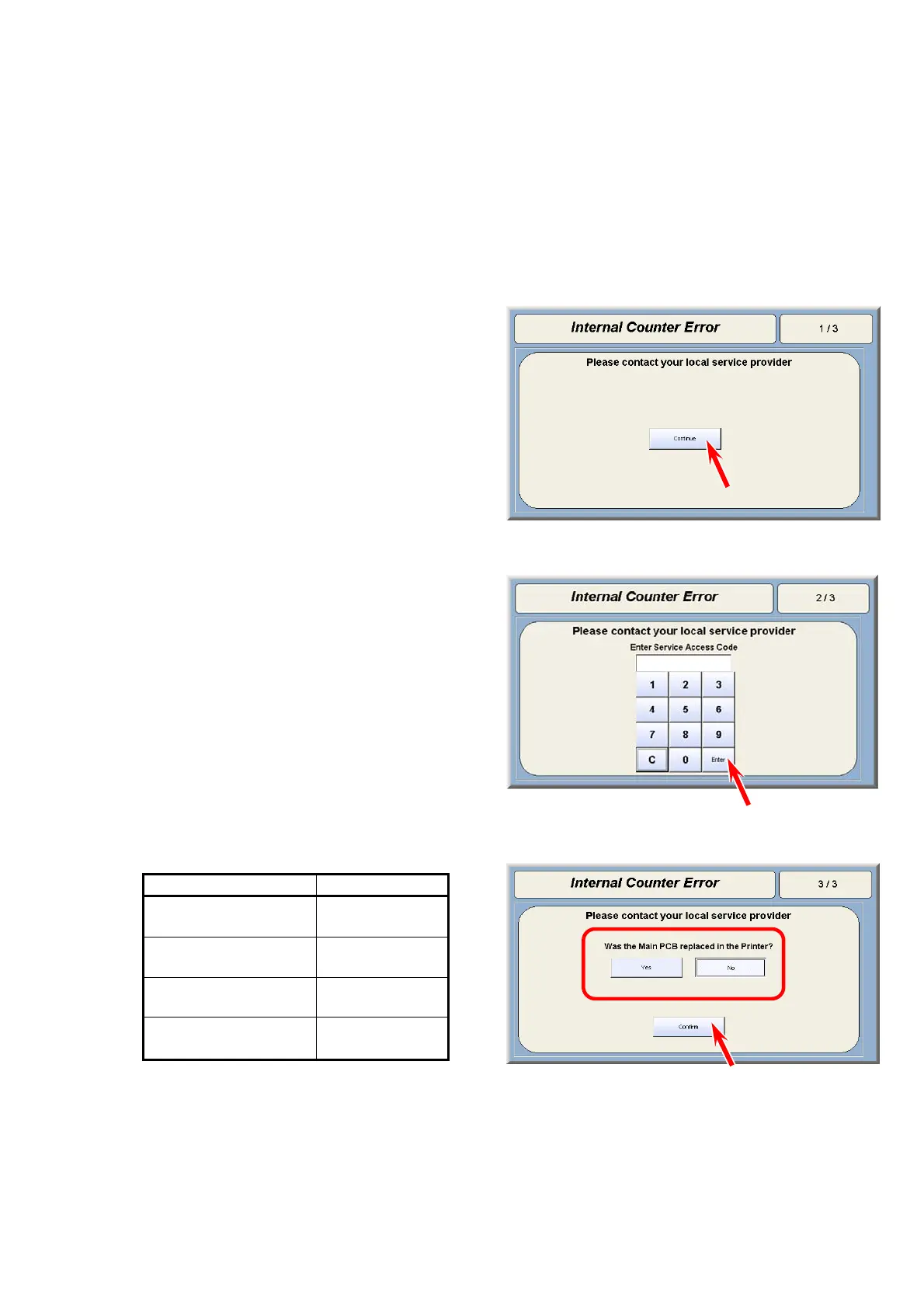
1. “Internal Counter Error” appears. Press [Continue].
2. Input “8495107” and press [Enter].
3. Choose Yes or No according to your situation, and then press [Confirm].
Yes Æ The counter values in the HDD will be written to the PW11720 PCB Assy.
No Æ The counter values in PW11720 PCB Assy will be written to the HDD.
Action Selection
Replaced
PW11720 PCB
Yes
Replaced
HDD
No
Format & Reinstall
HDD (Ghost)
No
No intended action
done
No



 To Next Page