K117sm8e5
8-48
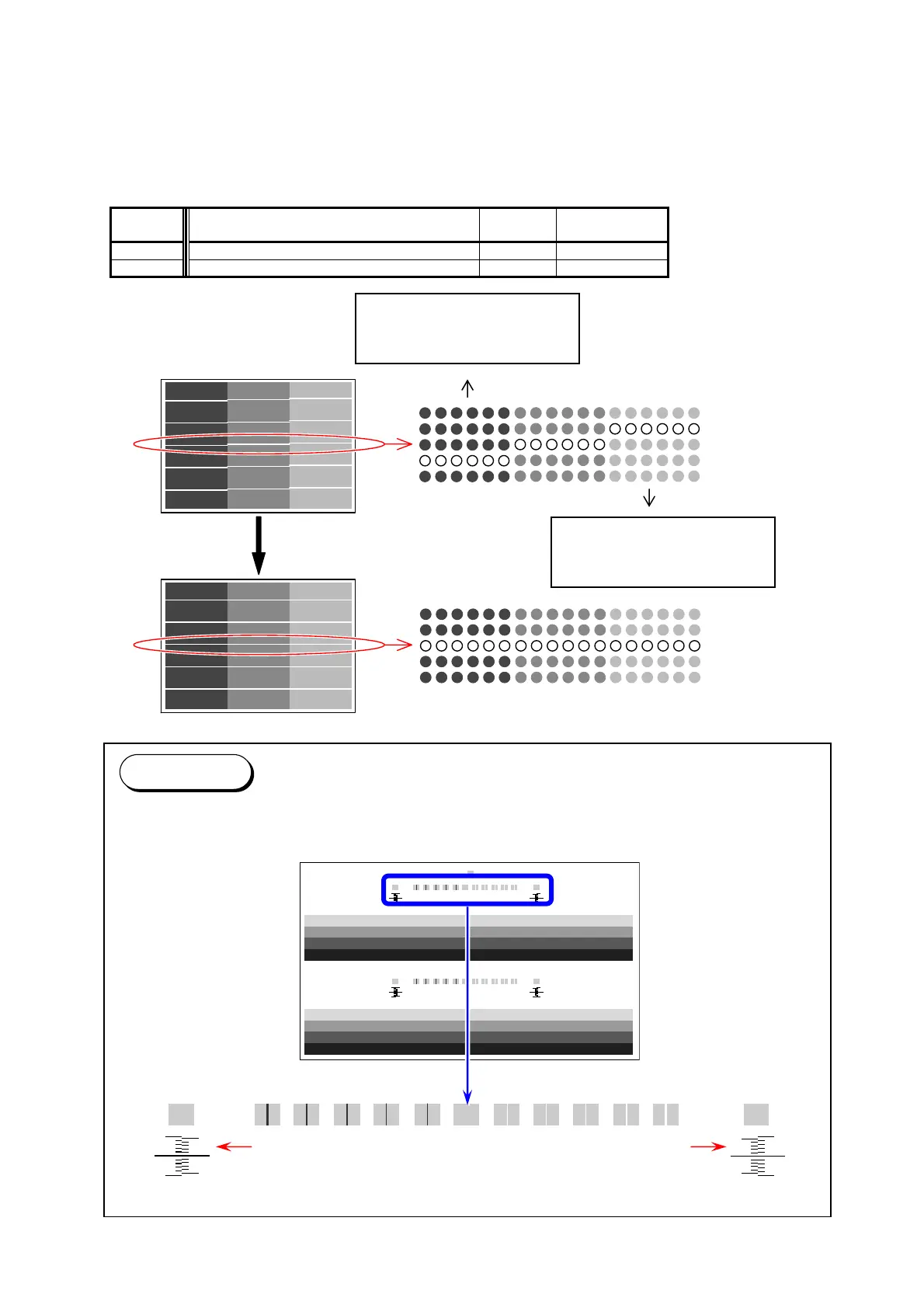
014, 015 Vertical Alignment of LED Block
It is possible to align the pixels between Image Blocks if there is a gap of pixels.
The Image Block B is the standard, and both the Image Blocks A and C can be shifted vertically.
If you increase the setting value by “+1”, the whole pixels of the concerning Image Block is shifted
“0.5 pixel” to the trailing edge side.
These can be used if a horizontal line has a step at the border of the Blocks.
Item No. Setting Item Setting
range
Step of
increment
014 Horizontal Alignment of LED Block A/B 0 to 144 0.5 pixel
015 Horizontal Alignment of LED Block B/C 0 to 144 0.5 pixel
Decrease the value of
“014” to shift the block A to
the leading edge side.
Decrease the value of
“015” to shift the block C to
the trailing edge side.
Reference
Test Pattern No.9 S(3) is an integrated test pattern image for margins at edges, focus and
pixcel sticth check.
Border of A/B by
current result
Border of B/C by
current result



 To Next Page