K117sm6e1
6-4
6. 2 Cleaning
Please make the following maintenances to keep the machine in a good condition and to get a
superior image.
Unit / Area Maintenance part Way of cleaning
Main Frame
Machine inside
Clean the machine inside with a dry cloth.
Upper Unit
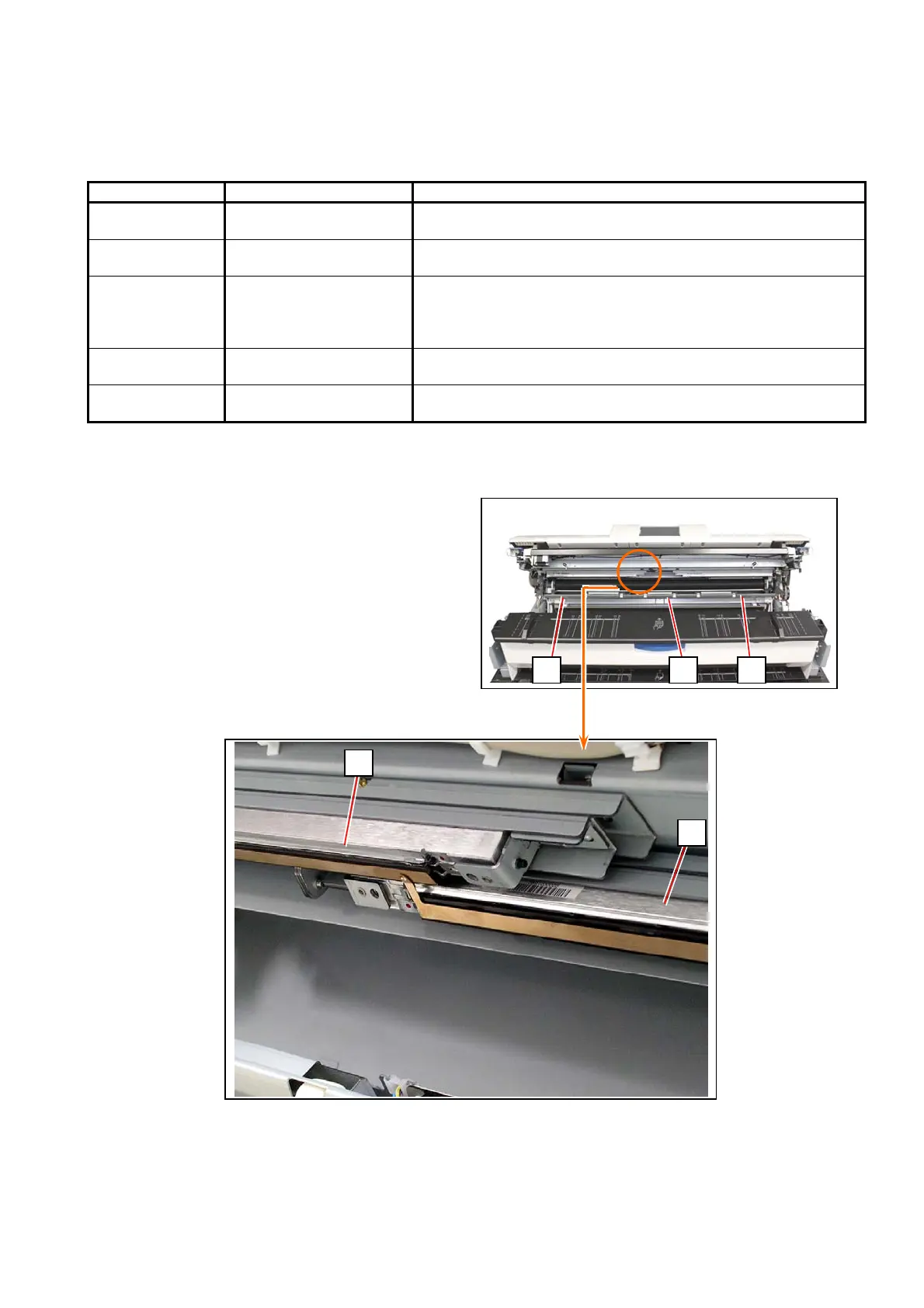
LED Head (Selfoc Lens)
3 blocks
Gently wipe it with a soft dry cloth.
NEVER use solvents such as alcohol.
Process Unit Photoconductive Drum Gently wipe the green surface area with a soft dry cloth.
Rotate the drive gear to turn Photoconductive Drum.
NEVER scratch the surface.
NEVER touch by a bare hand.
Exit Cover
Nail Stripping
12 pieces
Remove stuck substance on the top tip of the Nail Stripping.
See [6.2.1 Cleaning Nail Stripping]
Scanner Unit Between Upper / Lower
scanner unit
Wipe with a dry cloth
LED Head:
See [5.1.5 Process Unit] to remove Process Unit.
Wipe LED Head Block (A) (B) (C).
The metal plates attract possible scattering toner
to prevent the LED Head Blocks from getting dirt.
A B C
A
B



 To Next Page