K117sm8e5
8-46
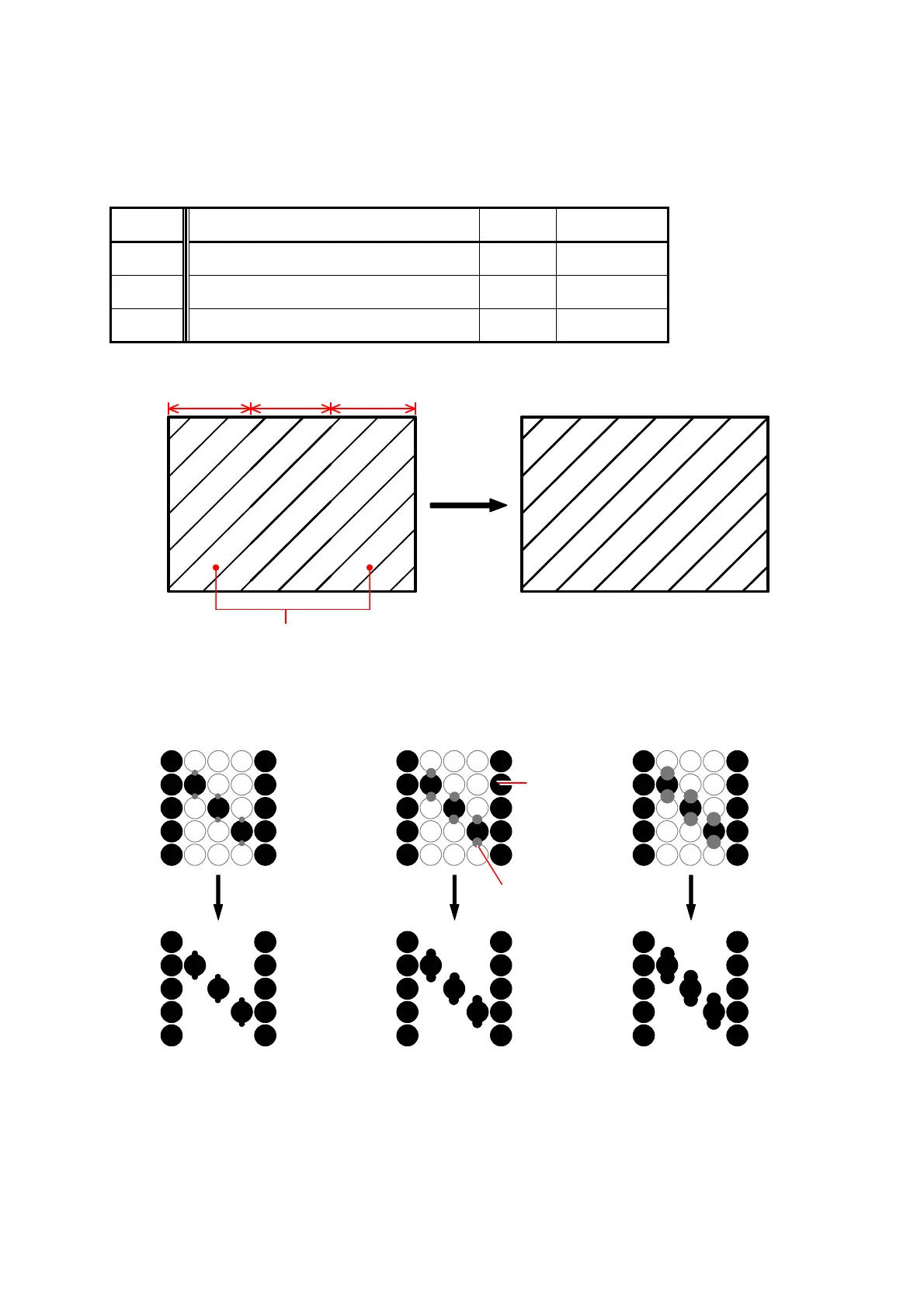
011 to 013 LED Strobe Time for IST (Supplemental Pixel)
If such image as a diagonal line looks too weak, you can make it clearer by changing the LED
Strobe Time for the Supplemental Pixels.
The adjustment is available for each Image Block independently.
A diagonal line comes to look clearer if you increase the setting value, as the LED Strobe Time for
the Supplemental Pixels becomes longer.
Item No. Setting Item Setting
range
Step of
increment
011 LED Strobe Time for Supplemental Pixel
(Image Block A : Left)
0 to 18 1 micro second
012 LED Strobe Time for Supplemental Pixel
(Image Block B : Center)
0 to 18 1 micro second
013 LED Strobe Time for Supplemental Pixel
(Image Block C : Right)
0 to 18 1 micro second
Block A Block B Block C
Increase the setting values of “011” and “013”
to make the images of these blocks clearer.
Setting value is decreased. Default Setting value is increased.
Actual print image
For the detail information about “Main Pixel” and “Supplemental Pixel”, see the reference
column on the next page.
Main pixel
Supplemental
pixel



 To Next Page