215916 89 Revision A
Faults and Telltales
Faults and telltales displayed on the Harvest Performance Tracker (HPT) provide important information about the
windrower and the engine.
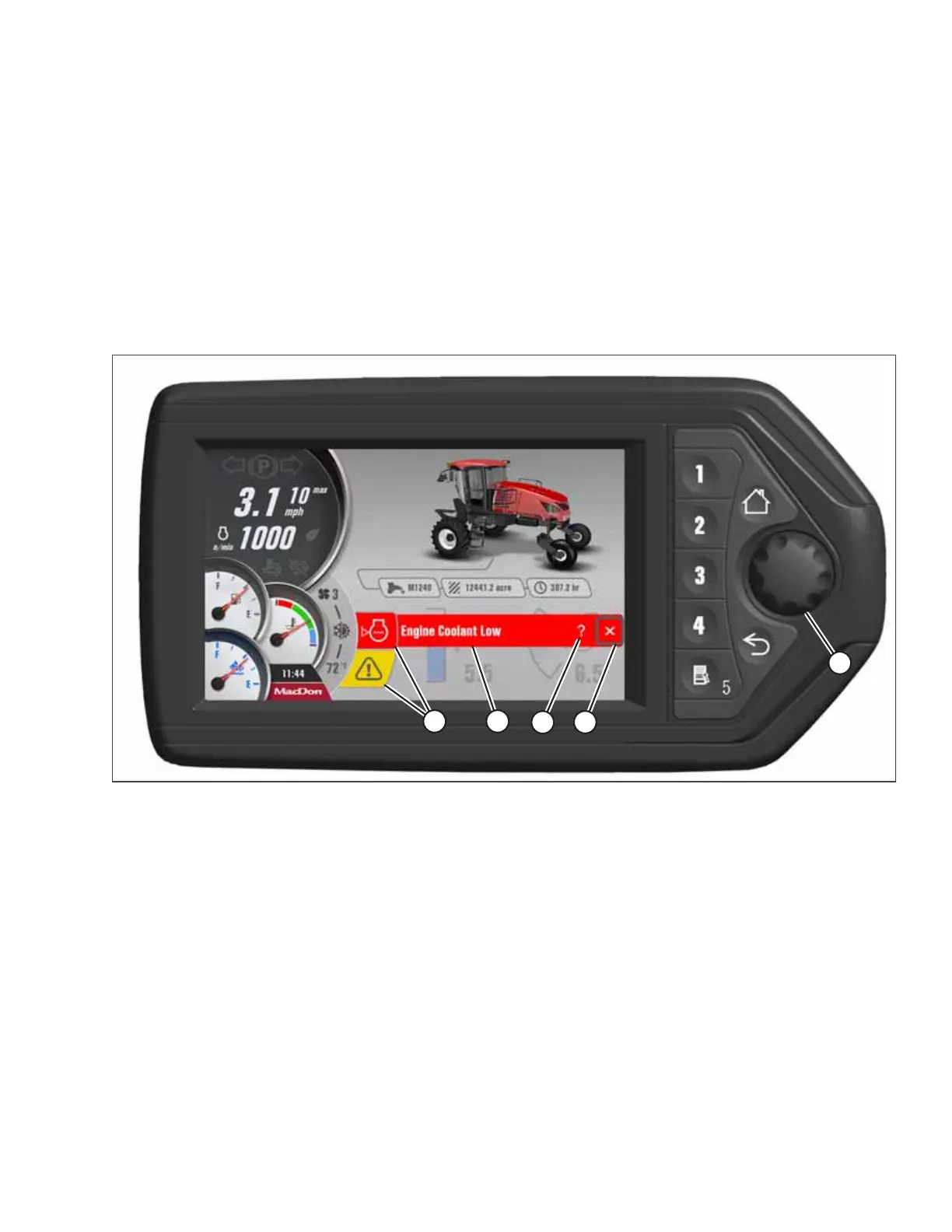
Telltales (A) include a symbol indicating the affected area (refer to 4.2 Symbol Definitions, page 108) and a short
description of fault (B).
• Red faults (displayed on the top line) indicate that a major fault has occurred and will cause progressive damage or
affect the safe operation of the machine. The machine should be shut down as soon as possible.
• Yellow faults (displayed on the bottom line) indicate that a failure has occurred, and the machine should be serviced as
soon as possible to diagnose the failure.
Figure 3.96: HPT Run Screen Displaying Faults
To display a more detailed fault page, use HPT scroll knob (E) to select question mark symbol (C).
To close short description (B), use HPT scroll knob (E) to select close symbol (D). Telltales (A) remain on the screen until the
fault is corrected.
NOTE:
Closing the short description of a yellow fault will mute the alarm tone associated with that fault. Alarm tones associated
with red faults cannot be muted.
NOTE:
For instructions on clearing fault codes, refer to Clearing Fault Codes, page 94.
OPERATOR’S STATION



 To Next Page