/
−−−−−<SET MODE>−−−−−−
INTERPOLATION
OFF
1:ON
2:OFF
−−−−−−<SELECT>−−−−−−−
|CAN−| |
EXIT| CEL| |ENTR
/
−−−−−<SET MODE>−−−−−−
REF. OSCILLATOR
+0.00000 E+0
+0.00000
E+0
−−−−−−−<INPUT>−−−−−−−
|CAN−| |
EXIT| CEL| |ENTR
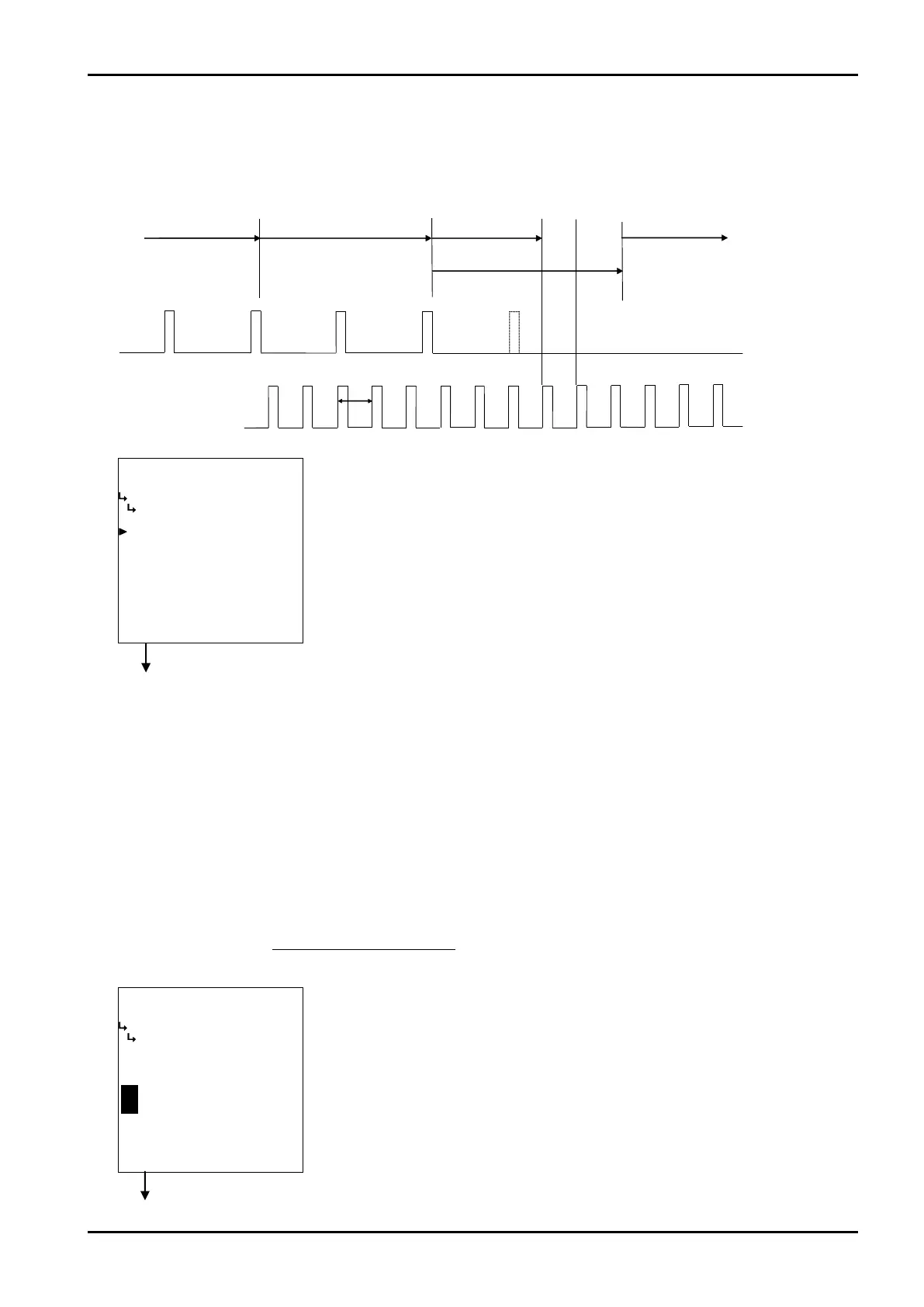
Pulseinput
Latestperiod
Max.period
Endmeas.
Startmeas.
Endmeas.
Startmeas.
Calculateperiod Calculateperiod
Calc.
period
Calc.
period
Calc.
period
Prev.periodbeforelast
Previousperiod
Period=0
E-880TM-3-E
1
Reference clock (5MHz)
Measured frequency (Hz)
⑧ Instant flowrate measurement - reference oscillator correction factor setup
(REF. OSCILLATOR)
The reference oscillator correction factor in instant flowrate measurement is set up here.
- How internal reference oscillator (5MHz) is corrected -
While the reference clock in instant flowrate measurement is 5MHz, slight errors exist between flow
computers.
To reduce measurement errors due to these errors to a minimum, a correction factor in the following
formula plays a role of correcting the internal reference oscillator. The correction factor for the
reference oscillator is determined by
K
C
=K
T
-1= -1
Interpolation – “to read between the lines” - involves a process to run a periodic check for the
presence of incoming pulses at intervals of 100 ms; calculate the period based on the elapsed time at
the time of check when pulses are missing for a duration beyond the previously measured period of
time.
Instant flowrate measurement submenu screen p. 67
Instant flowrate measurement submenu screen p. 67
←Interpolation option select
For details of option selection, see “(2) Option select setup screen (SELECT)” on
page 46.
※ In the SYS mode, this item is not shown if the instant flowrate measurement
type (① Instant flowrate measurement type setup (MEASURE. TYPE) on
page 68) is set to “COUNT”.
You select implement interpolation (ON) or without interpolation (OFF).
←Numerical value input setup
For details of numerical value input setup, see “(1) Numerical value setup screen
(INPUT)” on page 43.
※ In the SYS mode, this item is not shown if the instant flowrate measurement
type (① Instant flowrate measurement type setup (MEASURE. TYPE) on
page 68) is set to “COUNT”.








 To Next Page