/
−−−−−<SET MODE>−−−−−−
DENSITY PARAMETER
・UNIT
g/l
・UNDER ALARM POINT
+1.00000 E−2
・OVER ALARM POINT
+2.00000 E+0
・UNDER FALLBACK
+1.00000 E−2
↓−−−−<SUB MENU>−−−−−
MAIN| | |
MENU| | |ENTR
Example Measurement units: g/l
Under alarm point(UNDER ALARM POINT):800g/l
Over alarm point(OVER ALARM POINT):850g/l
Under fallback level(UNDER FALLBACK):1150g/l
Over fallback level(OVER FALLBACK):1200g/l
0g/1
0g/1 1.0g/1
1.0g/1
Overfallbacklevel
Underfallbacklevel
Underalarmpoint Overalarmpoint
Meas.range
/
−−−−−<SET MODE>−−−−−−
DENSITY PARAMETER
・UNIT
g/l
・UNDER ALARM POINT
+1.00000 E−2
・OVER ALARM POINT
+2.00000 E+0
・UNDER FALLBACK
+1.00000 E−2
↓−−−−<SUB MENU>−−−−−
MAIN| | |
MENU| | |ENTR
Example Measurement units: g/l
Under alarm point(UNDER ALARM POINT):800g/l
Over alarm point(OVER ALARM POINT):850g/l
Under fallback level(UNDER FALLBACK):1150g/l
Over fallback level(OVER FALLBACK):1200g/l
0g/1
0g/1 1.0g/1
1.0g/1
Overfallbacklevel
Underfallbacklevel
Underalarmpoint Overalarmpoint
Meas.range
E-880TM-3-E
13
6.4.23 Density Calculation Setup (DENSITY PARAMETER), EL4321
Along with density calculation associated values, the alarm points and fallback levels with respect to the
corrected density are set up here.
※ These settings are used only in Model EL4321. They are not shown in other models.
<Calculation Formula>
T
0
' = T
0
+α(t-t
cal
)
T : Period time at measurement
T
0
:Period time under vacuum(350 (μs) ±10%)
d
0
: Constant(70 (g/l) ±10%) K:Constant
t : Line temperature t
c a
l
:Temperature during calibration
α : Temperature coefficient
d=
[ ]
(T - T
0
' )
2
2T
0
'
(T−T
O
' )+K
2d
0
T
0
'
(1)Density calculation setup submenu screen
At the submenu, move the cursor to the desired setup item with the up arrow and down arrow keys.
At the touch of (the) function key “ENTR”, the screen switches to the desired item setup screen.
① Density calculation - unit setup (UNIT) p. 125
③ Density calculation - under alarm point setup (UNDER ALARM POINT) p. 126
④ Density calculation - over alarm point setup (OVER ALARM POINT) p. 126
⑤ Density calculation - under fallback level (UNDER FALLBACK) p. 127
To the setup screen pointed by the cursor
SET mode main menu screen ⇒ 6.2 SET mode main menu screen p. 36
① Density pulse input option
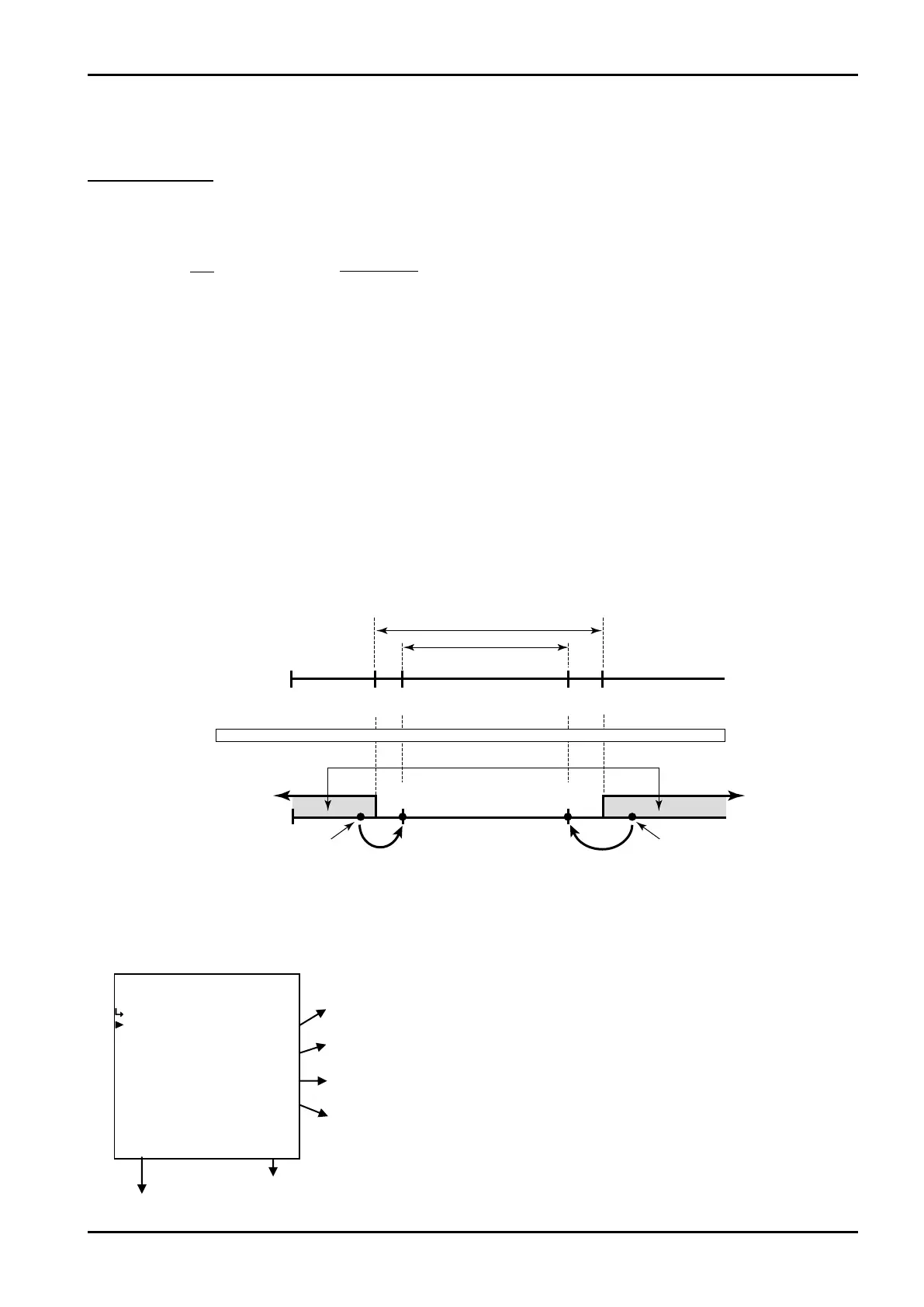
The density displayed in the RUN mode is shown in the measuring range where its high limit is at the
over alarm point while its low limit is at the under alarm point, corresponding to the input. If the input
exceeds or falls short of this range, the over or under fallback level is shown.
Max. full scale
Full
scale
Min. baseline
Base – full scale setting range
Meas. range
Base
line
Under
alarm pt.
Over fallback
level
Under
fallback level
Over
alarm pt.
Alarm output
Dens. input
800g/l 850g/l 1150g/l 1200g/l
Flowrate signal meas.Flowrate signal meas.








 To Next Page