Chapter 10: NMEA Module, Rev. 1.3
10.5 NMEA Module Configuration
The NMEA Module is configured using the NMEAModuleConfig.exe configuration utility via a
crossover Ethernet connection.
10.5.1 Checking the NMEA Module Configuration
To check the current NMEA Module configuration, complete the following steps:
1. Ensure that only 1 NMEA Module is connected at one time. ALL inputs must be
disconnected as each NMEA Module must be configured individually.
2. Ensure a crossover Ethernet cable is connected directly from the Module to the
technician PC (or DMM if configuring from the DMM).
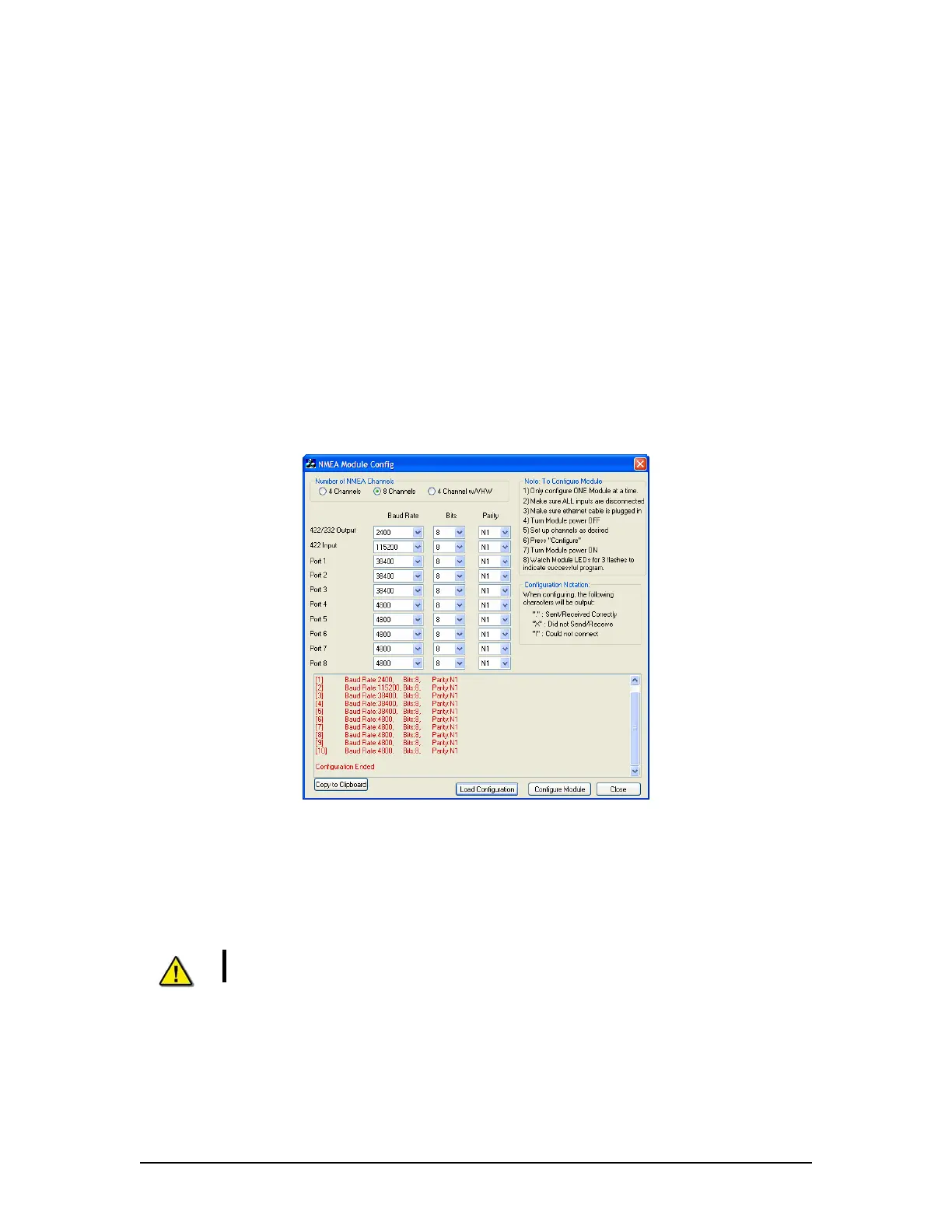
3. Start the NMEA Module Config utility.
Figure 10–4 - NMEA Module Configuration Utility
4. In the Number of NMEA Channels section, select the radio button that corresponds to
the applicable Module (4 Channels, 8 Channels, or 4 Channel w/VHW) being
configured.
5. Click the “Load Configuration” button, located at the bottom of the configuration utility
window.
NOTE! A dialog box will appear asking the user to cycle power on the Module.
DO NOT select ‘OK’ at this point.
6. Disconnect and reconnect the power connection.
7. Click ‘OK’. The configuration will be broadcast for five (5) seconds after the Module is
powered on and will appear in the text box at the bottom of the utility and in the
selection boxes.
VDR-100G3/G3S Installation Manual 15/01/2009
10-6



 To Next Page